

Hello everyone,
We have a respondent pool which we will distribute surveys occasionally.
We want to count the number of surveys each respondent attended to so that we can send them a thank you e-mail when their total number of responses reaches certain points (10 and 20).
I guess we need to be creating an an e-mail trigger or action based on an embedded data field. Which is created as "TotalResponseCount" when contacts are imported from a .csv file to XM Directory.
I am trying to update this field at the end of each survey by using math operations.
I add a screenshot below showing the Survey Flow I am working on to count the total survey responses.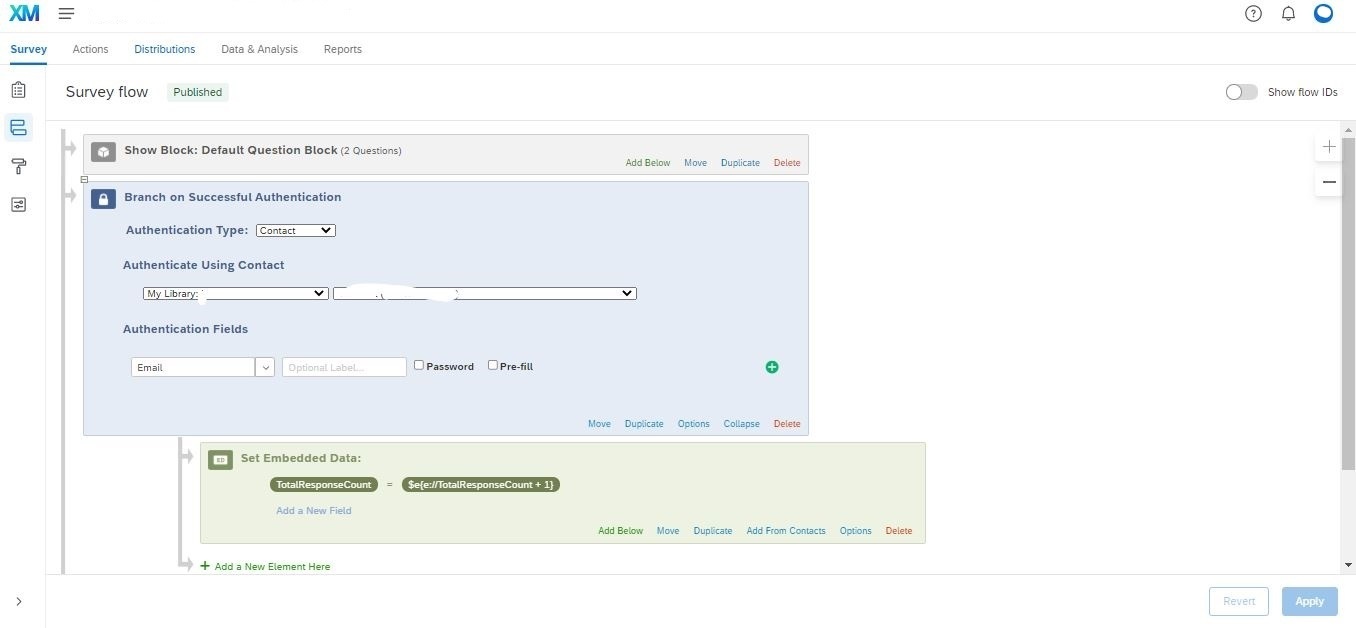
But this operation does not seem to work. The data field stays the same after I complete the survey several times with the same credentials. What am I doing wrong? Is there a better way to do what I am describing here?
I am relatively new to contact management so I would appreciate any help for completing this task
Thanks!

Counting the total number of responses of a contact in XM Directory
Best answer by AmaraW
Hi ykocaman - if you have not yet already, we'd recommend taking a look at this support page about adding/updating contact information with the XM Directory Task! If you have any follow up questions, please be sure to reach out to our Support team, as they are best equipped to help!



Sign up
Already have an account? Login

Welcome! To join the Qualtrics Experience Community, log in with your existing Qualtrics credentials below.
Confirm your username, share a bit about yourself, then you're ready to explore and connect .
Free trial account? No problem. Log in with your trial credentials to join.
No free trial account? No problem! Register here
Already a member? Hi and welcome back! We're glad you're here 🙂
You will see the Qualtrics login page briefly before being taken to the Experience Community.
Login with Qualtrics
Welcome! To join the Qualtrics Experience Community, log in with your existing Qualtrics credentials below.
Confirm your username, share a bit about yourself, then you're ready to explore and connect .
Free trial account? No problem. Log in with your trial credentials to join. No free trial account? No problem! Register here
Already a member? Hi and welcome back! We're glad you're here 🙂
You will see the Qualtrics login page briefly before being taken to the Experience Community.
Login to the Community
No account yet? Create an account
Welcome! To join the Qualtrics Experience Community, log in with your existing Qualtrics credentials below.
Confirm your username, share a bit about yourself, then you're ready to explore and connect .
Free trial account? No problem. Log in with your trial credentials to join.
No free trial account? No problem! Register here
Already a member? Hi and welcome back! We're glad you're here 🙂
You will see the Qualtrics login page briefly before being taken to the Experience Community.
Login with Qualtrics
Welcome! To join the Qualtrics Experience Community, log in with your existing Qualtrics credentials below.
Confirm your username, share a bit about yourself, then you're ready to explore and connect .
Free trial account? No problem. Log in with your trial credentials to join. No free trial account? No problem! Register here
Already a member? Hi and welcome back! We're glad you're here 🙂
You will see the Qualtrics login page briefly before being taken to the Experience Community.
Enter your E-mail address. We'll send you an e-mail with instructions to reset your password.