Top topic change widget | Experience Community
Skip to main content
Question

Top topic change widget

  • Sep 16, 2023 4:52 AM UTC
  • 3 replies
  • 256 views

Forum|alt.badge.img+1

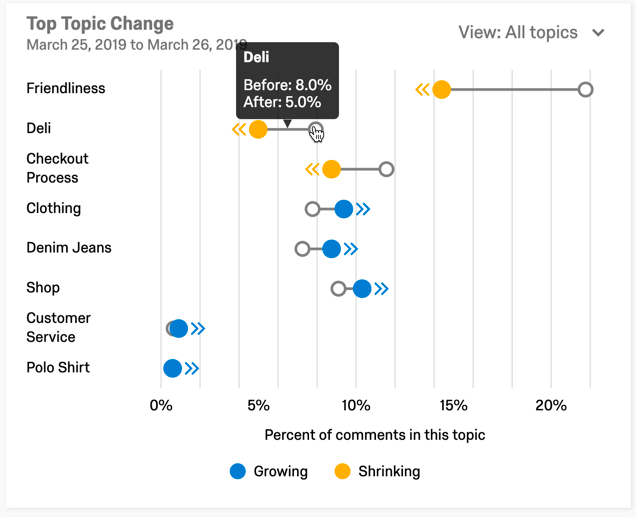
Can someone please help me how we can change the date view for “Top Topic change widget”

For e.g. if i wish to change the view to month/quarter/year. right now i only see this fixed to current month. Sharing the screenshot from the learning material and not my dashboard.

I see a similar question but this is answered.

Thank you for looking into my question.
 

3 replies

krbhavya
Level 6 ●●●●●●
Forum|alt.badge.img+20
  • Level 6 ●●●●●●
  • Sep 16, 2023 7:40 AM UTC

HI @Reema_Karanwal 

I don’t think so that there is any  filter to change the date view for “Top Topic change widget”.

But you can create a similar widget in the dashboard

Refer to below link

https://www.qualtrics.com/support/vocalize/widgets/analysis-widgets-cx/text-iq-table-widget/?parent=p00755#About


Forum|alt.badge.img+1
  • Author
  • Level 2 ●●
  • Sep 18, 2023 8:46 AM UTC

thats a pity… because i really like the representation to see the topic change (filtered by the topic at different levels) and also see the weekly trend. this representation is not very ncie in the widget.

Many times, such analysis are used by researchers to report on their data and include as screenshots..

Maybe a suggestion to developers to consider adding :)


Forum|alt.badge.img+14
  • Level 5 ●●●●●
  • Sep 18, 2023 4:00 PM UTC

You could submit your idea to add this feature here: https://community.qualtrics.com/p/evolve