How can I put a drop-down list in a form question field? | Experience Community

Skip to main content
Solved

How can I put a drop-down list in a form question field?

  • Sep 26, 2019 2:15 PM UTC
  • 45 replies
  • 7894 views

Show first post

45 replies

TomG
Level 8 ●●●●●●●●
Forum|alt.badge.img+27
  • Level 8 ●●●●●●●●
  • Oct 10, 2022 8:56 PM UTC

If anyone is interested in a form dropdown solution that is much easier to implement and has much more functionality, see formSelects.


dekennedy7
Level 2 ●●
Forum|alt.badge.img+10
  • Level 2 ●●
  • Oct 10, 2022 9:16 PM UTC

Very nice @TomG! Are you aware of any code out there to remove the border around form fields? If a field is editable it makes sense to have a border, but if I'm using JS coding to prevent editing it would be nice to have the border hidden / removed to the respondent doesn't misinterpret.


TomG
Level 8 ●●●●●●●●
Forum|alt.badge.img+27
  • Level 8 ●●●●●●●●
  • Oct 11, 2022 12:58 AM UTC

https://community.qualtrics.com/XMcommunity/discussion/comment/50630#Comment_50630Qualtrics.SurveyEngine.addOnload(function() {
jQuery("#"+this.questionId+" .InputText").css("border","none");
});


Forum|alt.badge.img
  • Level 1 ●
  • Jun 28, 2023 3:37 AM UTC

Hi uhrxx005 , thanks a lot for your answer. It helped me a lot.
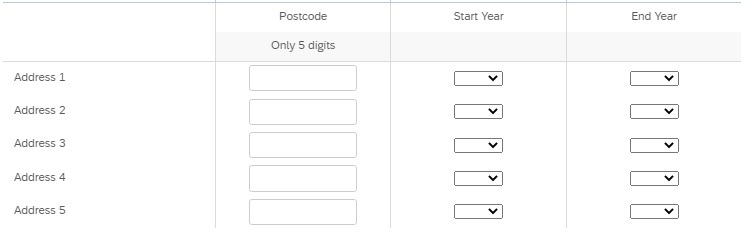
I'm also trying to prepare a question in a format similar to this. There is one text entry and two drop down lists for the dates. Do you have a code where I can put dates in drop down lists (from 1950 to 2021 and end year should be greater than start year)? I tried this solution but it didn't work for me. Thanks a lot.
1.jpg

How do I make a question formatted like this?  I cannot figure it out for the life of me.  Thanks!


ArunDubey
QPN Level 8 ●●●●●●●●
Forum|alt.badge.img+41
  • QPN Level 8 ●●●●●●●●
  • Jun 28, 2023 11:32 AM UTC

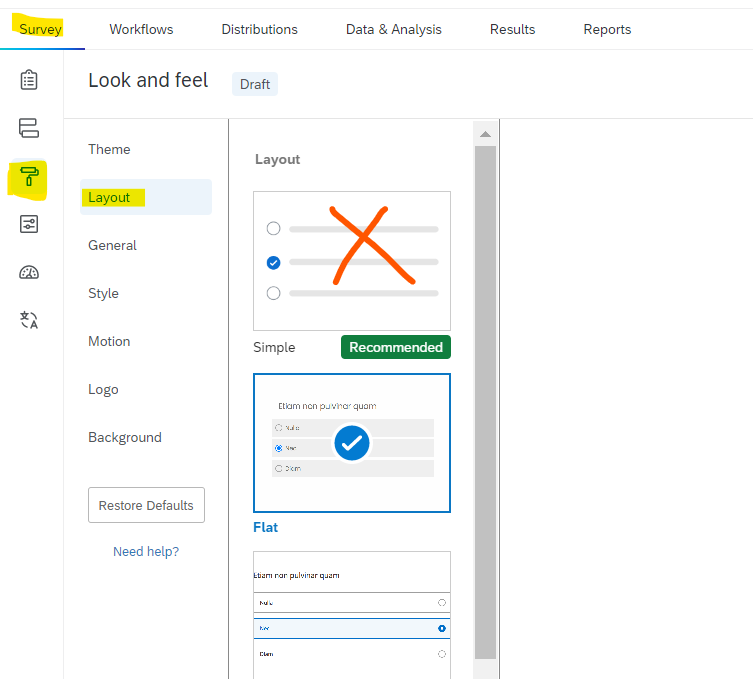
@jtherien , you can use side by side setup. but make survey side by side setup doesn’t support simple layout. You will need to change your survey layout from look and feel for this setup.


Forum|alt.badge.img
  • Level 1 ●
  • Jun 28, 2023 1:17 PM UTC

@jtherien , you can use side by side setup. but make survey side by side setup doesn’t support simple layout. You will need to change your survey layout from look and feel for this setup.

Can you give me some instruction?  I’m wondering if my institution doesn’t have a full license because I can’t see anything in Look and Feel to make these changes.


ArunDubey
QPN Level 8 ●●●●●●●●
Forum|alt.badge.img+41
  • QPN Level 8 ●●●●●●●●
  • Jun 28, 2023 2:33 PM UTC

@jtherien , here you go. Do not select simple layout.


Forum|alt.badge.img
  • Level 1 ●
  • Jun 28, 2023 2:46 PM UTC

Thanks.  Unfortunately my layout option is grayed out so I assume we don’t have a full software license.  


ArunDubey
QPN Level 8 ●●●●●●●●
Forum|alt.badge.img+41
  • QPN Level 8 ●●●●●●●●
  • Jun 28, 2023 2:48 PM UTC

Thanks.  Unfortunately my layout option is grayed out so I assume we don’t have a full software license.  

You should check with your brand administrator. I think you might not have permission to change it. If it will be grayed out for them then for sure this issue is about the license agreement. 


Forum|alt.badge.img
  • Level 1 ●
  • Jun 28, 2023 6:09 PM UTC

Thanks.  So apparently it has to do with a static theme.  I need to create a dynamic theme.  So for now, I just switched it to a blank dynamic theme.  However, after I change the layout to something else (not simple), there is absolutely nothing different in order for me to make a more complicated matrix question.  *Sigh*  Thanks for all of the assistance today.  Just trying to make something more streamlined but making myself crazy in the process.  


ArunDubey
QPN Level 8 ●●●●●●●●
Forum|alt.badge.img+41
  • QPN Level 8 ●●●●●●●●
  • Jun 29, 2023 6:12 AM UTC

Thanks.  So apparently it has to do with a static theme.  I need to create a dynamic theme.  So for now, I just switched it to a blank dynamic theme.  However, after I change the layout to something else (not simple), there is absolutely nothing different in order for me to make a more complicated matrix question.  *Sigh*  Thanks for all of the assistance today.  Just trying to make something more streamlined but making myself crazy in the process.  

I think you should reach out to Qualtrics account executive to know your license limit.


Forum|alt.badge.img+2
  • Level 1 ●
  • Jun 29, 2023 12:19 PM UTC

This QSF file should help you set it up.

It’s possible I’m missing something because I’m new to the community side of Qualtrics, but where is the QSF file linked?  


Forum|alt.badge.img
  • Level 1 ●
  • Jun 29, 2023 1:15 PM UTC

This QSF file should help you set it up.

It’s possible I’m missing something because I’m new to the community side of Qualtrics, but where is the QSF file linked?  

Phew.  I thought it was me.  I couldn’t find it either.


Forum|alt.badge.img+1

QSF file seems to be gone.


JoseS
Administrator
Forum|alt.badge.img+25
  • Administrator
  • Sep 8, 2023 8:37 PM UTC

Hello @uhrxx005, would you please be able to re-upload this QSF as a zip file for all new users who view this post? 🙂

@matthewlegge @jtherien, it seems that this file has been removed. Let’s hope the user is willing and able to re-upload the file as a zip file for you to download.


TomG
Level 8 ●●●●●●●●
Forum|alt.badge.img+27
  • Level 8 ●●●●●●●●
  • Sep 8, 2023 10:12 PM UTC

@Joris_D  - I have a function, formSelects, that supports default choices. It is also much more flexible and robust that the code posted on this thread.  If interested, you can contact me by private message.


Forum|alt.badge.img
  • Sep 13, 2023 1:10 PM UTC

Thanks so much David!!! That´s exactly what I needed!!!
SUPER GENIUS!! 😎 😎
Greetings from Colombia - Vocé!

What am I missing? Where is this super genius solution - I’m not seeing it in this thread. You mind sharing with a nube.


Forum|alt.badge.img+1
  • Feb 1, 2024 11:25 PM UTC

This QSF file should help you set it up.

Can someone share the QSF file with me?


Forum|alt.badge.img+1

This QSF file should help you set it up.

where can i find the QSF? 


JoseS
Administrator
Forum|alt.badge.img+25
  • Administrator
  • Answer
  • Jul 15, 2026 9:56 PM UTC

Hello everyone, just updating this thread to say that a solution was uploaded on this thread by ​@Tom_1842! Please refer to that Best Answer when adding a drop-down list in a form question field. 😊