

Hi
I have read TomG's responses to the questions on this page: https://www.qualtrics.com/community/discussion/2809/track-whether-a-link-is-clicked-in-qualtrics-even-a-respondent-leaves-for-the-opened-new-page. They were very helpful, thank you for that!
However, I still have some problems with tracking whether a participant has clicked on the link or not.
Ideally I would like to code whether someone has clicked as '1', and someone who has not clicked as '0'. How can I do this in Qualtrics? Or otherwise: how and where can I see the differences between those who clicked and those who didn't?
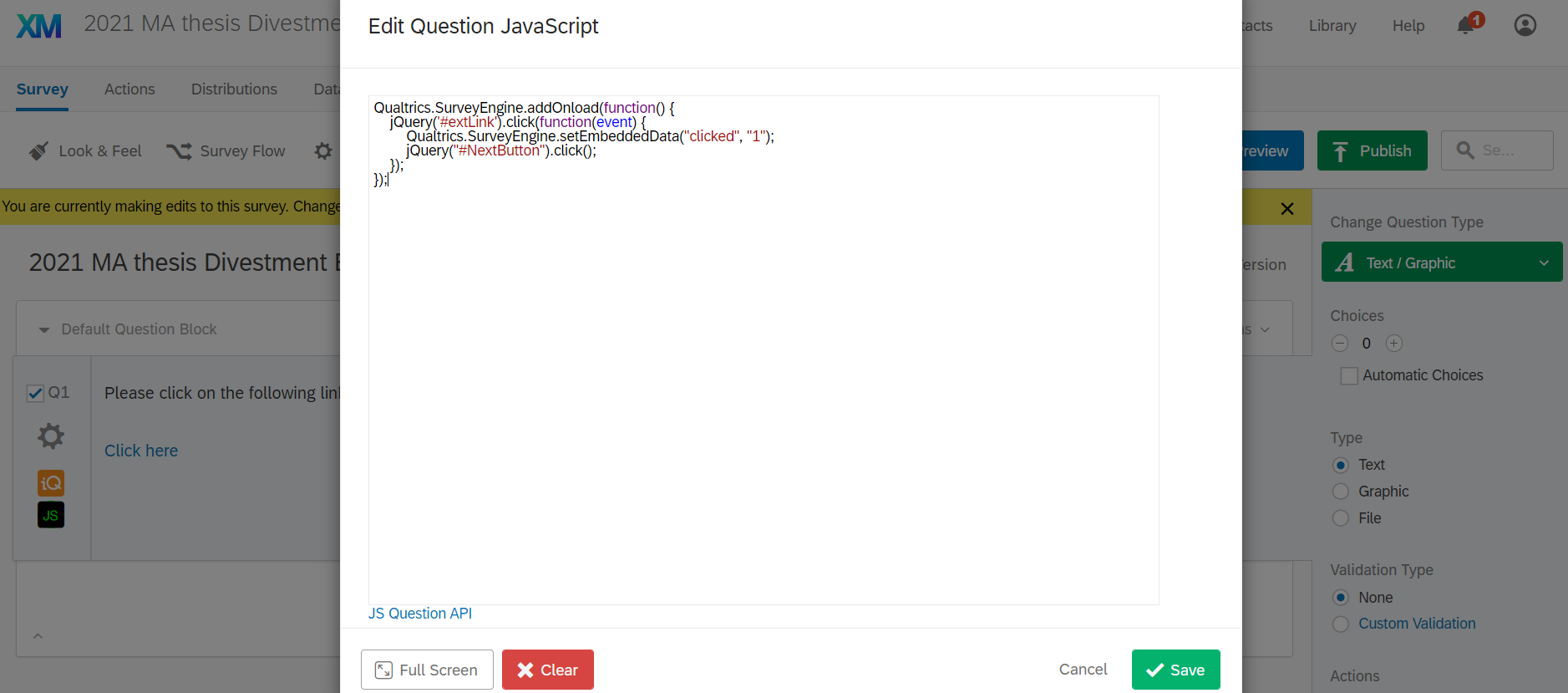
Screenshots of my survey flow and JS: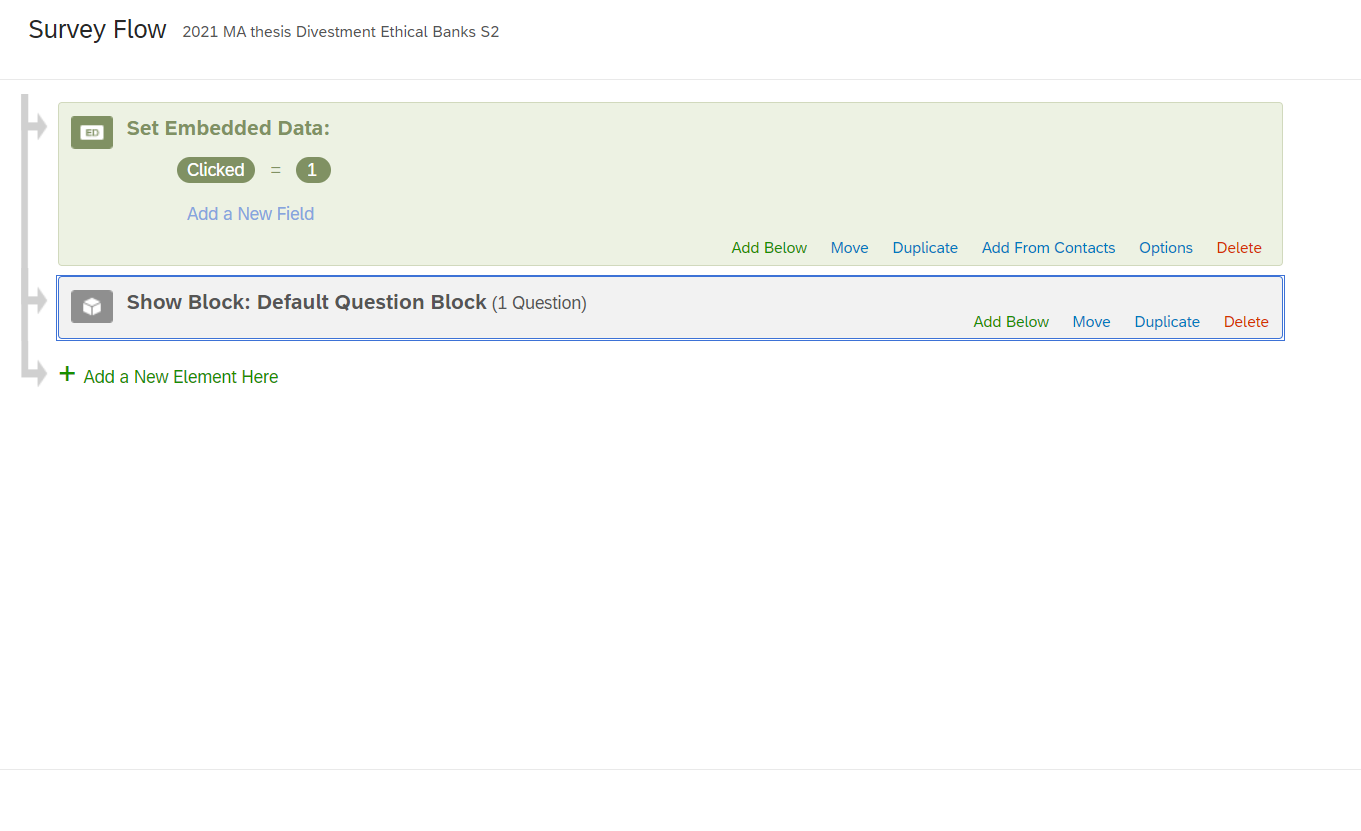

Solved
Where can I find whether participants clicked on a link or not?
Best answer by JoycaV
Hi,
In your survey flow, you should put "clicked = 0" instead of "Clicked = 1". (also make sure you respect the same capitalization in the survey flow as in your javascript).
What the javascript does is the following:
When the link is clicked, the embedded data field "clicked" is set to "1".
So all those who clicked, will get the value 1.
That means, if you want all people who did not click, to have the value "0", then 0 must be your default value. That's what you do in the survey flow.
As en example, here is a flow:
MisterX opens your survey.
The first block in your survey flow is the Embedded data, where you set the field "clicked" to 0.
So right now, MisterX will have clicked = 0
Now, MisterX clicks your link.
Because of the javascript, the value of "clicked" for MisterX will now change to "1".
Kr,
Joyca












Sign up
Already have an account? Login

Welcome! To join the Qualtrics Experience Community, log in with your existing Qualtrics credentials below.
Confirm your username, share a bit about yourself, then you're ready to explore and connect .
Free trial account? No problem. Log in with your trial credentials to join.
No free trial account? No problem! Register here
Already a member? Hi and welcome back! We're glad you're here 🙂
You will see the Qualtrics login page briefly before being taken to the Experience Community.
Login with Qualtrics
Welcome! To join the Qualtrics Experience Community, log in with your existing Qualtrics credentials below.
Confirm your username, share a bit about yourself, then you're ready to explore and connect .
Free trial account? No problem. Log in with your trial credentials to join. No free trial account? No problem! Register here
Already a member? Hi and welcome back! We're glad you're here 🙂
You will see the Qualtrics login page briefly before being taken to the Experience Community.
Login to the Community
Welcome! To join the Qualtrics Experience Community, log in with your existing Qualtrics credentials below.
Confirm your username, share a bit about yourself, then you're ready to explore and connect .
Free trial account? No problem. Log in with your trial credentials to join.
No free trial account? No problem! Register here
Already a member? Hi and welcome back! We're glad you're here 🙂
You will see the Qualtrics login page briefly before being taken to the Experience Community.
Login with Qualtrics
Welcome! To join the Qualtrics Experience Community, log in with your existing Qualtrics credentials below.
Confirm your username, share a bit about yourself, then you're ready to explore and connect .
Free trial account? No problem. Log in with your trial credentials to join. No free trial account? No problem! Register here
Already a member? Hi and welcome back! We're glad you're here 🙂
You will see the Qualtrics login page briefly before being taken to the Experience Community.
Enter your E-mail address. We'll send you an e-mail with instructions to reset your password.