



Hi All
Hope all is well.
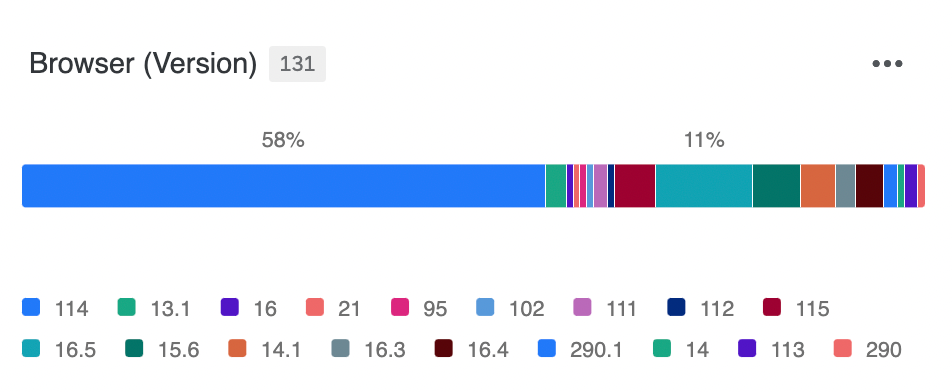
All my Breakdown bar widgets on my dashboard display ascending, but for some reason this one seems a little mixed up. I’ve tried deleting and rebuilding but the same happens.
Hope you can help :)
Thanks!

Hi All
Hope all is well.
All my Breakdown bar widgets on my dashboard display ascending, but for some reason this one seems a little mixed up. I’ve tried deleting and rebuilding but the same happens.
Hope you can help :)
Thanks!
Best answer by Eumetis
Hi
The numbers are considered as text. In this case, you can re-order them as a.1, b.2, c3, d4 and so on….
Sorry, how would I do this?
Thanks :)
Hi you can rename the labels and manually sort then. If you want dynamic sorting use simple chart stack it and then sort it
Already have an account? Login

Welcome! To join the Qualtrics Experience Community, log in with your existing Qualtrics credentials below.
Confirm your username, share a bit about yourself, then you're ready to explore and connect .
Free trial account? No problem. Log in with your trial credentials to join. No free trial account? No problem! Register here
Already a member? Hi and welcome back! We're glad you're here 🙂
You will see the Qualtrics login page briefly before being taken to the Experience Community.
No account yet? Create an account
Welcome! To join the Qualtrics Experience Community, log in with your existing Qualtrics credentials below.
Confirm your username, share a bit about yourself, then you're ready to explore and connect .
Free trial account? No problem. Log in with your trial credentials to join. No free trial account? No problem! Register here
Already a member? Hi and welcome back! We're glad you're here 🙂
You will see the Qualtrics login page briefly before being taken to the Experience Community.
Enter your E-mail address. We'll send you an e-mail with instructions to reset your password.

