



Hello, I have 2 paragraphs that are displaying in bold, I have attempted multiple times to highlight the paragraphs and uncheck bold but it still being shown that way. Any other ideas I can try? Thanks!

Solved
Bold in font format
Best answer by arunxmarchitect
There are a couple of things you can check:
Use Case 1: In the Survey Builder, click inside the Question Text and select Remove Formatting. This will clear any hidden formatting that may be causing the text to remain bold. The Qualtrics support article below shows where to find this option:
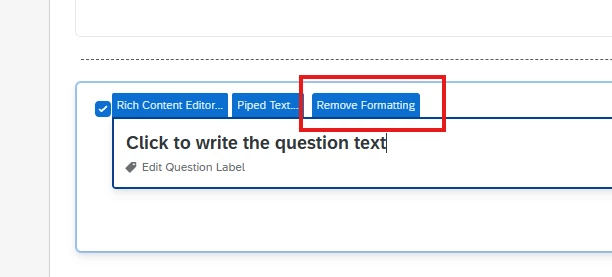
Use Case 2: If you don't see a Remove Formatting option, there are two other common causes:
-
Custom CSS applied in the Survey Look & Feel that forces the text to display in bold.
-
JavaScript added to the question that modifies the formatting.
For example, I've seen cases where the text appears normal (not bold) in the Survey Builder but is rendered in bold only in the survey preview because of custom CSS or JavaScript.
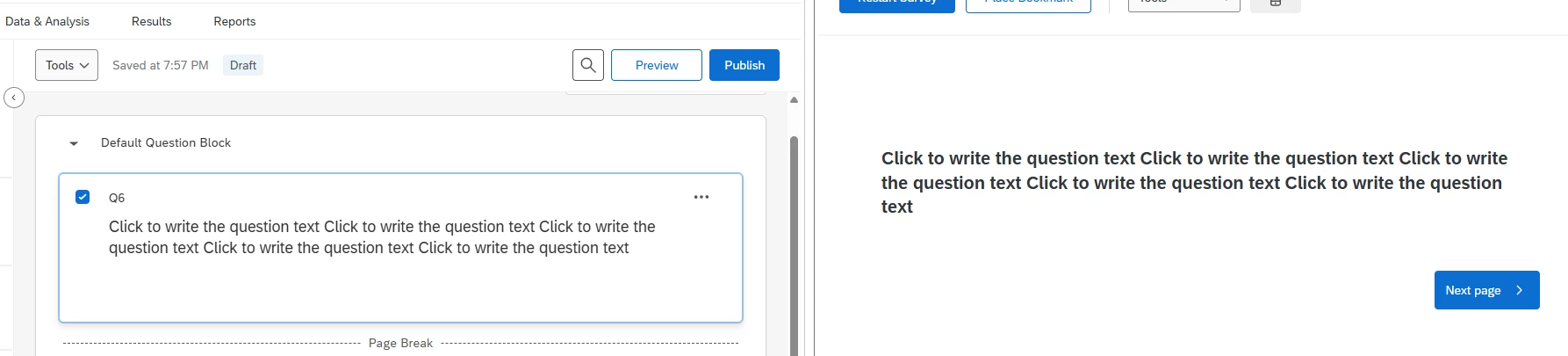
If you can share a screenshot of the Survey Builder and the survey preview, or let us know whether you're seeing the bold text in the builder or only in the preview, we can help narrow it down.



Sign up
Already have an account? Login

Welcome! To join the Qualtrics Experience Community, log in with your existing Qualtrics credentials below.
Confirm your username, share a bit about yourself, then you're ready to explore and connect .
Free trial account? No problem. Log in with your trial credentials to join.
No free trial account? No problem! Register here
Already a member? Hi and welcome back! We're glad you're here 🙂
You will see the Qualtrics login page briefly before being taken to the Experience Community.
Login with Qualtrics
Welcome! To join the Qualtrics Experience Community, log in with your existing Qualtrics credentials below.
Confirm your username, share a bit about yourself, then you're ready to explore and connect .
Free trial account? No problem. Log in with your trial credentials to join. No free trial account? No problem! Register here
Already a member? Hi and welcome back! We're glad you're here 🙂
You will see the Qualtrics login page briefly before being taken to the Experience Community.
Login to the Community
Welcome! To join the Qualtrics Experience Community, log in with your existing Qualtrics credentials below.
Confirm your username, share a bit about yourself, then you're ready to explore and connect .
Free trial account? No problem. Log in with your trial credentials to join.
No free trial account? No problem! Register here
Already a member? Hi and welcome back! We're glad you're here 🙂
You will see the Qualtrics login page briefly before being taken to the Experience Community.
Login with Qualtrics
Welcome! To join the Qualtrics Experience Community, log in with your existing Qualtrics credentials below.
Confirm your username, share a bit about yourself, then you're ready to explore and connect .
Free trial account? No problem. Log in with your trial credentials to join. No free trial account? No problem! Register here
Already a member? Hi and welcome back! We're glad you're here 🙂
You will see the Qualtrics login page briefly before being taken to the Experience Community.
Enter your E-mail address. We'll send you an e-mail with instructions to reset your password.