

I have 10 surveys that must be presented in random order. To do this, I have a randomizer set to evenly present the 10 surveys. However, I need a a fixed block to be displayed when 25%, 50%, and 75% of the full project is complete, regardless of the random survey order.
There are 12 surveys in total (demographics are always presented first and contact information is always presented last, both outside of the randomizer) so the 25% completion block must be displayed once the first 2 randomized surveys are complete, the 50% block must be displayed after the next 3 surveys are complete, and the 75% block must be displayed following the next 3.
I've attempted to use multiple randomizers but I run into issues with survey repetition (i.e., Section 2 is presented twice) because the 2nd randomizer doesn't refer to the 1st randomizer, and so on.
Is there a way to insert fixed these 3 fixed blocks between the randomized surveys?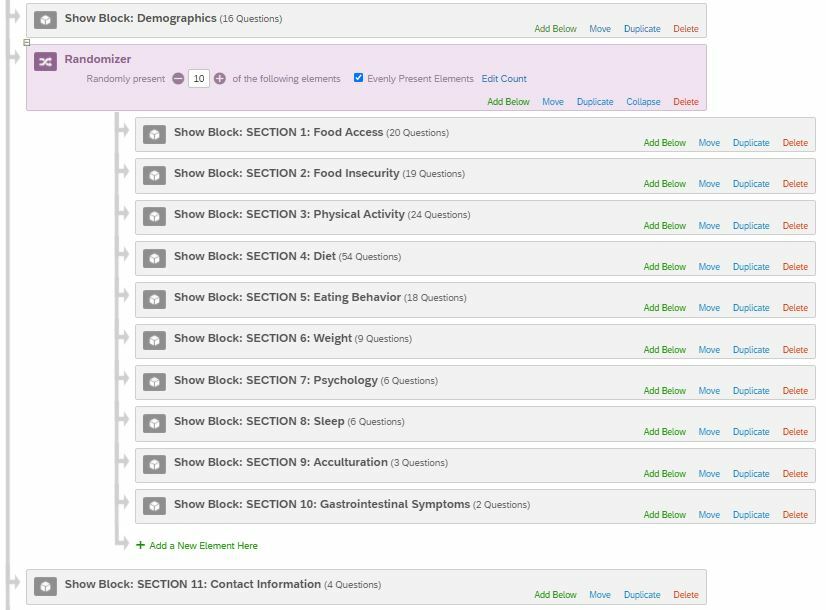
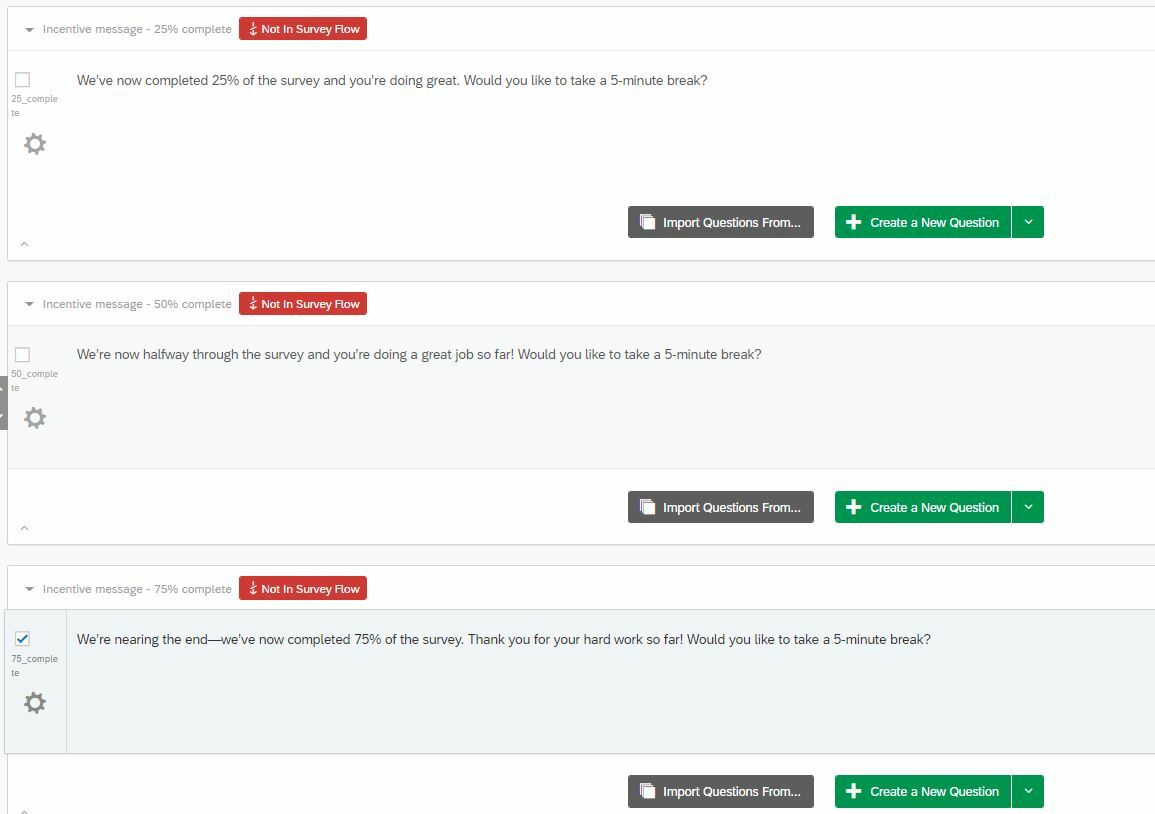

Can I insert fixed blocks between randomized blocks?
Best answer by ahmedA
Add an embedded variable counter, set its value to 0 prior to the randomizer.
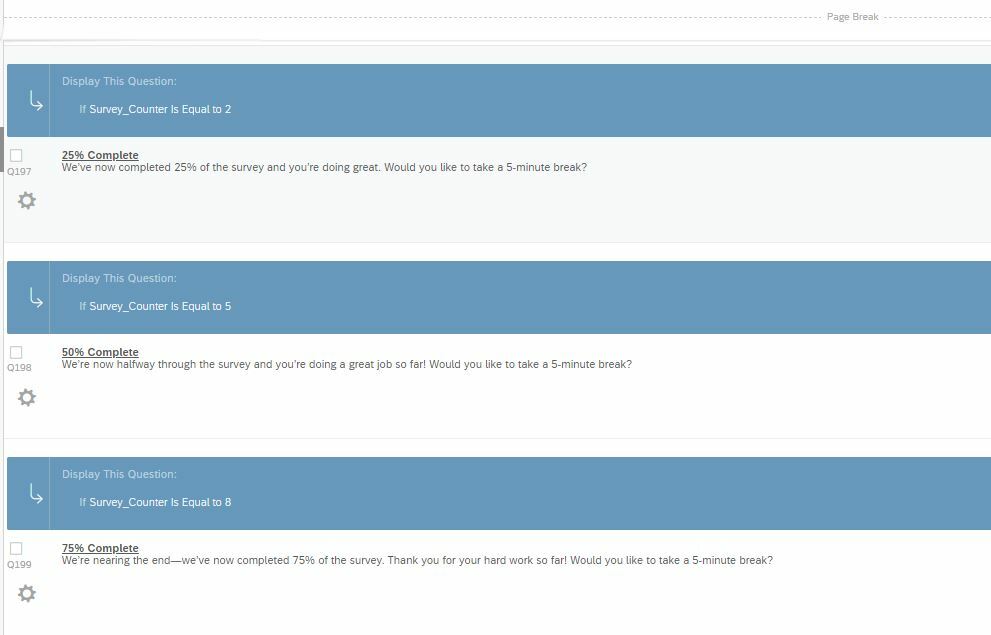
Add the 3 break questions on each block after a page break. To each add a display logic. 25%: Display only if counter is equal to 2, 50% Display only if counter is equal to 5 etc. You can add the timer question to enfore a break.
Either use JS to update the value of the counter when the block is displayed.
Or put each of the ten blocks in a group with an add embedded data block that uses Math operations to increment the value of the counter by 1.


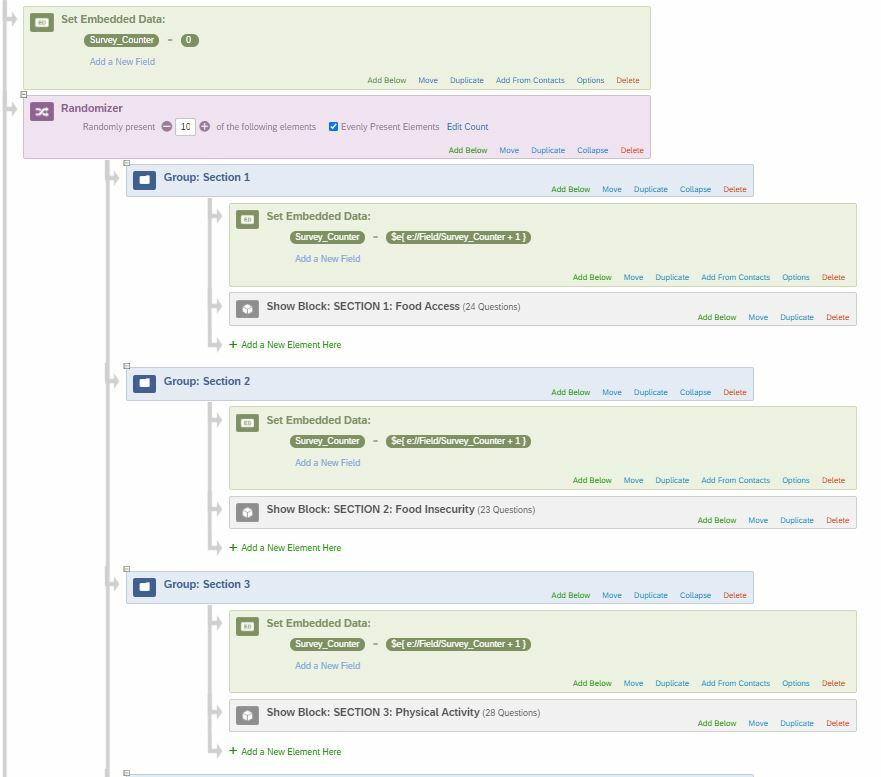 And the completion display logic looks like this:
 Thanks again!
Sign up
Already have an account? Login

Welcome! To join the Qualtrics Experience Community, log in with your existing Qualtrics credentials below.
Confirm your username, share a bit about yourself, then you're ready to explore and connect .
Free trial account? No problem. Log in with your trial credentials to join.
No free trial account? No problem! Register here
Already a member? Hi and welcome back! We're glad you're here 🙂
You will see the Qualtrics login page briefly before being taken to the Experience Community.
Login with Qualtrics
Welcome! To join the Qualtrics Experience Community, log in with your existing Qualtrics credentials below.
Confirm your username, share a bit about yourself, then you're ready to explore and connect .
Free trial account? No problem. Log in with your trial credentials to join. No free trial account? No problem! Register here
Already a member? Hi and welcome back! We're glad you're here 🙂
You will see the Qualtrics login page briefly before being taken to the Experience Community.
Login to the Community
No account yet? Create an account
Welcome! To join the Qualtrics Experience Community, log in with your existing Qualtrics credentials below.
Confirm your username, share a bit about yourself, then you're ready to explore and connect .
Free trial account? No problem. Log in with your trial credentials to join.
No free trial account? No problem! Register here
Already a member? Hi and welcome back! We're glad you're here 🙂
You will see the Qualtrics login page briefly before being taken to the Experience Community.
Login with Qualtrics
Welcome! To join the Qualtrics Experience Community, log in with your existing Qualtrics credentials below.
Confirm your username, share a bit about yourself, then you're ready to explore and connect .
Free trial account? No problem. Log in with your trial credentials to join. No free trial account? No problem! Register here
Already a member? Hi and welcome back! We're glad you're here 🙂
You will see the Qualtrics login page briefly before being taken to the Experience Community.
Enter your E-mail address. We'll send you an e-mail with instructions to reset your password.