

Qualtrics new experience feedback: Email Messages section | Experience Community
Skip to main content

Qualtrics new experience feedback: Email Messages section

  • July 29, 2026
  • 11 replies
  • 347 views

We noticed that the Email Messages section in Qualtrics has been redesigned, and we would like to share some feedback.


At this time, we do not recommend switching to the new experience. Is there any way for us to continue using the current (classic) experience after September 30, 2026?


Our main concerns with the new design are:


  1. Reduced visual organization. The new interface no longer clearly indicates whether an email reminder is nested under the initial outreach or represents a separate email outreach. This makes it more difficult to understand the overall communication sequence.

  2. Limited visibility. The new interface displays detailed information for only one email at a time, whereas the current (classic) experience allows us to view all email outreaches together. The current (classic) layout makes it much easier to monitor outreach history, compare email performance, and identify overall communication trends at a glance.


We appreciate the effort to improve the platform and hope you'll consider retaining the classic experience, or incorporating these usability improvements into the new design.


11 replies

InessaG
Level 5 ●●●●●
Forum|alt.badge.img+19
  • Level 5 ●●●●●
  • July 29, 2026

100% agree. This is not an improvement in any way. 

And still no way to search for a particular distribution (by email address or any other field other than date). For those of us with thousands of distributions per day, there is no way to narrow down. 


Tom_1842
Level 8 ●●●●●●●●
Forum|alt.badge.img+28
  • Level 8 ●●●●●●●●
  • July 29, 2026

I agree. A few additional observations:

  • The lack of reminder nesting is difficult to work with. It makes managing survey follow-ups more cumbersome than it was in the previous experience.
  • I also miss the ability to filter recipient lists by Group when selecting recipients. There is still an icon indicating that a list is shared with a Group, but there doesn't seem to be any way to filter or select lists based on Group.
  • The From Name, From Email Address, and Reply-To Email fields are not picking up the defaults defined in Account Settings.
  • Moving from a single distribution configuration page to multiple pages requires more clicks and feels less efficient overall.
  • The removal of recipient counts from the distributions list is a loss of information. Previously, I could quickly see how many contacts were included in each distribution. Now I have to open each one individually, which adds extra effort when managing multiple distributions.
  • It also looks like the default link expiration behavior has changed. Previously, links defaulted to expiring after 60 days. Now the default appears to be "The link will remain active as long as the survey is active." That's not necessarily a problem, but the support documentation should be updated to reflect the new default behavior.

Forum|alt.badge.img+21
  • QPN Level 5 ●●●●●
  • July 29, 2026

hey ​@AlonsoC you might need to check this post!


Agreed.  The new view is not helpful when trying to see the relations between emails when you are running multiple campaigns for the same survey.


AlonsoC
Qualtrics Employee
Forum|alt.badge.img+30
  • Qualtrics Employee
  • August 6, 2026

Hi all, 

The product team is aware of this feedback and exploring options. As a short-term workaround, they mentioned that it is possible to return to the previous UI. 


  • August 10, 2026

Related to the email message redesign, I could not find the button to insert a library file in the email message, which we have relied on heavily to increase response rate. The current view allows insert graphic, a link, or a table, but not a file. I can still upload files to the library. What happened to the links to these files in message composition? Please bring them back. 


TusharDalwani
QPN Level 6 ●●●●●●

Hi, Thank you for sharing this. I agree with the feedback shared above. There are 2 main things i would like to call out where the new UI lacks feature parity with Old UI.


  1. The scheduled distributions do not show the timezone now
  2. You cannot set a specific time for link expiration date now (can set the custom date though)

TomG
Level 8 ●●●●●●●●
Forum|alt.badge.img+27
  • Level 8 ●●●●●●●●
  • August 12, 2026

Hi all, 

The product team is aware of this feedback and exploring options. As a short-term workaround, they mentioned that it is possible to return to the previous UI. 

@AlonsoC,

Currently, when you switch to the old experience there is a notification that says, “You’re currently viewing a version of emails that will be available until 09/30/2026.” Based on the many issues documented here, I believe it would be prudent to delay the forced switch to the new UI until all the issues are addressed. That seems very unlikely by 9/30.

Also, I would like to add another issue to the list. The old UI would remember the settings from the last distribution (From, From name, Reply to, Subject and Message), but with the new UI you have to start from scratch each time. It is both inefficient and much more error prone.

Thanks for following up on this!


MichaelC
Qualtrics Employee
Forum|alt.badge.img+43
  • Qualtrics Employee
  • August 13, 2026

Hello, everyone! Thank you very much to each of you for the very detailed feedback about this topic. Alonso and I have escalated everyone’s concerns to the team internally, and we anticipate more information to be forthcoming sometime early next week. 

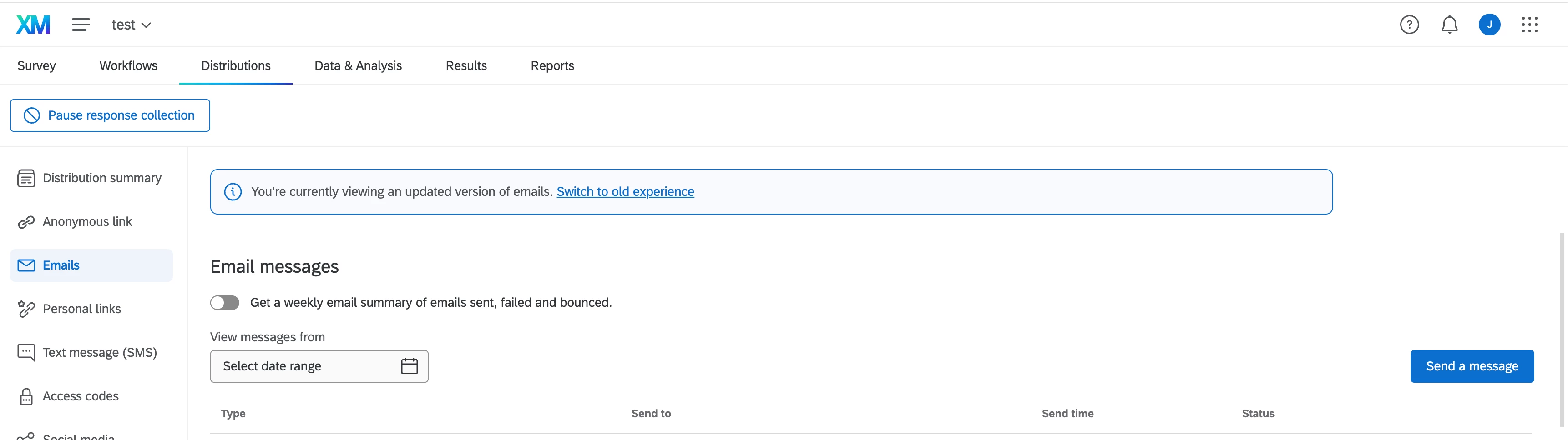
In the meantime, you should be able to switch to the old experience if so desired. Please refer to the screenshot below. 

We hope to have more information and comment from the internal product teams soon.


AlonsoC
Qualtrics Employee
Forum|alt.badge.img+30
  • Qualtrics Employee
  • August 18, 2026

Hello everyone, here’s an update from the product team:


Thank you all for the detailed feedback on the new email experience. It has been shared directly with the product team and every point raised here has been logged and is being reviewed.
On the why: the email section was rebuilt so that it meets our accessibility standards, which the previous design could not, and so that email distribution works the same way everywhere it appears in Qualtrics rather than differently in each place. That also means improvements we make from here reach all of those places at once.
We know that does not make the adjustment easier in the short term. The team is reviewing the specific points raised in this thread and will share more when there is something concrete. In the meantime you can continue using the classic experience via the link at the top of the emails page.


pamelalbeck
Level 5 ●●●●●
Forum|alt.badge.img+41
  • Level 5 ●●●●●
  • August 20, 2026

I went back after reading these posts and flipped over to the new experience to try it out.  My biggest issue was how to read the distribution and reminders.  I couldn’t tell which was the original email and which were the reminders (I had two scheduled) and had to switch back to classic.