
Reverting to Old Versions of Dashboards | Experience Community
Skip to main content

Reverting to Old Versions of Dashboards

  • January 14, 2026
  • 5 replies
  • 38 views

dladner
Level 1 ●

I need your help!!!

I have this survey that many people complete that requires them to upload file(s). After the deadline when I’m compiling the raw data, I use the “Revert to old versions of dashboards” button under settings on the Results tab (screenshot attached). This allows me to export all uploaded files to specific questions into a single PDF with links that will open the selected link/uploaded file in a browser tab when clicked.

Has anyone found a way to accomplish this in the new version of dashboards? If not, can you please upvote this as a feature to stay (to either revert to old dashboards or add this as a new feature in the new version of dashboards)?

If you have any questions or need clarification on my post, please comment. :)


Thank you for your time,

- Dara L.

5 replies

Lpena
Qualtrics Employee
Forum|alt.badge.img+3
  • Qualtrics Employee
  • January 20, 2026

Hey Dlander!


It looks like the option to switch back to the old version of dashboards has moved. You can now find that toggle within the Dashboard settings under the theme section, rather than the Results tab. Just a heads up that if you do revert, you'll lose out on the newer updates like widget grouping and accessibility enhancements, and any work done in the new version won't carry over.

Regarding that specific export feature you mentioned—bundling all uploaded files into one PDF with clickable links—it doesn't seem to be a native part of the new dashboards just yet. You can still export pages to PDF or PPTX, but that specific file-link functionality isn't explicitly listed. Since the old dashboards are being phased out, it's probably a good idea to submit this as a feature request or upvote it if you see it on the roadmap.


If you're running into technical walls or need someone to take a closer look at your specific dashboard setup, it might be worth opening a case with the experts over at the Customer Success Hub: https://support-portal.qualtrics.com/. They're the best resource for digging into potential bugs or missing features like this one! 🙂


dladner
Level 1 ●
  • Author
  • January 20, 2026

Hey Dlander!


It looks like the option to switch back to the old version of dashboards has moved. You can now find that toggle within the Dashboard settings under the theme section, rather than the Results tab. Just a heads up that if you do revert, you'll lose out on the newer updates like widget grouping and accessibility enhancements, and any work done in the new version won't carry over.

Regarding that specific export feature you mentioned—bundling all uploaded files into one PDF with clickable links—it doesn't seem to be a native part of the new dashboards just yet. You can still export pages to PDF or PPTX, but that specific file-link functionality isn't explicitly listed. Since the old dashboards are being phased out, it's probably a good idea to submit this as a feature request or upvote it if you see it on the roadmap.


If you're running into technical walls or need someone to take a closer look at your specific dashboard setup, it might be worth opening a case with the experts over at the Customer Success Hub: https://support-portal.qualtrics.com/. They're the best resource for digging into potential bugs or missing features like this one! 🙂

Lpena,

Thank you for your reply. I am still currently able to revert to the old dashboard to get what I need, but was informed that that particular feature would eventually be removed after reaching out to the Customer Success Hub for this in the past. After getting the report I need in the old dashboard, I always revert it back to the new dashboard(s). :)

The purpose of this post was more-so to see if anyone had discovered a way to bundle all uploaded files into a PDF with clickable links (like I am currently able to do in the old dashboard). I thought this was a place to start the conversation for feature requests - where is the proper place to post that? Because I definitely want to have that out there to hopefully be integrated into the new dashboards!


Tom_1842
Level 8 ●●●●●●●●
Forum|alt.badge.img+28
  • Level 8 ●●●●●●●●
  • January 20, 2026

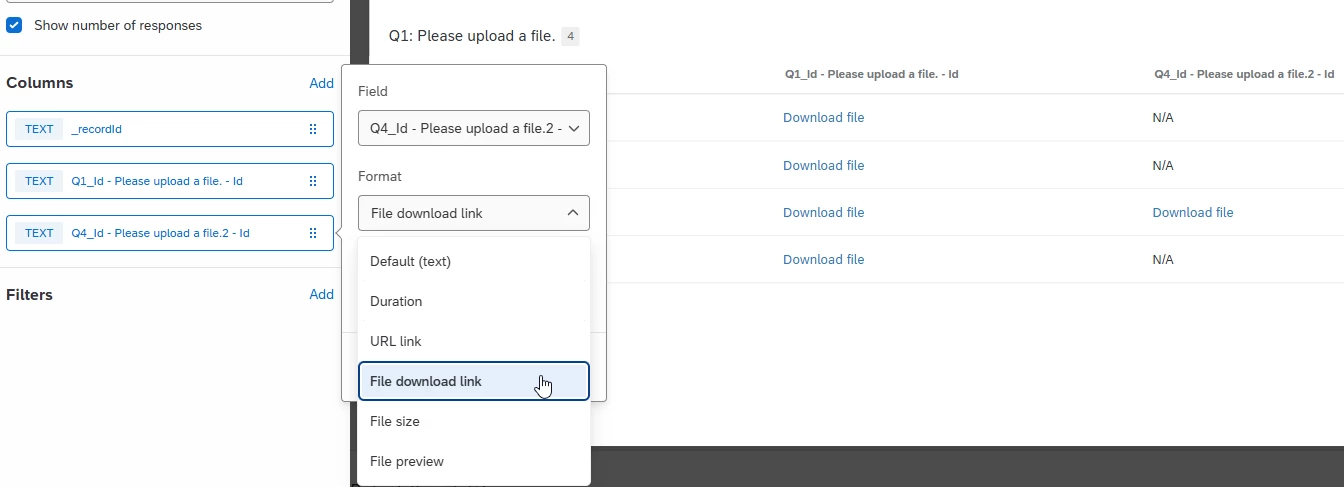
On my end, the default visualization for File Upload question in the new Results Dashboard is a Record Table. When exporting this widget to PDF, the column "Id" can contain clickable links to the uploaded file but may need to have its 'Format' updated to "File download link", like in the below. Multiple File Upload question links can be included in this table by editing the widget to include those columns, and then updating their Formats to be "File download link".

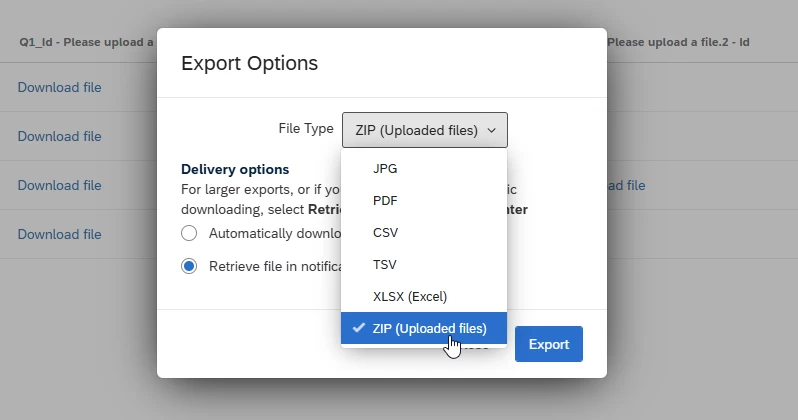
Also, when exporting the Record Table widget, you can get a Zip file of all files uploaded to the survey by changing the File Type to "ZIP (Uploaded files)".


JoseS
Administrator
Forum|alt.badge.img+21
  • Administrator
  • January 21, 2026

Hey Dlander!


It looks like the option to switch back to the old version of dashboards has moved. You can now find that toggle within the Dashboard settings under the theme section, rather than the Results tab. Just a heads up that if you do revert, you'll lose out on the newer updates like widget grouping and accessibility enhancements, and any work done in the new version won't carry over.

Regarding that specific export feature you mentioned—bundling all uploaded files into one PDF with clickable links—it doesn't seem to be a native part of the new dashboards just yet. You can still export pages to PDF or PPTX, but that specific file-link functionality isn't explicitly listed. Since the old dashboards are being phased out, it's probably a good idea to submit this as a feature request or upvote it if you see it on the roadmap.


If you're running into technical walls or need someone to take a closer look at your specific dashboard setup, it might be worth opening a case with the experts over at the Customer Success Hub: https://support-portal.qualtrics.com/. They're the best resource for digging into potential bugs or missing features like this one! 🙂

Lpena,

Thank you for your reply. I am still currently able to revert to the old dashboard to get what I need, but was informed that that particular feature would eventually be removed after reaching out to the Customer Success Hub for this in the past. After getting the report I need in the old dashboard, I always revert it back to the new dashboard(s). :)

The purpose of this post was more-so to see if anyone had discovered a way to bundle all uploaded files into a PDF with clickable links (like I am currently able to do in the old dashboard). I thought this was a place to start the conversation for feature requests - where is the proper place to post that? Because I definitely want to have that out there to hopefully be integrated into the new dashboards!

Hello ​@dladner

The proper place to post your product ideas is in on Evolve, our product ideation program! 😁
If you’re not sure how to post your idea, check out our Product Ideation Overview and our Create an Idea post.

Please let me know if you have any questions!


dladner
Level 1 ●
  • Author
  • January 21, 2026

On my end, the default visualization for File Upload question in the new Results Dashboard is a Record Table. When exporting this widget to PDF, the column "Id" can contain clickable links to the uploaded file but may need to have its 'Format' updated to "File download link", like in the below. Multiple File Upload question links can be included in this table by editing the widget to include those columns, and then updating their Formats to be "File download link".

Also, when exporting the Record Table widget, you can get a Zip file of all files uploaded to the survey by changing the File Type to "ZIP (Uploaded files)".


Nice, I will have to test this out to see if it accomplishes the same thing as what I was previously doing on the old dashboards. Thank you for the informative screenshots as well, ​@Tom_1842! :)