



Strange Progress Bar On Survey End | Experience Community
Skip to main content
Solved

Strange Progress Bar On Survey End

  • Aug 22, 2023 8:38 PM UTC
  • 3 replies
  • 234 views

Forum|alt.badge.img+1

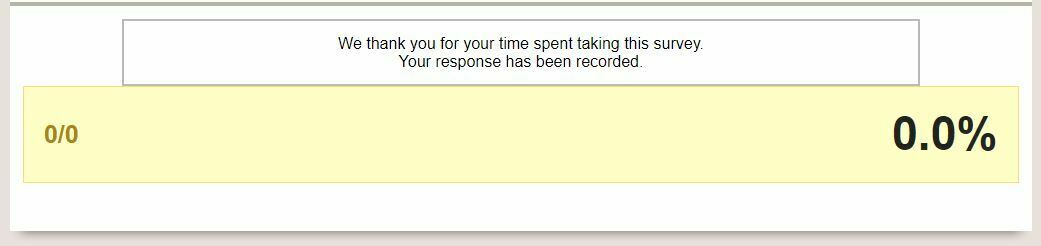
A strange progress bar has recently appeared at the end of one of my surveys and I am unsure how to get rid of it. I’ve verified that the end of survey is set to “Default” in both the block and survey flow and that no progress bar option is selected under “Look and Feel”. There is also no Footer entry or JavaScript.


Does anyone have any suggestions on how to get rid of this item? 


Best answer by BReinesch

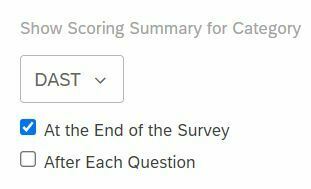
I found the cause of the issue. The solution was found in “Survey options” under “Scoring” then “Scoring Options” on the right-hand side for the lone option that was there. 


This opened up a pop-up with three sections, the middle one had the relevant information. An option to show the Scoring Summary at the end of the survey was somehow checked off. Unchecking this removed the yellow bar from my initial post.


View original

3 replies

Forum|alt.badge.img+8
  • QPN Level 4 ●●●●
  • Aug 22, 2023 10:20 PM UTC

Are you by any change using a custom end message? 


Forum|alt.badge.img+1
  • Author
  • Level 2 ●●
  • Aug 23, 2023 1:51 PM UTC

Are you by any change using a custom end message? 

I am not. Both the Survey Flow and Builder view show everything as set to “Default”. Is there another place that a custom setting could be affecting this?


Forum|alt.badge.img+1
  • Author
  • Level 2 ●●
  • Answer
  • Aug 23, 2023 6:02 PM UTC

I found the cause of the issue. The solution was found in “Survey options” under “Scoring” then “Scoring Options” on the right-hand side for the lone option that was there. 


This opened up a pop-up with three sections, the middle one had the relevant information. An option to show the Scoring Summary at the end of the survey was somehow checked off. Unchecking this removed the yellow bar from my initial post.