


Hello again,
in addition to my previous question I have one more issue with the carry forward logic: I would like to carry forward choices from 6 questions into one new questions. To be concrete: Patients choose what has helped them from several categories of therapies. Each of these categories is a question ans is quite large, so I want to ask them in a new question how much effect each of their answers had on gthem.
So I have 6 MC-questions and want to pipe the chosen elements from these 6 questions into one new question.
What makes the whole thing even more complicates it, that these 6 questions a MC in a likert-like scale format and I want to carry forward those items answered with scale points 3 AND 4 (as asked in my previous question).
How can I achieve this?
Thanks and regards,
Michael

How to carry forward answers from several questions into 1 new question
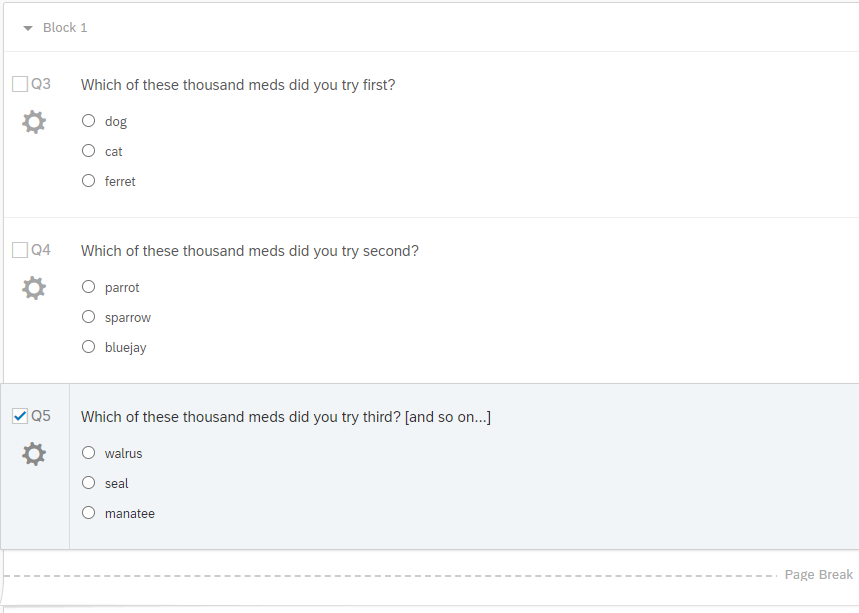
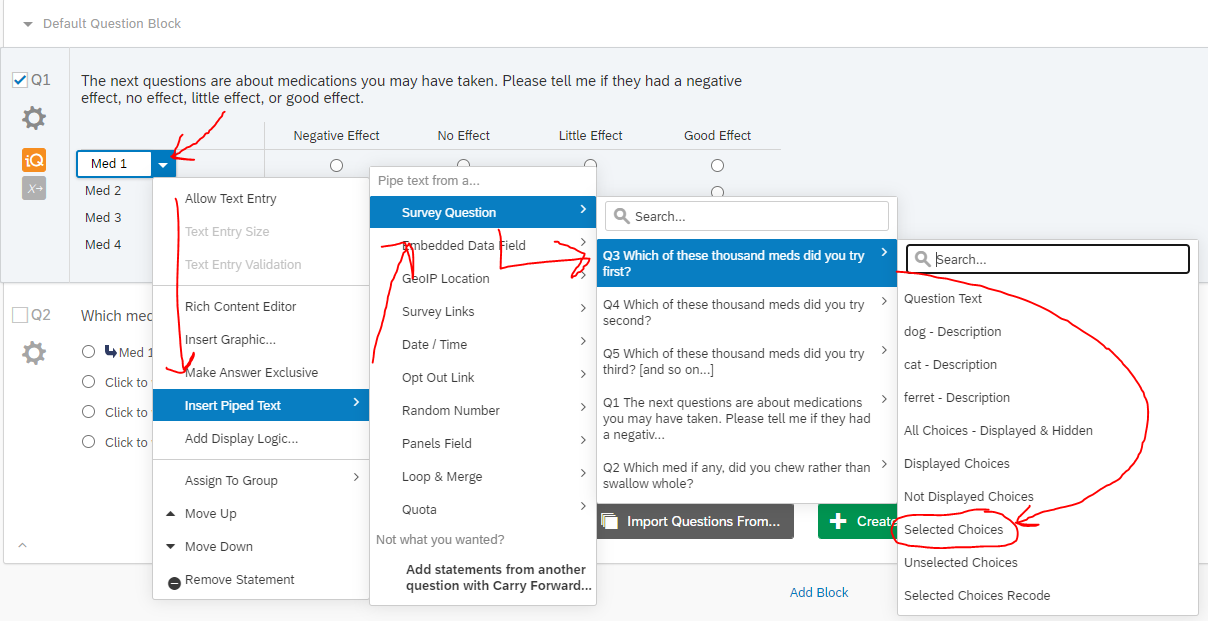 that will pipe in the name of selected choice. It will look like this:
 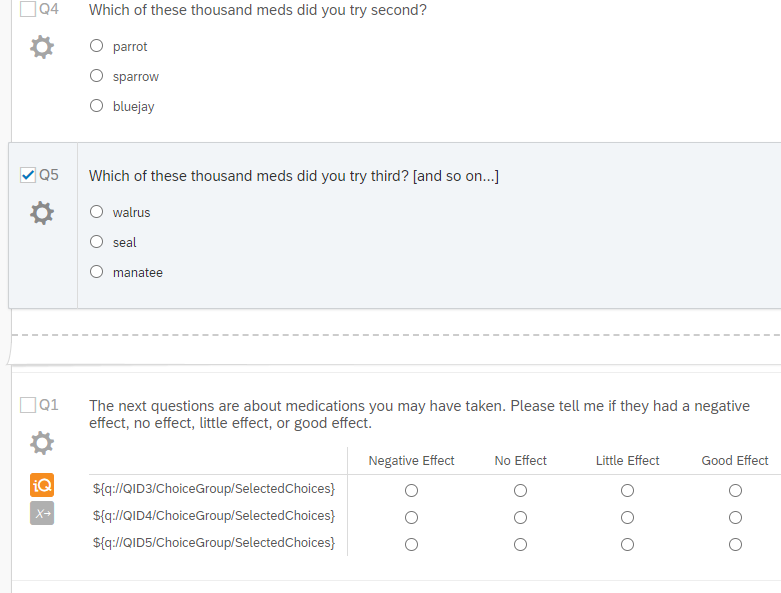 *Due Diligence* If you have 'don't know' or 'refused' or 'no med' options, make sure use display logic on any statements in the matrix to ensure they don't show up there.
 Sign up
Already have an account? Login

Welcome! To join the Qualtrics Experience Community, log in with your existing Qualtrics credentials below.
Confirm your username, share a bit about yourself, then you're ready to explore and connect .
Free trial account? No problem. Log in with your trial credentials to join.
No free trial account? No problem! Register here
Already a member? Hi and welcome back! We're glad you're here 🙂
You will see the Qualtrics login page briefly before being taken to the Experience Community.
Login with Qualtrics
Welcome! To join the Qualtrics Experience Community, log in with your existing Qualtrics credentials below.
Confirm your username, share a bit about yourself, then you're ready to explore and connect .
Free trial account? No problem. Log in with your trial credentials to join. No free trial account? No problem! Register here
Already a member? Hi and welcome back! We're glad you're here 🙂
You will see the Qualtrics login page briefly before being taken to the Experience Community.
Login to the Community
Welcome! To join the Qualtrics Experience Community, log in with your existing Qualtrics credentials below.
Confirm your username, share a bit about yourself, then you're ready to explore and connect .
Free trial account? No problem. Log in with your trial credentials to join.
No free trial account? No problem! Register here
Already a member? Hi and welcome back! We're glad you're here 🙂
You will see the Qualtrics login page briefly before being taken to the Experience Community.
Login with Qualtrics
Welcome! To join the Qualtrics Experience Community, log in with your existing Qualtrics credentials below.
Confirm your username, share a bit about yourself, then you're ready to explore and connect .
Free trial account? No problem. Log in with your trial credentials to join. No free trial account? No problem! Register here
Already a member? Hi and welcome back! We're glad you're here 🙂
You will see the Qualtrics login page briefly before being taken to the Experience Community.
Enter your E-mail address. We'll send you an e-mail with instructions to reset your password.