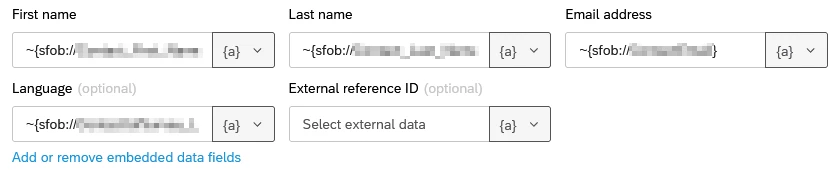
Someone at my company set up a workflow for ServiceNow to send survey invitations by email. The First Name, Last Name, Email, and Language fields are all filled in with a Piped Text format I am not familiar with, and I can’t find any documentation for it.
The email message also uses the ~{sfob://Fieldname} syntax to copy data from the ServiceNow event to the email message.
I can intuit that SFOB stands for Salesforce Object, and I can tell that the fieldname that follows must match the fieldname in ServiceNow, but I have some remaining questions that I hope the community will be able to help me with:
Why does my workflow message use specialized pipe text ( ~{sfob://Fieldname} ) instead of the normal {e://Field/Fieldname}? In other words, why isn’t the imported data from ServiceNow treated like embedded data by piped text the same way that transaction data is?
What is the tilde (~) before the left curly brace for? Is it necessary?
If I want to use data from ServiceNow in my survey, do I use the embedded data syntax for piped text {e://Field/Fieldname} (assuming I define Fieldname in an embedded data survey block) or can I use the ~{sfob://Fieldname} syntax? If not, why does that syntax work in messages then?
Best answer by nikamshubham73
Hi @alex_vanfosson,
To answer your Questions:
The workflow message uses the specialized pipe text ~{sfob://Fieldname} because the data imported from ServiceNow is stored as ServiceNow object data rather than standard Qualtrics Embedded Data. Since this information originates from an external integration and is associated with the ServiceNow object context, it must be referenced using the sfob pipe text format. Standard pipe text like ${e://Field/Fieldname} only works for Embedded Data stored within the survey response itself, whereas ~{sfob://Fieldname} is used to access fields coming directly from the ServiceNow object within the workflow.
Yes, it is necessary in workflow messages when referencing fields like ~{sfob://Fieldname}, because without the tilde the system may not correctly process the object-based pipe text. Standard survey pipe text (like ${e://Field/Fieldname}) does not require the tilde since it refers directly to embedded data within the survey response.
The workflow message uses the specialized pipe text ~{sfob://Fieldname} because the data imported from ServiceNow is stored as ServiceNow object data rather than standard Qualtrics Embedded Data. Since this information originates from an external integration and is associated with the ServiceNow object context, it must be referenced using the sfob pipe text format. Standard pipe text like ${e://Field/Fieldname} only works for Embedded Data stored within the survey response itself, whereas ~{sfob://Fieldname} is used to access fields coming directly from the ServiceNow object within the workflow.
Yes, it is necessary in workflow messages when referencing fields like ~{sfob://Fieldname}, because without the tilde the system may not correctly process the object-based pipe text. Standard survey pipe text (like ${e://Field/Fieldname}) does not require the tilde since it refers directly to embedded data within the survey response.