
Preventing duplicate external data reference ID's in automatic upload to directory | Experience Community
Skip to main content
Question

Preventing duplicate external data reference ID's in automatic upload to directory

  • September 8, 2026
  • 1 reply
  • 9 views

I want to make sure that multiple respondents will not have the same external data reference value in my directory.


I have set up a workflow for a survey so that if a respondent qualifies (the survey acts as a screener for my project) then their participant ID #, which is generated with the embedded data field Login ID = ${rand://int/100000:999999}, will be exported into one of my directories along with their name and contact information. I have set it up so this Login ID will be exported to this directory as each contact’s external data reference value. I am a little worried about the chance of a participant randomly being assigned the same value as a different participant for their Login ID. So, if a contact has the same external data reference value as another contact in the same directory, will I get an alert or some kind of notice? Has anyone found a better method for assigning eligible participants unique identification numbers? I do want to say that the participant will need to know their Login ID when they qualify/finish the screener (I have set it up to display to the participant with piped text) so that is why the randomized value saved as an embedded data field was so convenient. It would also be nice to continue with this survey to directory workflow to keep things automated. Any help is appreciated!

1 reply

arunxmarchitect
Level 4 ●●●●
Forum|alt.badge.img+8
  • Level 4 ●●●●
  • September 9, 2026

@jgwest , 

Qualtrics does not automatically check for duplicate random IDs when using the random number generator for Embedded Data fields. This means there is a small chance that two respondents could be assigned the same Login ID, especially if you use a short range (e.g., 6 digits). However, the probability of duplicates becomes extremely rare if you use longer IDs—Qualtrics recommends using 10 to 12 digits for your random number range to make repeats negligible.

You will not receive an alert or notice if a duplicate External Data Reference is assigned. The system will either merge the contact (if deduplication is enabled) or overwrite/update the existing contact, depending on your directory settings.


Custom Solution:

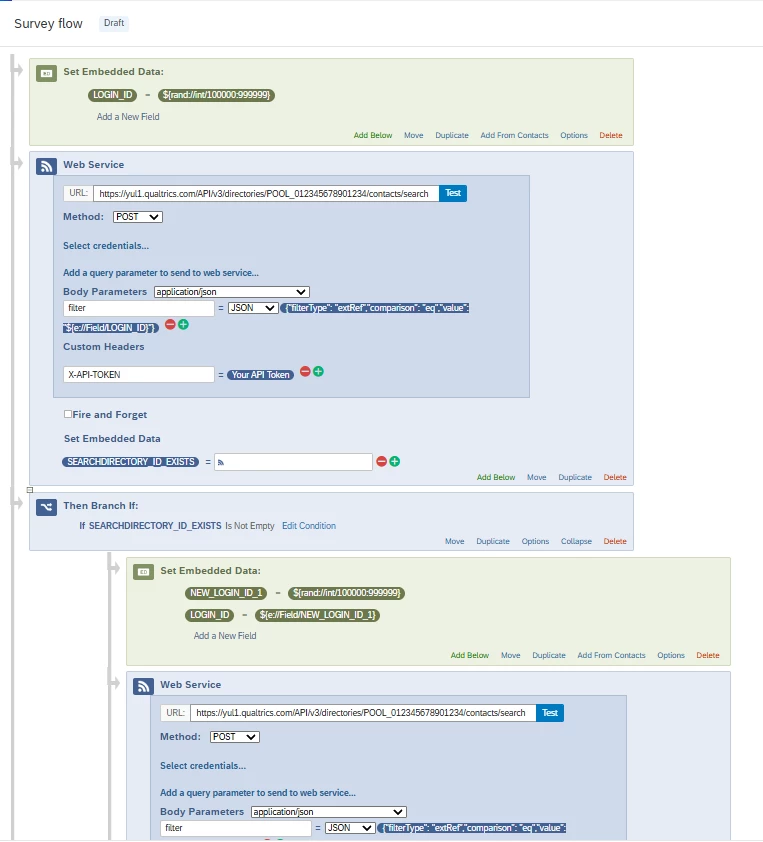
After you assign the random number as a Login ID, you can use a Web Service Task in your Qualtrics surveyflow/workflow to check if the newly assigned ID already exists in your directory. If the ID is found, you can generate a new random number in another field, repeat the check, and assign the new value. This process helps ensure that each participant receives a unique ID and reduces the risk of duplicate IDs in your directory.

Simple Flow:

  1. Assign random number (Login ID) to respondent.
  2. Use Web Service Task to check if Login ID exists in directory.
  3. If it exists, generate a new random number and repeat the check.
  4. Assign the unique Login ID to the respondent.

This approach helps automate the process and avoids assigning the same ID to multiple contacts.