


Qualtrics AI Virtual Event Series | Experience Community
Skip to main content
Sticky

Qualtrics AI Virtual Event Series

  • April 21, 2025
  • 36 replies
  • 29452 views
Qualtrics AI Virtual Event Series
Show first post

36 replies

jbaker
Groups Administrator
Forum|alt.badge.img+2
  • Groups Administrator
  • August 6, 2025

Hey ​@DeltaMV thank you for your question!

@AlexandreLeduc - thank you for the response - you are completely correct - it would be in the “validation” section of the survey builder!


As far as setting up the permissions, if you are enabling this for users, it would be under:

  • AI Adaptive Followup – Basic or AI Adaptive Followup – Advanced permission.
  • The Use AI Adaptive Followup – Advanced third-party organization setting enabled.
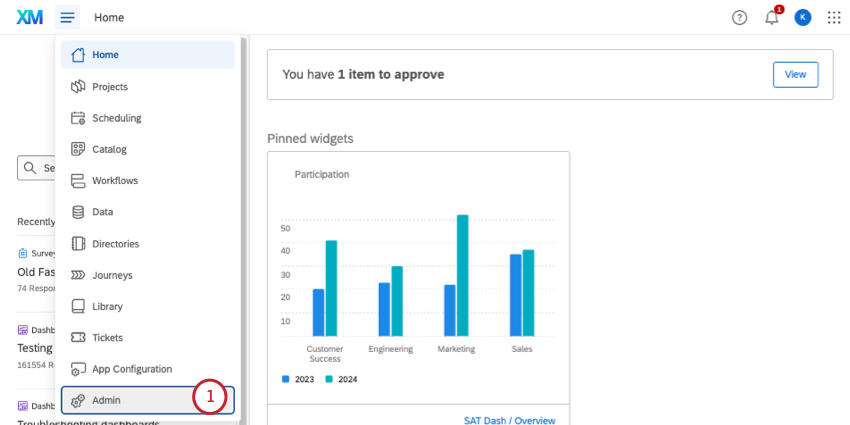
  1. Navigate to Admin Settings:

    • Click the hamburger menu (☰) in the top-left corner of your Qualtrics dashboard.
    • Select Admin.

    Opening hamburger menu and selecting admin

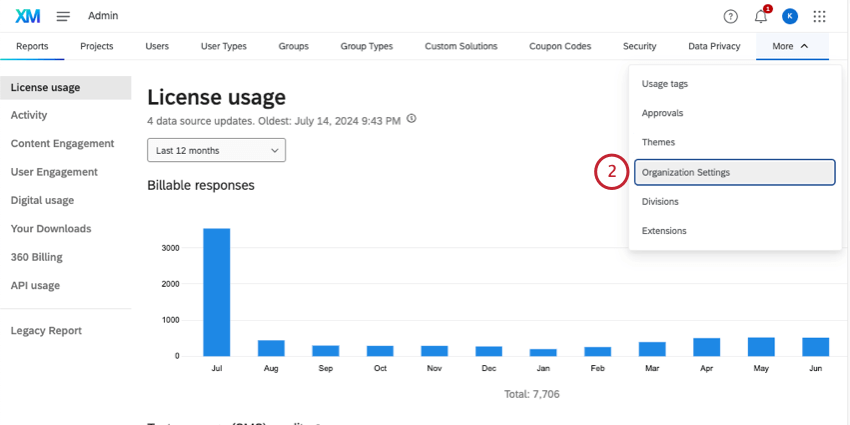
  2. Go to Organization Settings:

    • In the Admin panel, click More and select Organization Settings.

    from list of admin pages, clicking more, then selecting organization settings

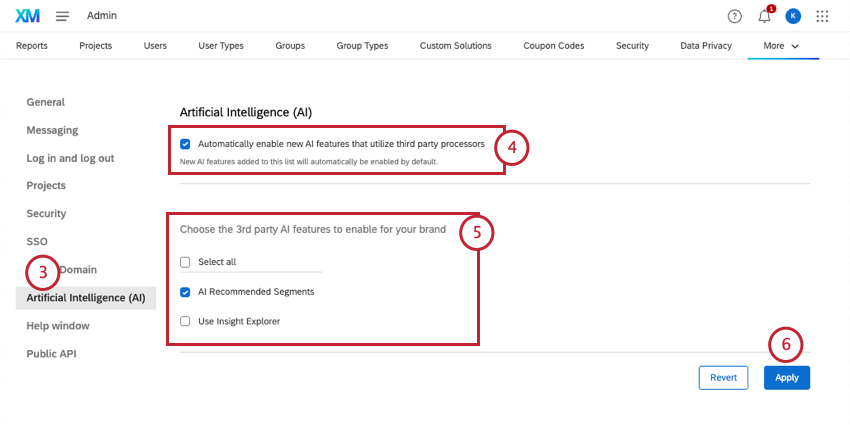
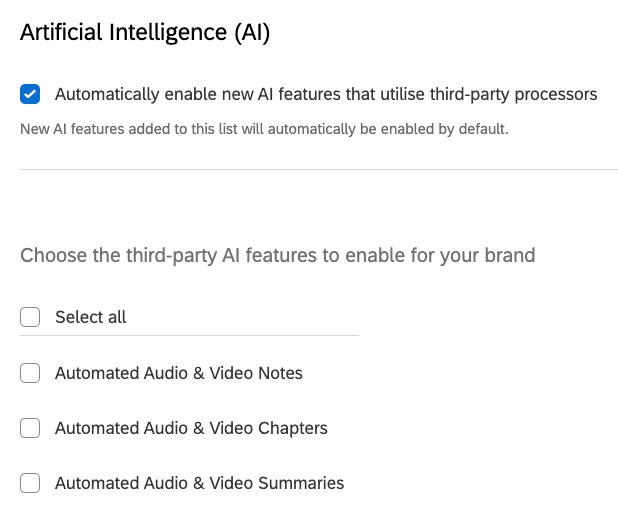
  3. Select Artificial Intelligence (AI):

    • In the left-hand menu, click Artificial Intelligence (AI).

    selecting AI from left menu

  4. Enable AI Features:

    • Locate the Use AI Adaptive Followup – Advanced setting and toggle it to On.
    • If you don’t see this option, it may not be available for your account. Contact Qualtrics Support for assistance.

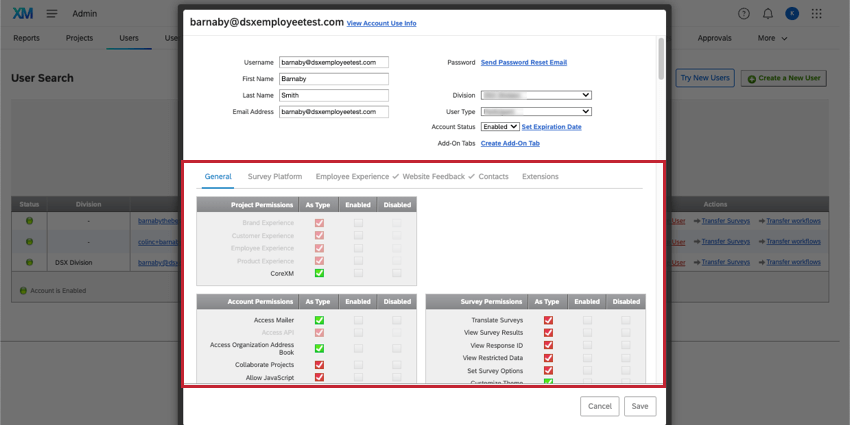
    editing a user's permissions

  5. Edit User Permissions:

    • In the Admin panel, go to Users.
    • Select the user account you want to edit.
    • Enable the AI Adaptive Followup – Basic or AI Adaptive Followup – Advanced permission.
  6. Save Changes:

    • Click Apply to save the changes.

Language Availability

Currently, Conversational Feedback is available in English (US/UK). Expanding language support is a priority for Qualtrics, and Vietnamese is included in the list of supported languages for the Customer Success Hub. However, for AI features like Conversational Feedback, Vietnamese is not yet supported. Tier 2 languages that will more than likely launch next are: Japanese, Spanish, and German. After this, we will focus on additional languages such as Vietnamese, Mandarin, Portuguese, and more!


Thank you


Forum|alt.badge.img
  • August 7, 2025

Hey ​@DeltaMV thank you for your question!

@AlexandreLeduc - thank you for the response - you are completely correct - it would be in the “validation” section of the survey builder!


As far as setting up the permissions, if you are enabling this for users, it would be under:

  • AI Adaptive Followup – Basic or AI Adaptive Followup – Advanced permission.
  • The Use AI Adaptive Followup – Advanced third-party organization setting enabled.
  1. Navigate to Admin Settings:

    • Click the hamburger menu (☰) in the top-left corner of your Qualtrics dashboard.
    • Select Admin.

    Opening hamburger menu and selecting admin

  2. Go to Organization Settings:

    • In the Admin panel, click More and select Organization Settings.

    from list of admin pages, clicking more, then selecting organization settings

  3. Select Artificial Intelligence (AI):

    • In the left-hand menu, click Artificial Intelligence (AI).

    selecting AI from left menu

  4. Enable AI Features:

    • Locate the Use AI Adaptive Followup – Advanced setting and toggle it to On.
    • If you don’t see this option, it may not be available for your account. Contact Qualtrics Support for assistance.

    editing a user's permissions

  5. Edit User Permissions:

    • In the Admin panel, go to Users.
    • Select the user account you want to edit.
    • Enable the AI Adaptive Followup – Basic or AI Adaptive Followup – Advanced permission.
  6. Save Changes:

    • Click Apply to save the changes.

Language Availability

Currently, Conversational Feedback is available in English (US/UK). Expanding language support is a priority for Qualtrics, and Vietnamese is included in the list of supported languages for the Customer Success Hub. However, for AI features like Conversational Feedback, Vietnamese is not yet supported. Tier 2 languages that will more than likely launch next are: Japanese, Spanish, and German. After this, we will focus on additional languages such as Vietnamese, Mandarin, Portuguese, and more!


Thank you


Dear ​@jbaker, thanks for your response.

But my problem is i dont have the same option “AI recommended segments" as your guidance (Step 3 - area 5). This is all we have


Forum|alt.badge.img+4
  • Level 1 ●
  • August 8, 2025

Could you post links above (or in the event pages) to the recordings of the AI sessions? 

I’m looking for the series from the other day, but now that the event has concluded I can’t access the links that were posted in the “lobby/waiting room”


AshleyDriggs
Qualtrics Employee
Forum|alt.badge.img+2
  • Author
  • Qualtrics Employee
  • August 8, 2025

@brbecker, thanks for your question! Since this is a recurring webinar series, we don’t have the recordings available right now. The good news is that we have more sessions coming up soon, so you can join live again without missing out. You can find upcoming dates on our Events page. Once the series has concluded, we’ll likely make the recordings available. Thanks!


Forum|alt.badge.img

Is this session designed for those who have already adopted AI or is this an information session? 


AshleyDriggs
Qualtrics Employee
Forum|alt.badge.img+2
  • Author
  • Qualtrics Employee
  • August 25, 2025

@christopherhaering, great question! The two sessions are designed for different stages of the Qualtrics AI journey:

  • Qualtrics AI: Discover What’s Possible is an information session. It’s ideal if you don’t currently have AI features but want to explore what’s available and see live examples of how AI can be used across Customer Experience, Employee Experience, and Strategy & Research.

  • Qualtrics AI: Getting Started with Core Features is more hands-on. It’s designed for those who already have access to Qualtrics AI features and want practical training and guidance on how to start using them.

We hope to see you at one of our events soon!


XM_JoshB
Level 5 ●●●●●
Forum|alt.badge.img+33
  • Level 5 ●●●●●
  • August 27, 2025

I wanted to register for the following: Qualtrics AI: Getting Started with Core Features

All of the sessions available show Asia, Pacific, Australia as the only countries eligible for registration. Will there be a North America event scheduled? 


AshleyDriggs
Qualtrics Employee
Forum|alt.badge.img+2
  • Author
  • Qualtrics Employee
  • August 27, 2025

Hi ​@XM_JoshB. All events are open to everyone regardless of the tags you see on the registration page. The sessions on September 16 and 17 should work well for North American time zones. If you run into any issues registering, please let us know—we’d be happy to help. Hope to see you at one of our events soon!


XM_JoshB
Level 5 ●●●●●
Forum|alt.badge.img+33
  • Level 5 ●●●●●
  • August 27, 2025

Hi ​@XM_JoshB. All events are open to everyone regardless of the tags you see on the registration page. The sessions on September 16 and 17 should work well for North American time zones. If you run into any issues registering, please let us know—we’d be happy to help. Hope to see you at one of our events soon!

Thank you for clarifying. The language is a bit confusing during registration. Have a great day!


  • November 5, 2025

Is the AI Generate Response option to social (Google, Facebook, etc) reviews available in all ticketing or only in the ‘Location Experience Hub’ ticketing system?


jbaker
Groups Administrator
Forum|alt.badge.img+2
  • Groups Administrator
  • November 5, 2025

Hey ​@cgriffy9 thank you for your question!

The AI generate a response function is not limited to the Location Experience ticketing system actually - it is available to any Qualtrics product that has the “Online Reputation Management” that have the integration with Google and social feature enabled - which includes most of our CX (Customer Experience) products (Locations, Care, Suite)!