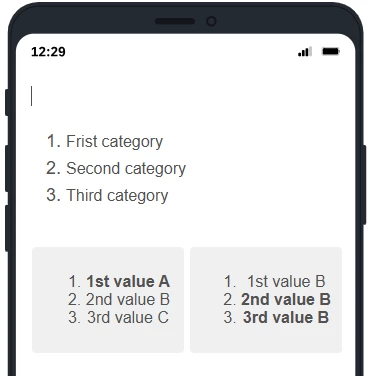
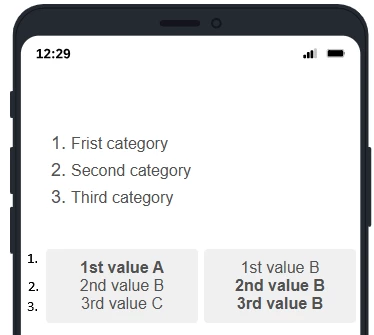
Im trying to make a mobile friendly multiple choice question where the question alternatives are side-by-side for alignment purposes.
Id like to add additional labels to the left of the choice alternatives.
How to do this?
What I have done:
What I would like to do:
Best answer by vgayraud
Hi,
Assuming from your screenshot you’re using a multiple choice type question, with format = list / column / 2, with a legacy classic layout, you could add (and adjust) the following script to your question custom code.
Qualtrics.SurveyEngine.addOnReady(function () {
var table = this.getQuestionContainer().querySelector('table.ChoiceStructure'); if (table) { var firstRow = table.querySelector('tr.reg'); if (firstRow) { var numberCell = document.createElement('td'); numberCell.className = 'LabelContainer LabelContatiner'; numberCell.style.width = '10%'; numberCell.style.verticalAlign = 'middle'; numberCell.innerHTML = ` <span class="LabelWrapper"> <span style="display:block;">1.<br>2.<br>3.</span> </span> `;
Assuming from your screenshot you’re using a multiple choice type question, with format = list / column / 2, with a legacy classic layout, you could add (and adjust) the following script to your question custom code.
Qualtrics.SurveyEngine.addOnReady(function () {
var table = this.getQuestionContainer().querySelector('table.ChoiceStructure'); if (table) { var firstRow = table.querySelector('tr.reg'); if (firstRow) { var numberCell = document.createElement('td'); numberCell.className = 'LabelContainer LabelContatiner'; numberCell.style.width = '10%'; numberCell.style.verticalAlign = 'middle'; numberCell.innerHTML = ` <span class="LabelWrapper"> <span style="display:block;">1.<br>2.<br>3.</span> </span> `;