


Advanced Transform task (Python script), passing a result to a pipe text for proceeding tasks | Experience Community
Skip to main content
Question

Advanced Transform task (Python script), passing a result to a pipe text for proceeding tasks

  • March 16, 2026
  • 1 reply
  • 5 views

Forum|alt.badge.img+11

Hi All,


In the Advanced Transform task (where you can write a python script) to manipulate the data, I would like to know how, like the code task, you can return a value or string that is available to use in a later tasks.  All the help (and bots!) say it’s possible using something like


return { summary: summary_text }


but this needs to be wrapped in a function() I believe.


The other option is to use something like


#print(SUMMARY=summary_text)


This get’s to the log, which is a downloadable file but I’d like to pass this into the proceeding email task.  Every variants I’ve tried still won’t show it up in the piped text dropdown.


Is this possible?


Thanks


Rod Pestell

PS there is no ‘Advanced Transform Task’ tag so had to select ‘Task’!
1 reply

Forum|alt.badge.img+11
  • Author
  • Level 4 ●●●●
  • March 16, 2026

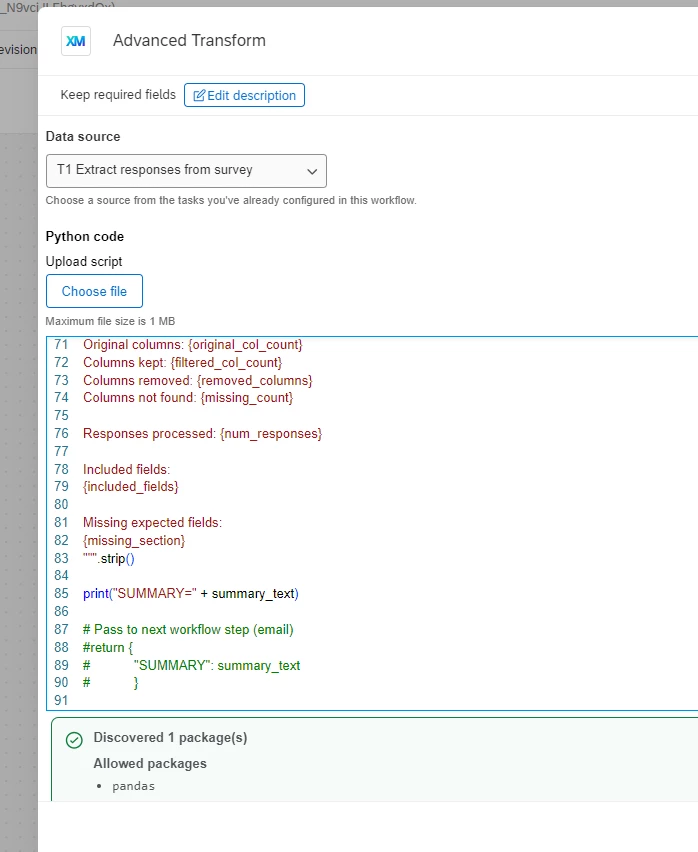
Update - Perhaps not everyone can see this task as it was a preview last year so incase not here is a screen shot of what it looks like


 you can see that I have tried print(“SUMMARY=” + summary_text) and also return but in this context it causes the script to fail as return needs to be put inside a function but there is no documentation that I can find on this to know how to pass this to a piped text for proceeding tasks.


I have also cc’d in the preview contact on this but am hoping a reply from anyone else who has perhaps had a play with this task.


Thanks


Rod Pestell
