Convert a date to a number | Experience Community
Skip to main content
Solved

Convert a date to a number

  • January 7, 2026
  • 7 replies
  • 58 views

Forum|alt.badge.img+1

I am creating a registration form that requires entering a child’s birthdate as a form field question. Based on the birthdate, I want to use branch logic to direct them to other parts of the form. For example, if the birthdate is between 09/02/2022 and 09/01/2023, I want to branch to the Pre-K portion of the form, etc. Since there is no option for branching before or after a date, I am trying to use “greater than or equal to” and “less than or equal to”. But since the entry is a date and not a number, this is not working. How do I fix this or convert the form field date to a number to use branch logic?

Best answer by Romanoman

To follow your requirement a bit more and also use JS as least as possible, I tried the approach below. The precondition is a date field with US format, and validation of the format done in the Qualtrics field itself.

On the form field question, I added this JavaScript:

Qualtrics.SurveyEngine.addOnPageSubmit(function () {
const el = document.getElementById('form-text-input-QID7-1');
const raw = (el && el.value ? el.value.trim() : '');
const m = raw.match(/^(\d{1,2})\/(\d{1,2})\/(\d{4})$/); // MM/DD/YYYY
if (!m) { Qualtrics.SurveyEngine.setJSEmbeddedData('DateISO', ''); return; }

// destructure the US format + leading zeroes added
let [, mm, dd, yyyy] = m;
mm = mm.padStart(2, '0');
dd = dd.padStart(2, '0');

// build YYYYMMDD format for easy comparison
const iso = yyyy + mm + dd;
Qualtrics.SurveyEngine.setJSEmbeddedData('DateISO', iso);
});

What it does is it takes the US date that was typed-in by a respondent into “form-text-input-QID7-1” (this needs to be replaced by your form field ID), and transforms it into international standards without dashes (YYYYMMDD), just a number, e.g. 20220903.

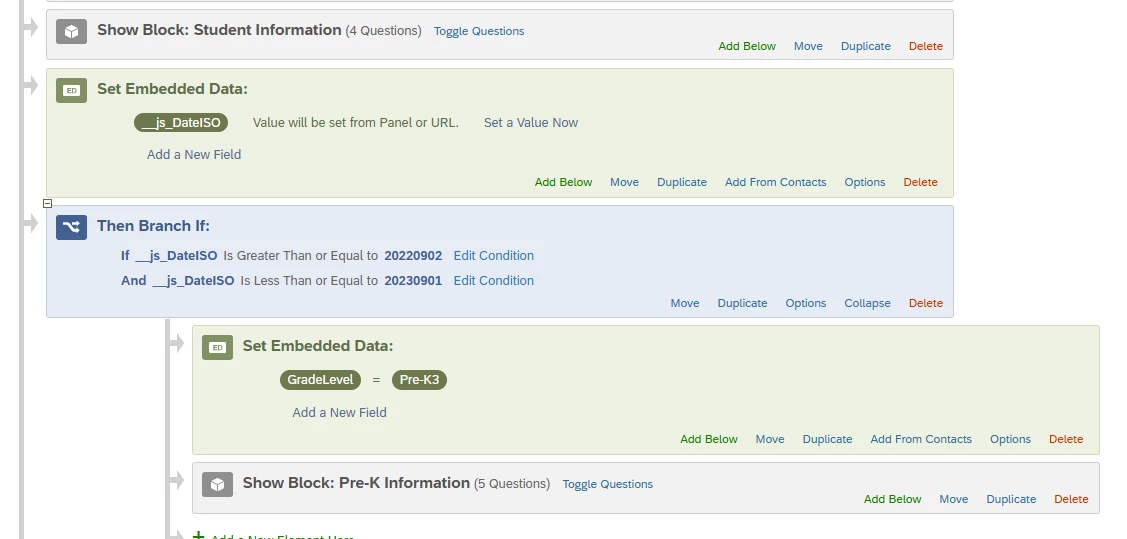
Then I had to add an embedded field with this date (__js_DateISO) into the survey flow:
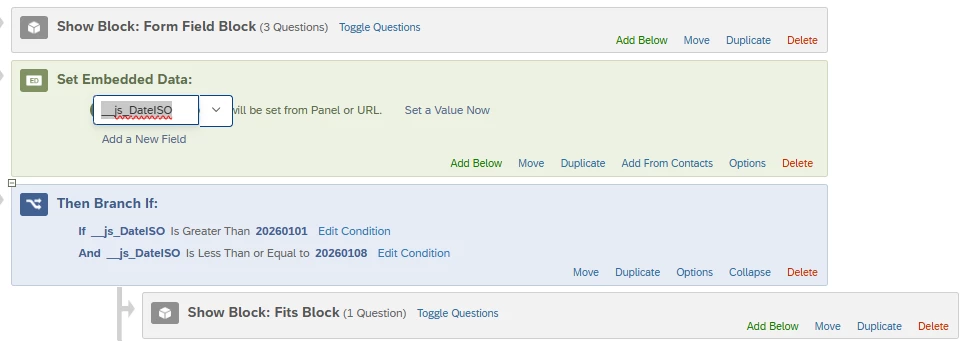
the __js_* prefix seems to be needed to make it work afterwords in the survey flow.

But then I was able to use the date in any way possible, use it as a piped text, for conditions, etc.


It should be easily reusable as long as you know the ID of the form field element, that can be acquired by inspecting the element in source code of the page, e.g. right clicking and using inspect in Chrome:



As an alternative, usage of the Calendar question type in the New survey taking experience is way easier - there you can directly grab the value in the international format too, and it can be used for a comparison like this one without any javascript.


7 replies

Forum|alt.badge.img+23

Hi ​@megan.clawson ,


Have you considered to use Javascript to check if the input is between the period, then set an embedded data, which can be later used to display the remaining blocks of question?


Hope the information below helps your case.


Note:

- Code below is a generated response from Copilot with some small tweaks as I am not that knowledgeable in Javascript to create one from scratch.

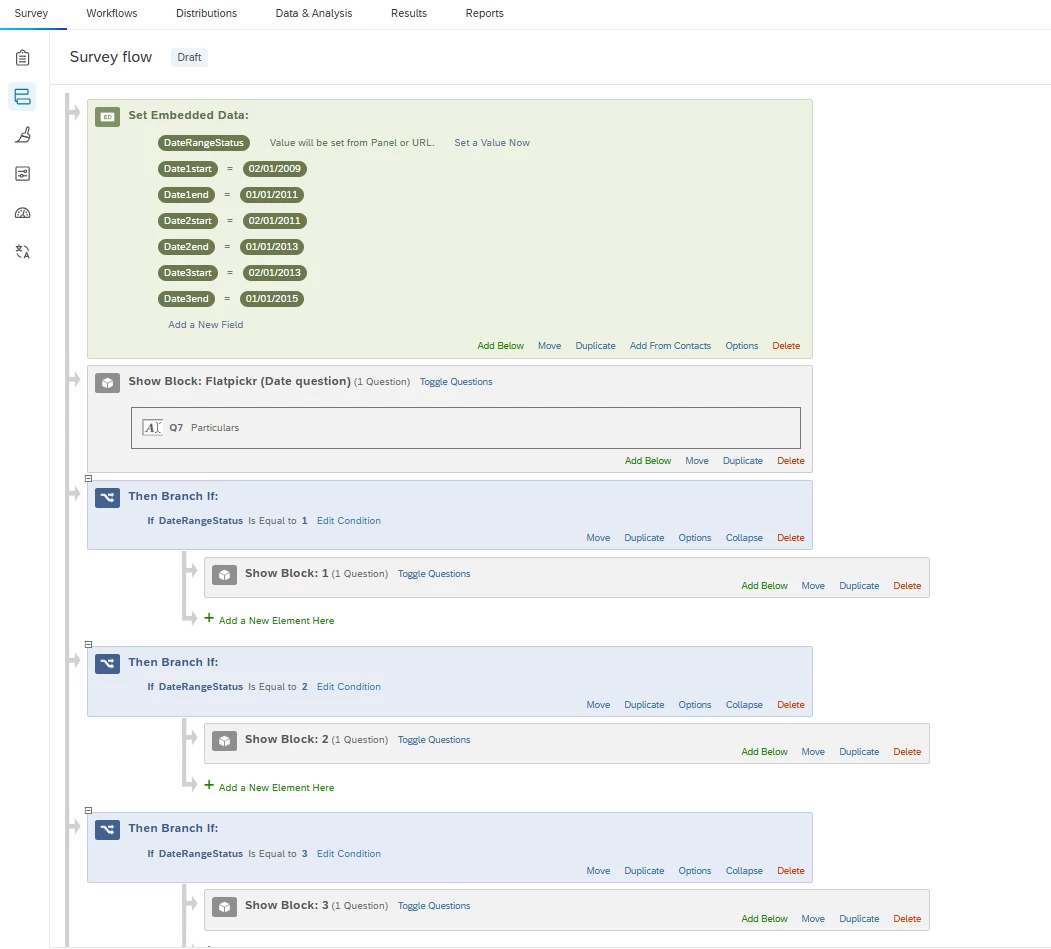
- I had a number of embedded data set up (Date1start, Date1end, Date2start, Date2end, Date3start, Date3end as 3 time periods in dd/mm/yyyy format and DateRangeStatus as the indicator to check to display remaining block of question).

- you can change status: 1 to status: “Pre-K” and change the condition DateRangeStatus to be equals to “Pre-K” to suit your scenario.

- I am using flat layout.

Qualtrics.SurveyEngine.addOnload(function () {
// =====================================
// CONFIG: which Form field holds the date?
// =====================================
const FIELD_INDEX = 1; // 1-based index: 1 = first input in the Form question

// Inclusive ranges → assign statuses
const ranges = [
{ min: "${e://Field/Date1start}", max: "${e://Field/Date1end}", status: 1 },
{ min: "${e://Field/Date2start}", max: "${e://Field/Date2end}", status: 2 },
{ min: "${e://Field/Date3start}", max: "${e://Field/Date3end}", status: 3 }
];

// Embedded Data field name (must exist in Survey Flow above this block)
const ED_FIELD = "DateRangeStatus";

// Optional UX hint (set SHOW_HINT_WHEN_INVALID = true to show format guidance)
const SHOW_HINT_WHEN_INVALID = true;
const MSG_FORMAT = "Please enter the date as DD/MM/YYYY (e.g., 01/01/2012).";

// =====================================
// HELPERS
// =====================================
function parseDMY(dmyStr) {
if (!dmyStr) return null;
const s = dmyStr.trim();
const m = s.match(/^(\d{2})\/(\d{2})\/(\d{4})$/); // DD/MM/YYYY
if (!m) return null;

const dd = Number(m[1]), mm = Number(m[2]), yyyy = Number(m[3]);
const d = new Date(yyyy, mm - 1, dd); // months are 0-based
// Calendar validity (reject 31/02/2013, etc.)
if (d.getFullYear() !== yyyy || d.getMonth() !== (mm - 1) || d.getDate() !== dd) return null;
return new Date(d.getFullYear(), d.getMonth(), d.getDate()); // strip time
}

function inRangeInclusive(d, minStr, maxStr) {
const min = parseDMY(minStr);
const max = parseDMY(maxStr);
return !!min && !!max && d >= min && d <= max;
}

function computeStatus(dmyStr) {
const d = parseDMY(dmyStr);
if (!d) return ""; // invalid format or impossible date
for (const r of ranges) {
if (inRangeInclusive(d, r.min, r.max)) return String(r.status);
}
return "0"; // outside all ranges
}

function setED(val) {
Qualtrics.SurveyEngine.setEmbeddedData(ED_FIELD, val);
}

// =====================================
// Locate the Form field input by index
// =====================================
const container = this.getQuestionContainer();
// Common input types in Form fields: text/date
const inputs = container.querySelectorAll('input[type="text"], input[type="date"]');
const dateInput = inputs[FIELD_INDEX - 1] || null;

if (!dateInput) {
// Fallback: do nothing if field not found
console.warn("Date input not found at index", FIELD_INDEX);
return;
}

// =====================================
// Live write (as respondent types/selects)
// =====================================
try {
dateInput.addEventListener("input", function () {
const status = computeStatus(dateInput.value);
setED(status);
});
dateInput.addEventListener("change", function () {
const status = computeStatus(dateInput.value);
setED(status);
});
} catch (e) { /* ignore if events not supported */ }

// =====================================
// Authoritative write just before page advances
// =====================================
this.addOnPageSubmit(function (page) {
const raw = dateInput.value;
const status = computeStatus(raw);
setED(status);

if (status === "" && SHOW_HINT_WHEN_INVALID) {
this.showValidationError(MSG_FORMAT);
// Uncomment to block submit on invalid format:
page.preventSubmit();
try { dateInput.focus(); } catch (e) {}
} else {
this.hideValidationError();
}
});

// Safety: write again on unload (quick navigation, auto-advance scenarios)
this.addOnUnload(function () {
setED(computeStatus(dateInput.value));
});
});
My survey flow using branch logic for block of question, but you can also use multiple question display logic in the survey builder.


Romanoman
Level 3 ●●●
Forum|alt.badge.img+9
  • Level 3 ●●●
  • Answer
  • January 8, 2026

To follow your requirement a bit more and also use JS as least as possible, I tried the approach below. The precondition is a date field with US format, and validation of the format done in the Qualtrics field itself.

On the form field question, I added this JavaScript:

Qualtrics.SurveyEngine.addOnPageSubmit(function () {
const el = document.getElementById('form-text-input-QID7-1');
const raw = (el && el.value ? el.value.trim() : '');
const m = raw.match(/^(\d{1,2})\/(\d{1,2})\/(\d{4})$/); // MM/DD/YYYY
if (!m) { Qualtrics.SurveyEngine.setJSEmbeddedData('DateISO', ''); return; }

// destructure the US format + leading zeroes added
let [, mm, dd, yyyy] = m;
mm = mm.padStart(2, '0');
dd = dd.padStart(2, '0');

// build YYYYMMDD format for easy comparison
const iso = yyyy + mm + dd;
Qualtrics.SurveyEngine.setJSEmbeddedData('DateISO', iso);
});

What it does is it takes the US date that was typed-in by a respondent into “form-text-input-QID7-1” (this needs to be replaced by your form field ID), and transforms it into international standards without dashes (YYYYMMDD), just a number, e.g. 20220903.

Then I had to add an embedded field with this date (__js_DateISO) into the survey flow:

the __js_* prefix seems to be needed to make it work afterwords in the survey flow.

But then I was able to use the date in any way possible, use it as a piped text, for conditions, etc.


It should be easily reusable as long as you know the ID of the form field element, that can be acquired by inspecting the element in source code of the page, e.g. right clicking and using inspect in Chrome:


As an alternative, usage of the Calendar question type in the New survey taking experience is way easier - there you can directly grab the value in the international format too, and it can be used for a comparison like this one without any javascript.


Forum|alt.badge.img+1
  • Author
  • Level 2 ●●
  • January 8, 2026

Thank you so much for these timely responses. I had tried something similar, but was not having success so I was afraid I was headed down the wrong path. Unfortunately, I am not having any luck with these solutions either. Is there something I am missing? Do I need anything in the Look & Feel Header for the JS?

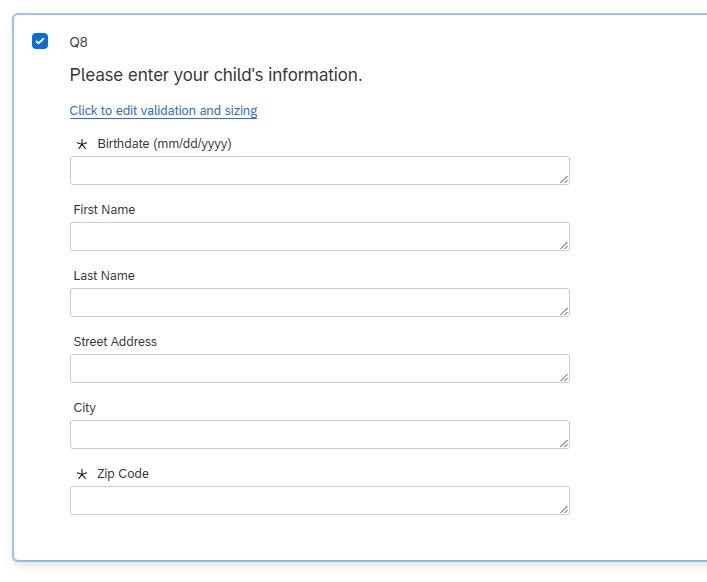
I am using the new survey experience. This is the survey question:

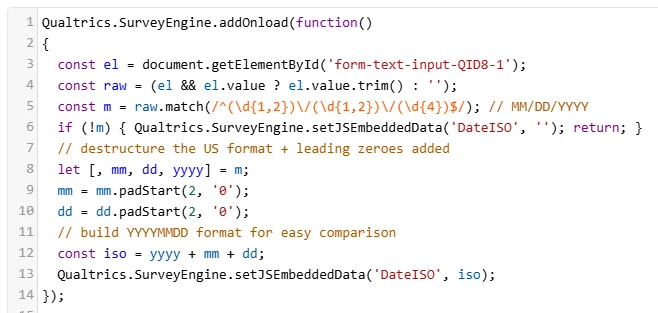
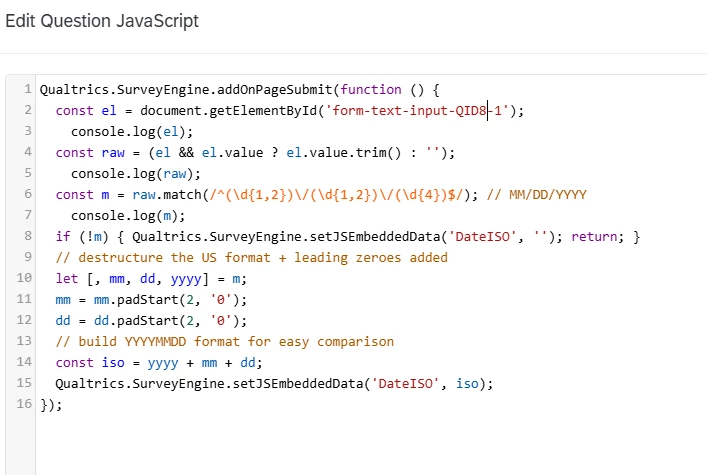
@Romanoman As suggested I have added this JS to the survey question (my QID is QID8-1):


This is what is in the survey flow:

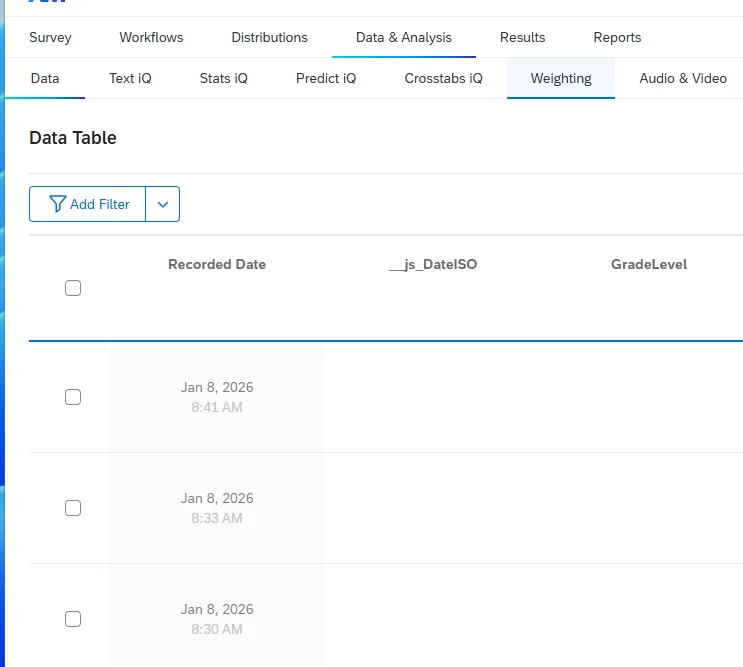
In data & analysis, these embedded data fields are empty:


Thanks for your continued help!


vgayraud
QPN Level 7 ●●●●●●●
Forum|alt.badge.img+60
  • QPN Level 7 ●●●●●●●
  • January 8, 2026

Hi,

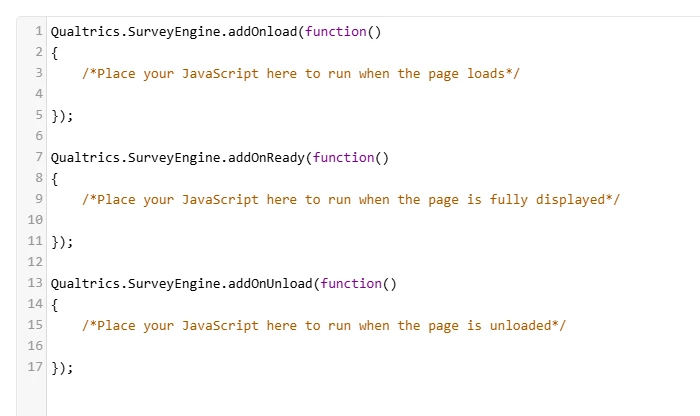
Your function should be in Qualtrics.SurveyEngine.addOnPageSubmit, not in Qualtrics.SurveyEngine.addOnload


Forum|alt.badge.img+1
  • Author
  • Level 2 ●●
  • January 8, 2026

@vgayraud this did not work either. I do not have OnPageSubmit so I used OnUnload…?


vgayraud
QPN Level 7 ●●●●●●●
Forum|alt.badge.img+60
  • QPN Level 7 ●●●●●●●
  • January 8, 2026

AddOnPageSubmit doesn’t appear by default, but you can add it.

It should look like this: 


Also, be sure that your element is really QID8-1 (it’s not because your question is Q8 that its ID is necessarily “QID8” nor that because your form field is the first to appear visually that it’s “-1”.


Forum|alt.badge.img+1
  • Author
  • Level 2 ●●
  • January 8, 2026

Wonderful! Not having it in Qualtrics.SurveyEngine.addOnPageSubmit was the issue. Working perfectly now. Thank you all so very much!!