

Hello,
Complete newbie to coding in JS, so I'm hoping someone can help. I'm trying to create a set of custom graphic sliders so that people can effectively choose their preferred portion of a variety of different foods. I found this incredibly helpful script posted by Nami, however I am experiencing difficulties with getting more than one slider to appear on the same page. The script is as follows:
Qualtrics.SurveyEngine.addOnload(function() {
/*Place your JavaScript here to run when the page loads*/
});
Qualtrics.SurveyEngine.addOnReady(function() {
/*Place your JavaScript here to run when the page is fully displayed*/
// Get Image
var img_apple = jQuery("#myImage1");
// Function to look for track changes in slider
jQuery("input[type = hidden]").change(function() {
var answer_apple = parseInt(jQuery("#QID1 input.ResultsInput").eq(0).val());
console.log(answer_apple)
// Images in order below
var images_list_apple = [
// Image URL's go here
]
// Swap image according to answer (zero indexed, thus -1)
img_apple[0].src = images_list_apple[answer_apple - 1]
});
});
Qualtrics.SurveyEngine.addOnUnload(function() {
/*Place your JavaScript here to run when the page is unloaded*/
});
Then for the second slider I have changed "#myimage1", the variable names, and changed the "QID" (changing the .eq() value, as previously suggested broke the entire script!). I can get all of the sliders to appear on one page, however upon clicking the first slider it loses the default image for the remaining sliders: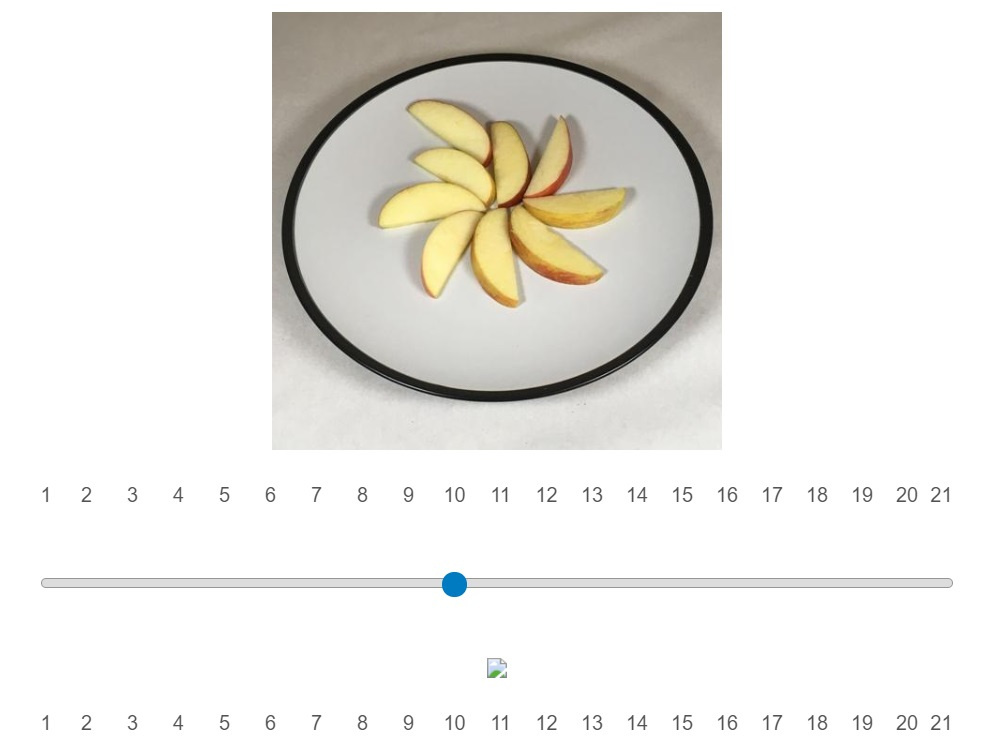 The sliders still function correctly and load the appropriate images, but I need that image to remain on-screen. Any suggestions? Hoping someone here can help.
Many thanks in advance,
Chris

Creating multiple custom graphic sliders on the same page
Best answer by CDelivett
I managed to fix this by introducing an 'If' statement after the image list, as follows:
if (answer_apple == answer_apple)
{
// Swap image according to answer (zero indexed, thus -1)
img_apple[0].src = images_list_apple[answer_apple - 1]
}
All of the sliders now appear correctly on the same page. The issue was that whenever I clicked on a slider the remaining sliders all returned a "NaN" result, and so they were unable to load an image.
Hope this helps!
Chris
Sign up
Already have an account? Login

Welcome! To join the Qualtrics Experience Community, log in with your existing Qualtrics credentials below.
Confirm your username, share a bit about yourself, then you're ready to explore and connect .
Free trial account? No problem. Log in with your trial credentials to join.
No free trial account? No problem! Register here
Already a member? Hi and welcome back! We're glad you're here 🙂
You will see the Qualtrics login page briefly before being taken to the Experience Community.
Login with Qualtrics
Welcome! To join the Qualtrics Experience Community, log in with your existing Qualtrics credentials below.
Confirm your username, share a bit about yourself, then you're ready to explore and connect .
Free trial account? No problem. Log in with your trial credentials to join. No free trial account? No problem! Register here
Already a member? Hi and welcome back! We're glad you're here 🙂
You will see the Qualtrics login page briefly before being taken to the Experience Community.
Login to the Community
No account yet? Create an account
Welcome! To join the Qualtrics Experience Community, log in with your existing Qualtrics credentials below.
Confirm your username, share a bit about yourself, then you're ready to explore and connect .
Free trial account? No problem. Log in with your trial credentials to join.
No free trial account? No problem! Register here
Already a member? Hi and welcome back! We're glad you're here 🙂
You will see the Qualtrics login page briefly before being taken to the Experience Community.
Login with Qualtrics
Welcome! To join the Qualtrics Experience Community, log in with your existing Qualtrics credentials below.
Confirm your username, share a bit about yourself, then you're ready to explore and connect .
Free trial account? No problem. Log in with your trial credentials to join. No free trial account? No problem! Register here
Already a member? Hi and welcome back! We're glad you're here 🙂
You will see the Qualtrics login page briefly before being taken to the Experience Community.
Enter your E-mail address. We'll send you an e-mail with instructions to reset your password.