

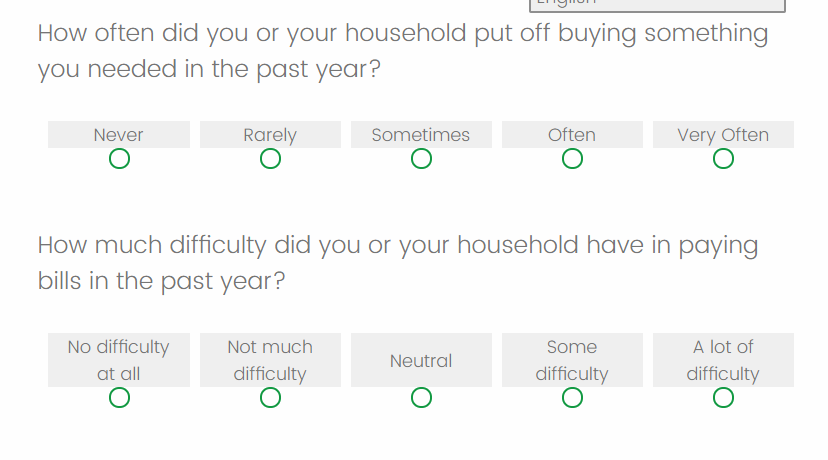
 I am hoping someone can help me with the CSS code to change the color of this matrix table options to grey (instead of green). All other questions type are the correct color, but I can't seem to find the lines of CSS code I need to change these colors.
I appreciate any support!
Erik
I am hoping someone can help me with the CSS code to change the color of this matrix table options to grey (instead of green). All other questions type are the correct color, but I can't seem to find the lines of CSS code I need to change these colors.
I appreciate any support!
Erik
Solved
CSS Code to change color of empty matrix table question circles
 +1
+1!
I am hoping someone can help me with the CSS code to change the color of this matrix table options to grey (instead of green). All other questions type are the correct color, but I can't seem to find the lines of CSS code I need to change these colors.
I appreciate any support!
Erik
I am hoping someone can help me with the CSS code to change the color of this matrix table options to grey (instead of green). All other questions type are the correct color, but I can't seem to find the lines of CSS code I need to change these colors.
I appreciate any support!
ErikBest answer by Anonymous
Hello @ErikS ,
Paste the below code in Add custom CSS
.Skin label.q-radio {
border: 2px solid #9b9b9b;
}
.Skin .Matrix .QuestionBody, .Skin .SBS .QuestionBody{
background:white;
}
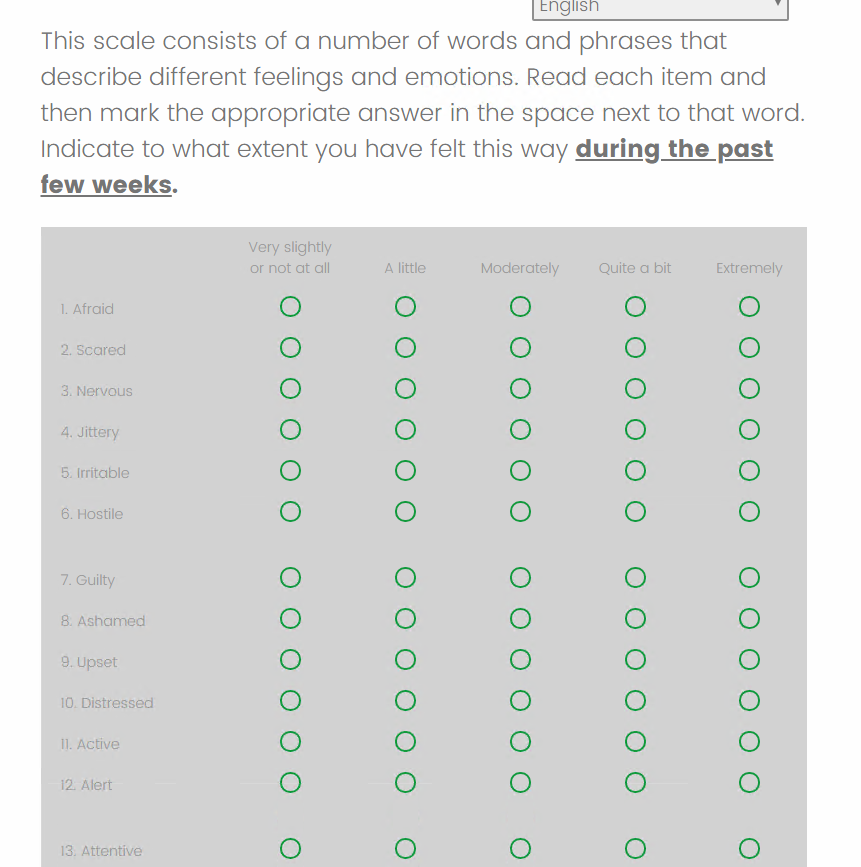 And I'm having the same problem with this questions type also. I want the background to be white, but the circles to be grey. Thanks in advance!
Sign up
Already have an account? Login

Welcome! To join the Qualtrics Experience Community, log in with your existing Qualtrics credentials below.
Confirm your username, share a bit about yourself, then you're ready to explore and connect .
Free trial account? No problem. Log in with your trial credentials to join.
No free trial account? No problem! Register here
Already a member? Hi and welcome back! We're glad you're here 🙂
You will see the Qualtrics login page briefly before being taken to the Experience Community.
Login with Qualtrics
Welcome! To join the Qualtrics Experience Community, log in with your existing Qualtrics credentials below.
Confirm your username, share a bit about yourself, then you're ready to explore and connect .
Free trial account? No problem. Log in with your trial credentials to join. No free trial account? No problem! Register here
Already a member? Hi and welcome back! We're glad you're here 🙂
You will see the Qualtrics login page briefly before being taken to the Experience Community.
Login to the Community
Welcome! To join the Qualtrics Experience Community, log in with your existing Qualtrics credentials below.
Confirm your username, share a bit about yourself, then you're ready to explore and connect .
Free trial account? No problem. Log in with your trial credentials to join.
No free trial account? No problem! Register here
Already a member? Hi and welcome back! We're glad you're here 🙂
You will see the Qualtrics login page briefly before being taken to the Experience Community.
Login with Qualtrics
Welcome! To join the Qualtrics Experience Community, log in with your existing Qualtrics credentials below.
Confirm your username, share a bit about yourself, then you're ready to explore and connect .
Free trial account? No problem. Log in with your trial credentials to join. No free trial account? No problem! Register here
Already a member? Hi and welcome back! We're glad you're here 🙂
You will see the Qualtrics login page briefly before being taken to the Experience Community.
Enter your E-mail address. We'll send you an e-mail with instructions to reset your password.