


 If you have answered the question, the question's link in the sidebar turns blue (well, the border does). With this survey we're building though, it might take someone a long time to answer, so I would like to keep the link to answered questions blue.
Right now, they are turning back to red, the default.
I have this code for when the user clicks on the question and answers it:
```
Qualtrics.SurveyEngine.addOnload(function (){
this.questionclick = function(event,element){
element.addEventListener("blur", blurFunction, true);
function blurFunction() {
if ((element.type == "text") && (element.value != "")){
var elementID = element.id.split('~')[1];
var questionID = elementID.substr(3, elementID.length);
document.getElementById('question-card' + questionID).classList.add('card-validated');
console.log("validated");
}
}
}
```
But I am at a loss as to how to replicate that for when the page is loaded (and the questions are already answered).
Thanks in advance for any advice or guidance!
If you have answered the question, the question's link in the sidebar turns blue (well, the border does). With this survey we're building though, it might take someone a long time to answer, so I would like to keep the link to answered questions blue.
Right now, they are turning back to red, the default.
I have this code for when the user clicks on the question and answers it:
```
Qualtrics.SurveyEngine.addOnload(function (){
this.questionclick = function(event,element){
element.addEventListener("blur", blurFunction, true);
function blurFunction() {
if ((element.type == "text") && (element.value != "")){
var elementID = element.id.split('~')[1];
var questionID = elementID.substr(3, elementID.length);
document.getElementById('question-card' + questionID).classList.add('card-validated');
console.log("validated");
}
}
}
```
But I am at a loss as to how to replicate that for when the page is loaded (and the questions are already answered).
Thanks in advance for any advice or guidance!
Solved
Customized validation: link to question marked as answered/validated after page is saved
Hello all,
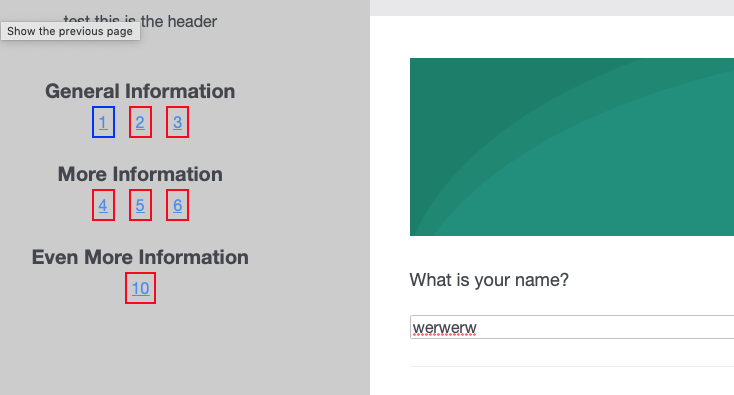
I'm building a survey (for the first time ever) in Qualtrics. I'm trying to get a color system for answered questions like so:
!
If you have answered the question, the question's link in the sidebar turns blue (well, the border does). With this survey we're building though, it might take someone a long time to answer, so I would like to keep the link to answered questions blue.
Right now, they are turning back to red, the default.
I have this code for when the user clicks on the question and answers it:
```
Qualtrics.SurveyEngine.addOnload(function (){
this.questionclick = function(event,element){
element.addEventListener("blur", blurFunction, true);
function blurFunction() {
if ((element.type == "text") && (element.value != "")){
var elementID = element.id.split('~')[1];
var questionID = elementID.substr(3, elementID.length);
document.getElementById('question-card' + questionID).classList.add('card-validated');
console.log("validated");
}
}
}
```
But I am at a loss as to how to replicate that for when the page is loaded (and the questions are already answered).
Thanks in advance for any advice or guidance!
If you have answered the question, the question's link in the sidebar turns blue (well, the border does). With this survey we're building though, it might take someone a long time to answer, so I would like to keep the link to answered questions blue.
Right now, they are turning back to red, the default.
I have this code for when the user clicks on the question and answers it:
```
Qualtrics.SurveyEngine.addOnload(function (){
this.questionclick = function(event,element){
element.addEventListener("blur", blurFunction, true);
function blurFunction() {
if ((element.type == "text") && (element.value != "")){
var elementID = element.id.split('~')[1];
var questionID = elementID.substr(3, elementID.length);
document.getElementById('question-card' + questionID).classList.add('card-validated');
console.log("validated");
}
}
}
```
But I am at a loss as to how to replicate that for when the page is loaded (and the questions are already answered).
Thanks in advance for any advice or guidance!Best answer by ZeinaM
Well, I managed to get it working for a text field. I'll leave this here in case it helps anyone else.
```
if (document.getElementById('QR~'+this.questionId).value != "" ) {
document.getElementById('question-card' + questionNumber).classList.add('card-validated');
} else if ((document.getElementById('QR~'+this.questionId).value == "" ) && ( document.getElementById('question-card' + questionNumber).classList.contains('card-validated' ))) {
document.getElementById('question-card' + questionNumber).classList.remove('card-validated');
}
```
Sign up
Already have an account? Login

Welcome! To join the Qualtrics Experience Community, log in with your existing Qualtrics credentials below.
Confirm your username, share a bit about yourself, then you're ready to explore and connect .
Free trial account? No problem. Log in with your trial credentials to join.
No free trial account? No problem! Register here
Already a member? Hi and welcome back! We're glad you're here 🙂
You will see the Qualtrics login page briefly before being taken to the Experience Community.
Login with Qualtrics
Welcome! To join the Qualtrics Experience Community, log in with your existing Qualtrics credentials below.
Confirm your username, share a bit about yourself, then you're ready to explore and connect .
Free trial account? No problem. Log in with your trial credentials to join. No free trial account? No problem! Register here
Already a member? Hi and welcome back! We're glad you're here 🙂
You will see the Qualtrics login page briefly before being taken to the Experience Community.
Login to the Community
Welcome! To join the Qualtrics Experience Community, log in with your existing Qualtrics credentials below.
Confirm your username, share a bit about yourself, then you're ready to explore and connect .
Free trial account? No problem. Log in with your trial credentials to join.
No free trial account? No problem! Register here
Already a member? Hi and welcome back! We're glad you're here 🙂
You will see the Qualtrics login page briefly before being taken to the Experience Community.
Login with Qualtrics
Welcome! To join the Qualtrics Experience Community, log in with your existing Qualtrics credentials below.
Confirm your username, share a bit about yourself, then you're ready to explore and connect .
Free trial account? No problem. Log in with your trial credentials to join. No free trial account? No problem! Register here
Already a member? Hi and welcome back! We're glad you're here 🙂
You will see the Qualtrics login page briefly before being taken to the Experience Community.
Enter your E-mail address. We'll send you an e-mail with instructions to reset your password.