Hi everyone! I'm trying to restrict the number of times (up to 6 times) people can listen to an audio clip within my survey. Additionally, I would like to track the number of times that same audio clip is played (i.e. 1-6 times). I've been browsing the online community for help, but can't seem to get the code to work properly in my survey. This is my first time using Qualtrics, so if anyone could provide any guidance at all, it would be very much appreciated!

Solved
How do you restrict the number of times an audio clip is played?
Best answer by AHammell
asimm123 You have some extra stuff in your HTML that you don't need need. The HTML View for your question should only contain the following:
Remember to listen carefully and make sure that your computer volume is on, as you will only be able to listen to the clip once.
In terms of the JavaScript, you'll want to be sure to add all of the JavaScript code that I included above.
(P.S. To embed code, use 3 " ` " symbols in a row and press "enter" :) )



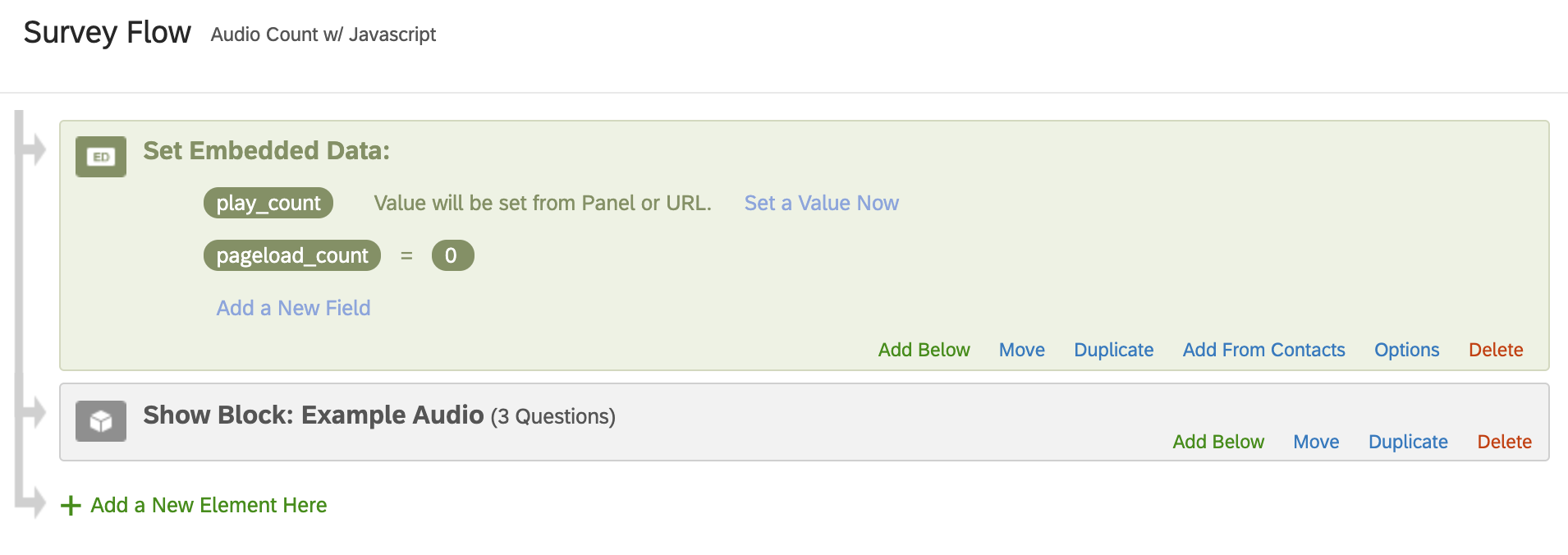 For #2) Go into the "HTML" view for your audio question and add the following HTML code:
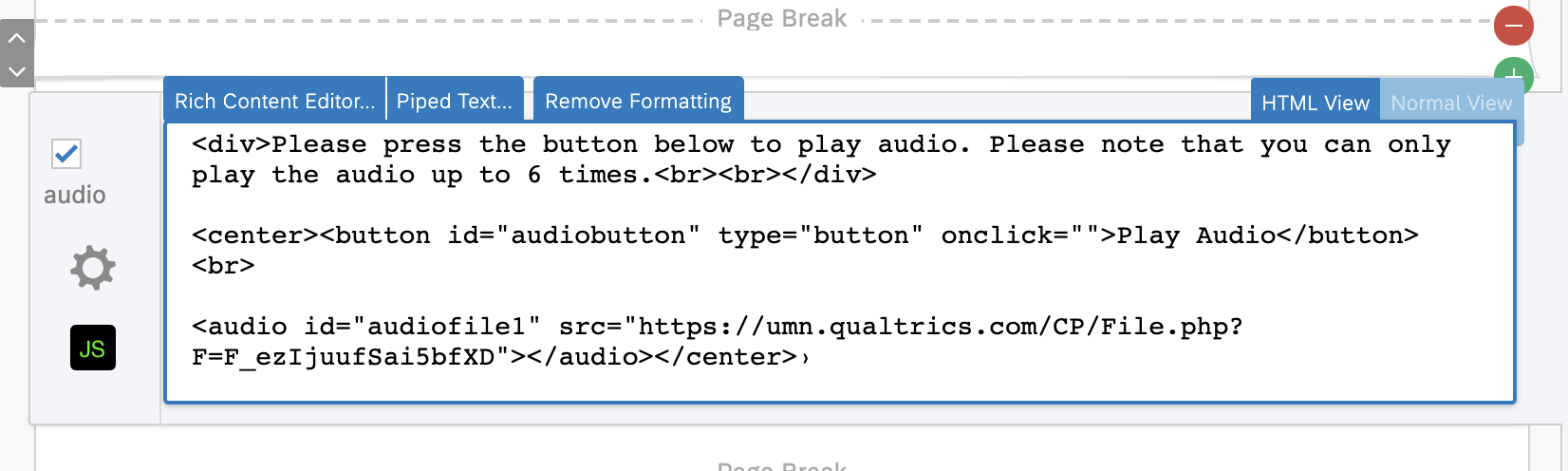 The only thing you need to change here is the URL between the quotes after "src"-- change it to the URL of whatever audio that you have. (Note: If you're not sure what the URL is, you can upload your audio within Qualtrics "rich content editor" within the question. After you upload the audio, go to the question's "HTML View", and the URL for your audio file should be within the HTML, much like my code above).
Sign up
Already have an account? Login

Welcome! To join the Qualtrics Experience Community, log in with your existing Qualtrics credentials below.
Confirm your username, share a bit about yourself, Once your account has been approved by our admins then you're ready to explore and connect .
Free trial account? No problem. Log in with your trial credentials to join.
No free trial account? No problem! Register here
Already a member? Hi and welcome back! We're glad you're here 🙂
You will see the Qualtrics login page briefly before being taken to the Experience Community
Login with Qualtrics
Welcome! To join the Qualtrics Experience Community, log in with your existing Qualtrics credentials below.
Confirm your username, share a bit about yourself, Once your account has been approved by our admins then you're ready to explore and connect .
Free trial account? No problem. Log in with your trial credentials to join. No free trial account? No problem! Register here
Already a member? Hi and welcome back! We're glad you're here 🙂
You will see the Qualtrics login page briefly before being taken to the Experience Community
Login to the Community
Welcome! To join the Qualtrics Experience Community, log in with your existing Qualtrics credentials below.
Confirm your username, share a bit about yourself, Once your account has been approved by our admins then you're ready to explore and connect .
Free trial account? No problem. Log in with your trial credentials to join.
No free trial account? No problem! Register here
Already a member? Hi and welcome back! We're glad you're here 🙂
You will see the Qualtrics login page briefly before being taken to the Experience Community
Login with Qualtrics
Welcome! To join the Qualtrics Experience Community, log in with your existing Qualtrics credentials below.
Confirm your username, share a bit about yourself, Once your account has been approved by our admins then you're ready to explore and connect .
Free trial account? No problem. Log in with your trial credentials to join. No free trial account? No problem! Register here
Already a member? Hi and welcome back! We're glad you're here 🙂
You will see the Qualtrics login page briefly before being taken to the Experience Community
Enter your E-mail address. We'll send you an e-mail with instructions to reset your password.