How to add a class to response options | Experience Community
Skip to main content
Solved

How to add a class to response options

  • Jan 29, 2025 10:35 PM UTC
  • 5 replies
  • 370 views

Forum|alt.badge.img+1

Hi,

I’m doing some custom styling on a multiple choice question in my survey and I think life would be easier if I could add a custom css class to each of the response options. I’m sure you can do this through javascript but I’m not sure how/what syntax to use? 

I don’t want to add the class to a parent element because my css would specifically be targeting when the response also has the “q-checked” class applied, so that a selected answer (for this question only, no other questions) has specific styling applied.

Thankyou!

 

Best answer by TomG

One of the nice things about CSS is your don’t need to apply the class to each element to be styled.  You can just add a class to the question then include it in your CSS rule.  For example, you can do something like in your Custom CSS:

.Skin .myClass label.MultipleAnswer.q-checked,
.Skin .myClass label.SingleAnswer.q-checked {
color: red;
}

The add this JS to your question:

Qualtrics.SurveyEngine.addOnload(function() {
jQuery(this.questionContainer).addClass("myClass");
});


View original

5 replies

TomG
Level 8 ●●●●●●●●
Forum|alt.badge.img+27
  • Level 8 ●●●●●●●●
  • Answer
  • Jan 30, 2025 1:40 AM UTC

One of the nice things about CSS is your don’t need to apply the class to each element to be styled.  You can just add a class to the question then include it in your CSS rule.  For example, you can do something like in your Custom CSS:

.Skin .myClass label.MultipleAnswer.q-checked,
.Skin .myClass label.SingleAnswer.q-checked {
color: red;
}

The add this JS to your question:

Qualtrics.SurveyEngine.addOnload(function() {
jQuery(this.questionContainer).addClass("myClass");
});


Forum|alt.badge.img+1
  • Author
  • Jan 30, 2025 1:48 AM UTC

Thankyou, that’s really helpful :) 


If I wanted to selectively apply the class to only one or two of responses, is that possible?


TomG
Level 8 ●●●●●●●●
Forum|alt.badge.img+27
  • Level 8 ●●●●●●●●
  • Jan 30, 2025 2:08 AM UTC

For specific labels, you don’t need a class. You can use the ‘for’ attribute in your CSS selector:

.Skin label.MultipleAnswer.q-checked[for='QR~QID1~2'] {color:red;}


Forum|alt.badge.img+1
  • Author
  • Jan 30, 2025 3:18 AM UTC

Oh cool, I didn’t know that! Thanks. 


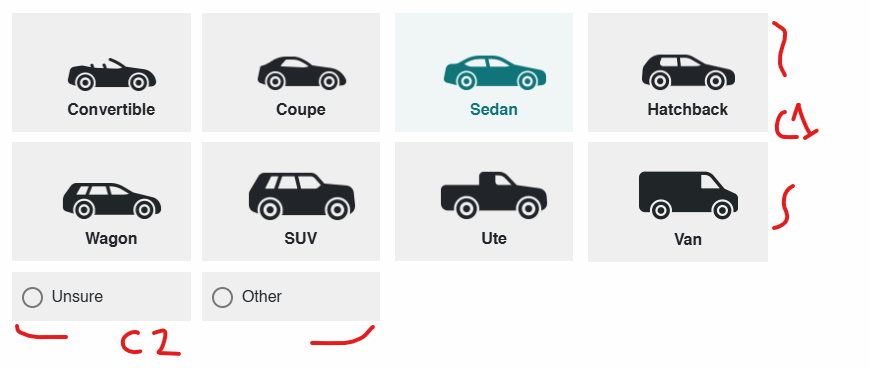
So for this example:


I could add class 1 to the question container and then essentially overwrite it for unsure & other using the CSS selector? That’s a lot more efficient than what I’m currently doing, thankyou!


TomG
Level 8 ●●●●●●●●
Forum|alt.badge.img+27
  • Level 8 ●●●●●●●●
  • Jan 30, 2025 11:45 AM UTC

Oh cool, I didn’t know that! Thanks. 


So for this example:


I could add class 1 to the question container and then essentially overwrite it for unsure & other using the CSS selector? That’s a lot more efficient than what I’m currently doing, thankyou!

Yes.