



I have a survey with sensitive topics that I need participants to be able to withdraw from at any time, while still being redirected to a debrief page and then an “end of survey” element for compensation. As it stands, I have three separate debrief blocks (one for early withdrawal, one for late withdrawal, and one for completion). I also have three “end of survey” elements, with each one having its own redirection link so that participants may be compensated based on how much they completed.
Right now, I have it set up so that if a participant clicks “Prefer not to continue,” their “withdraw” embedded data variable will either be changed to a “1” (early withdrawal) or “2” (late withdrawal). Upon clicking that button, the code forces the page to advance to the next survey element, which is a branch that detects whether their “withdraw” variable has changed and redirects them accordingly.
This is the HTML I have implemented for my “withdraw” text question at the bottom of each page and a screenshot of what the question looks like:
<span style="font-size:14px;"><i>If you are feeling distressed or having thoughts of self-harm, you can call or text 988 (U.S.)<br>You may stop the study at any time and withdrawal from the survey by pressing "Prefer not to continue" if you feel uncomfortable.</i></span>

<a style="font-size:14px; color:black; text-decoration:underline; cursor:pointer;" id="withdrawLink">
Prefer not to continue
</a>
This is the js for each of those questions as well:
Qualtrics.SurveyEngine.addOnReady(function () {

    var link = document.getElementById("withdrawLink");
    var that = this;

    link.onclick = function () {
        // set flag
        Qualtrics.SurveyEngine.setEmbeddedData("WITHDRAW", "1");
        // move forward
        that.clickNextButton();
    };

});
The same js is in the second half of the survey, with the “1” replaced by a “2.”
This is an image of my survey flow and an example of how the flow proceeds if a participant chooses not to continue:
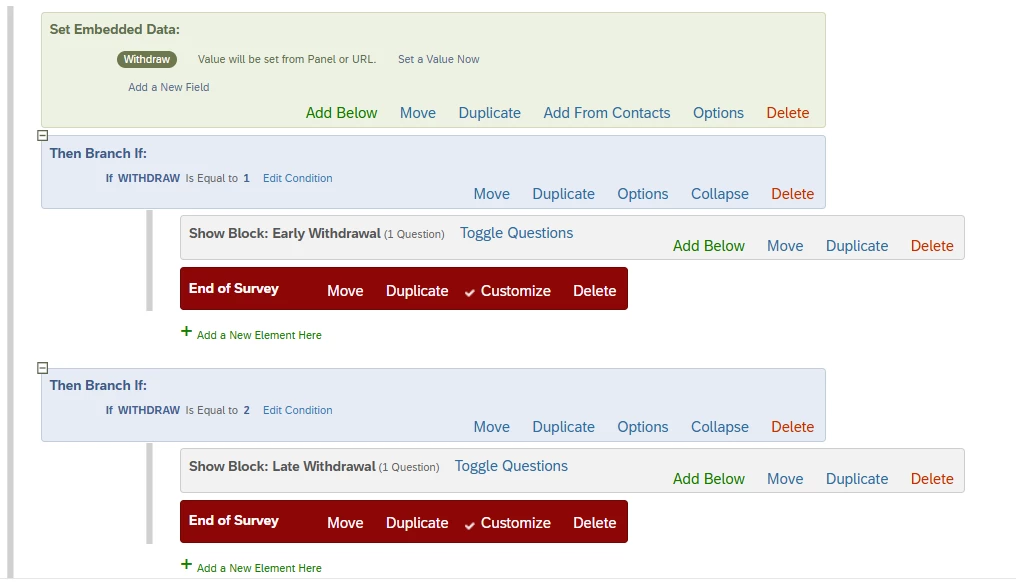
(Note that each of those “end of survey” elements redirect to different links)
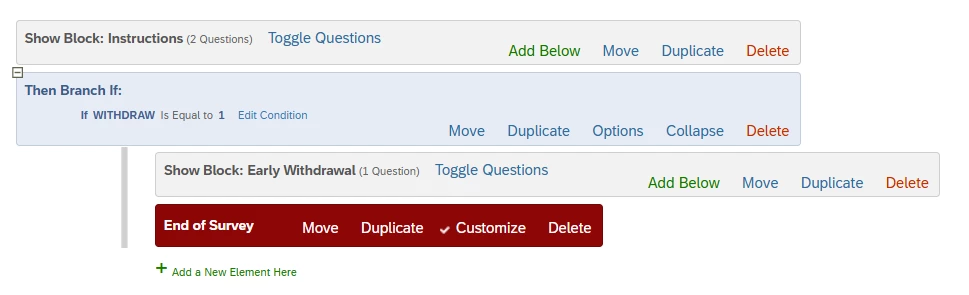
The issue is if I implement a randomizer (for jumbling up the order certain blocks appear to improve reliability), it does not guarantee the flow will check for a change in the “withdraw” variable, as the branch may randomly precede the blocks. Is there a way to marry the branch to the blocks with a randomizer so participants are always automatically redirected to the respective debrief block when clicking “Proceed not to continue?” Is there perhaps an easier fix?
Thank you!



