

Dear community,
I have a 10-row bipolar matrix in which the respondent chooses between option A and B. In the survey flow I set up a randomisation element, which picks a random number between 1 and 10. This number reflects a randomly drawn row of the bipolar matrix. I pipe the random number to a descriptive text and would like display the respondent's choice (A or B) in that particular, random row (1-10).
Is there any smart way to implement this (with or without JS)?
Cheers

Solved
How to randomly draw one of the rows in a biploar matrix and display the choice of the respondent?
Best answer by TomG
https://www.qualtrics.com/community/discussion/comment/27231#Comment_27231rcArr is an array where rcArr[0] is the left label and rcArr[1] is the right label. randRecode is the answer selected where 1 is left and 2 is right (you could recode them to 0 and 1 to match the rcArr indices).
To show what they selected you need some html and JS.
html where you want to pipe the selected choice text:
JS:
jQuery("#choiceText").html(rcArr[parseInt("${e://Field/randRecode}")-1]);
If you want to pipe the random row number, you need to add another field to your embedded data blocks (e.g., randRow = 1).



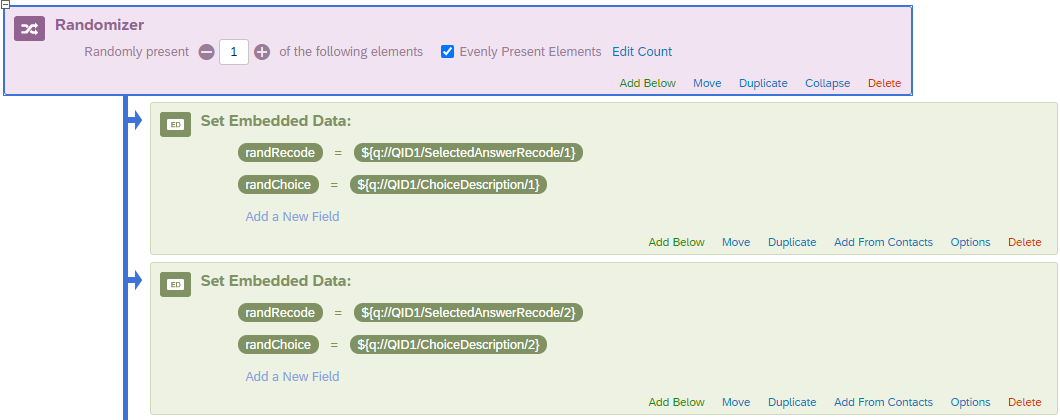 Then pipe randRecode and randChoice into JavaScript, parse randChoice with split() and then use randRecode to choose the left or right string.
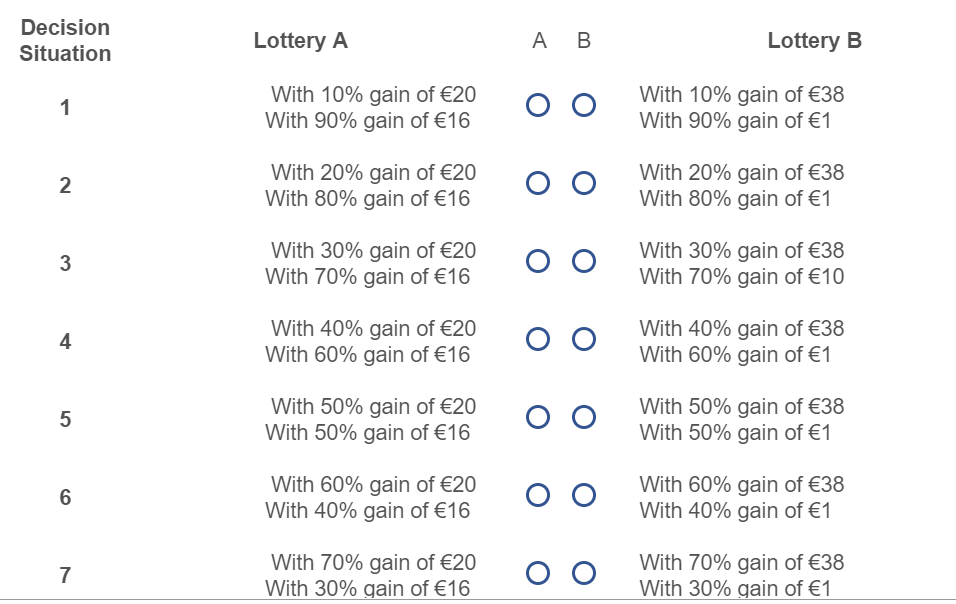 To do so, I need another random draw. Either drawing I or II with different probabilities (depending on the randomly drawn decision situation 1-10) or drawing 1 - 10 in which e.g. (decision situation 2) 1 and 2 represent I and 3-10 represent II.
 We randomly drew decision number ${e://Field/randRecode}, in which you selected lottery ${e://Field/randChoice}
Sign up
Already have an account? Login

Welcome! To join the Qualtrics Experience Community, log in with your existing Qualtrics credentials below.
Confirm your username, share a bit about yourself, then you're ready to explore and connect .
Free trial account? No problem. Log in with your trial credentials to join.
No free trial account? No problem! Register here
Already a member? Hi and welcome back! We're glad you're here 🙂
You will see the Qualtrics login page briefly before being taken to the Experience Community.
Login with Qualtrics
Welcome! To join the Qualtrics Experience Community, log in with your existing Qualtrics credentials below.
Confirm your username, share a bit about yourself, then you're ready to explore and connect .
Free trial account? No problem. Log in with your trial credentials to join. No free trial account? No problem! Register here
Already a member? Hi and welcome back! We're glad you're here 🙂
You will see the Qualtrics login page briefly before being taken to the Experience Community.
Login to the Community
No account yet? Create an account
Welcome! To join the Qualtrics Experience Community, log in with your existing Qualtrics credentials below.
Confirm your username, share a bit about yourself, then you're ready to explore and connect .
Free trial account? No problem. Log in with your trial credentials to join.
No free trial account? No problem! Register here
Already a member? Hi and welcome back! We're glad you're here 🙂
You will see the Qualtrics login page briefly before being taken to the Experience Community.
Login with Qualtrics
Welcome! To join the Qualtrics Experience Community, log in with your existing Qualtrics credentials below.
Confirm your username, share a bit about yourself, then you're ready to explore and connect .
Free trial account? No problem. Log in with your trial credentials to join. No free trial account? No problem! Register here
Already a member? Hi and welcome back! We're glad you're here 🙂
You will see the Qualtrics login page briefly before being taken to the Experience Community.
Enter your E-mail address. We'll send you an e-mail with instructions to reset your password.