PGR each group contains AND custom validation | XM Community
Skip to main content
Question

PGR each group contains AND custom validation

  • December 10, 2025
  • 6 replies
  • 47 views

Forum|alt.badge.img+5

Hello,

I’m using a Pick Group Rank question for 9 possible options across 3 groups. Respondents need to pick 1 option for each group. The validation is set for each group to contain a minimum and maximum of 1. All of that works fine.

But I ALSO want to add a custom validation so if the respondent chooses a specific option, they get an error message (that option is sold out). I know I can just remove that option or use display logic to prevent it being displayed at all, but I want that option to remain on the list and for the validation to fail if it’s selected. I can’t figure out how to add that custom validation on top of the “each group contains” validation. The Qualtrics interface really makes it seem like one or the other.

Appreciate any guidance you may have!

6 replies

vgayraud
QPN Level 7 ●●●●●●●
Forum|alt.badge.img+59
  • QPN Level 7 ●●●●●●●
  • December 10, 2025

Hi,

You could theoretically use a custom validation with logic sets with a structure like this (assuming OPTION9 is the sold out choice):

OPTION1A AND NOT OPTION2A ... AND NOT OPTION8A
OR
NOT OPTION1A AND OPTION2A ... AND NOT OPTION8A
OR
...
NOT OPTION1C ... AND OPTION8A
AND
NOT OPTION9A AND NOT OPTION9B AND NOT OPTION9C

That would be relatively painful to set up manually, and I’m not sure the platform even allows for that number of conditions.

The easier way would be to set the validation to min-max 1 for each group like you already are but add a custom script that would listen for events on your sold out option (probably click or dragstart), pop out an alert or display a message when triggered, and prevent it to be dragged.


Forum|alt.badge.img+5
  • Author
  • Level 1 ●
  • December 10, 2025

Hey Vincent,

Thanks for the quick response! I had wondered if I could do something along the lines you suggested with the custom validation, but the endless permutations gave me pause.

Your custom script idea that prevents the option from even being selected would actually be preferable to a failed validation, but I’m such a novice with JS that I wouldn’t know where to start.

Thanks again!


vgayraud
QPN Level 7 ●●●●●●●
Forum|alt.badge.img+59
  • QPN Level 7 ●●●●●●●
  • December 12, 2025

Hi Brian,

Maybe I can help, are you using the New Survey Taking Experience or one of the legacy layouts?


  • Level 4 ●●●●
  • December 12, 2025

Hello,

I’m using a Pick Group Rank question for 9 possible options across 3 groups. Respondents need to pick 1 option for each group. The validation is set for each group to contain a minimum and maximum of 1. All of that works fine.

But I ALSO want to add a custom validation so if the respondent chooses a specific option, they get an error message (that option is sold out). I know I can just remove that option or use display logic to prevent it being displayed at all, but I want that option to remain on the list and for the validation to fail if it’s selected. I can’t figure out how to add that custom validation on top of the “each group contains” validation. The Qualtrics interface really makes it seem like one or the other.

Appreciate any guidance you may have!

If you need alert or something right after the selection, then you need to use custom validation using JS. Qualtrics validation will do only after the respondent hit the next button or tries to move forward.


Forum|alt.badge.img+5
  • Author
  • Level 1 ●
  • December 12, 2025

Hey Vincent,

I appreciate that!

Yes, I’m using the New Survey Taking Experience, though I could disable that if necessary. I’m currently using JS on the PGR question to hide the rank digits when the options are placed into their respective groups. Only noting this in case it interferes with anything you might suggest:

Qualtrics.SurveyEngine.addOnReady(function()
{
    QID = this.questionId; jQuery("#" + QID + " .rank").hide();

Thanks!


vgayraud
QPN Level 7 ●●●●●●●
Forum|alt.badge.img+59
  • QPN Level 7 ●●●●●●●
  • December 13, 2025

Hi,

The code to hide the ranks seems to be for classic layouts, not for the New Survey Taking Experience.

In any case, you can start with this in the New Survey Taking Experience. You can specify the choices you want to block and the message fade-out delay at the beginning.

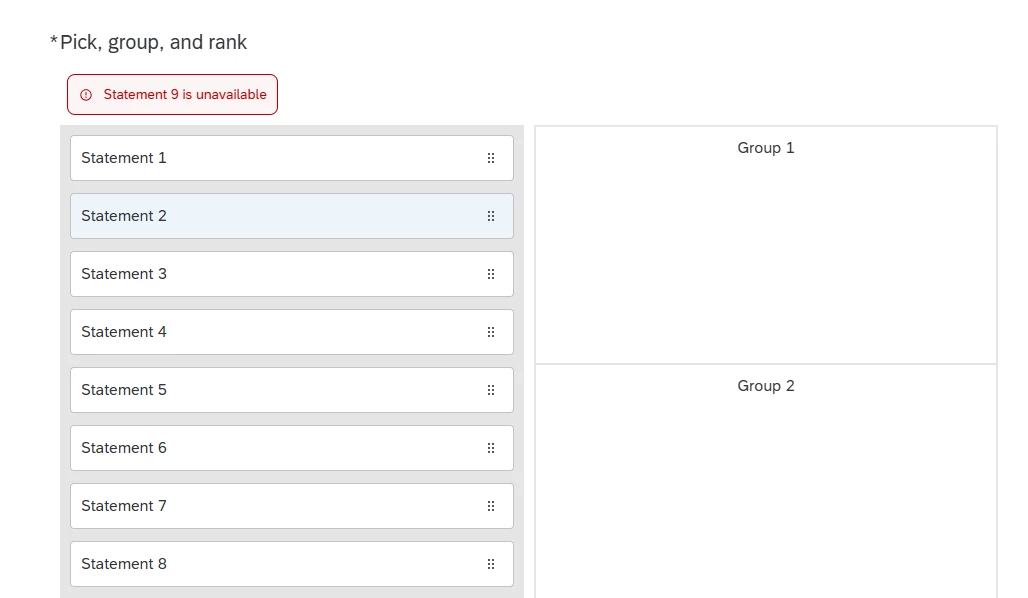
The script prevents the choices you specify to be clicked or dragged, insert an alert (based on the choice’s label) similar to Qualtrics’ validation message below the question’s text, auto-scroll into view and removes it after the specified duration.

Haven’t extensively tested in multiple browser.

Good luck!

Qualtrics.SurveyEngine.addOnload(function () {

// CONFIGURATION
var blockedChoices = [8, 9];
var fadeDuration = 5000;

var that = this;

// Display a styled alert message below the question text
function showMessage(msg) {
var displayEl = document.getElementById("question-display-" + that.questionId);
var old = displayEl.nextElementSibling;
if (old && old.classList && old.classList.contains("error-message-container")) old.remove();

// Create message container
var errorContainer = document.createElement("div");
errorContainer.className = "error-message-container error-message";
Object.assign(errorContainer.style, {
border: ".0625rem solid var(--palettes-error-1, #b00)",
borderRadius: ".5rem",
display: "inline-block",
alignItems: "center",
transition: "opacity 0.3s",
opacity: "1",
marginTop: "0.5em",
marginLeft: "0.5em",
color: "var(--palettes-error-1, #b00)"
});

// Create SVG icon
var svgIcon = document.createElementNS("http://www.w3.org/2000/svg", "svg");
svgIcon.setAttribute("aria-hidden", "false");
svgIcon.setAttribute("data-icontype", "Error");
svgIcon.setAttribute("width", "1.5rem");
svgIcon.setAttribute("height", "1.5rem");
svgIcon.setAttribute("viewBox", "0 0 24 24");
svgIcon.setAttribute("xmlns", "http://www.w3.org/2000/svg");
svgIcon.style.display = "inline-block";
svgIcon.style.verticalAlign = "middle";
svgIcon.style.marginRight = "0.4em";
svgIcon.style.fill = "currentColor";

var path1 = document.createElementNS("http://www.w3.org/2000/svg", "path");
path1.setAttribute("d", "M12 7.5C12.4142 7.5 12.75 7.83579 12.75 8.25V12C12.75 12.4142 12.4142 12.75 12 12.75C11.5858 12.75 11.25 12.4142 11.25 12V8.25C11.25 7.83579 11.5858 7.5 12 7.5Z");

var path2 = document.createElementNS("http://www.w3.org/2000/svg", "path");
path2.setAttribute("d", "M10.9922 15.3516C10.9922 14.795 11.4434 14.3438 12 14.3438C12.5566 14.3438 13.0078 14.795 13.0078 15.3516C13.0078 15.9082 12.5566 16.3594 12 16.3594C11.4434 16.3594 10.9922 15.9082 10.9922 15.3516Z");

var path3 = document.createElementNS("http://www.w3.org/2000/svg", "path");
path3.setAttribute("fill-rule", "evenodd");
path3.setAttribute("clip-rule", "evenodd");
path3.setAttribute("d", "M12 3.51562C7.31421 3.51562 3.51562 7.31421 3.51562 12C3.51562 16.6858 7.31421 20.4844 12 20.4844C16.6858 20.4844 20.4844 16.6858 20.4844 12C20.4844 7.31421 16.6858 3.51562 12 3.51562ZM5.01562 12C5.01562 8.14264 8.14264 5.01562 12 5.01562C15.8574 5.01562 18.9844 8.14264 18.9844 12C18.9844 15.8574 15.8574 18.9844 12 18.9844C8.14264 18.9844 5.01562 15.8574 5.01562 12Z");
svgIcon.appendChild(path1);
svgIcon.appendChild(path2);
svgIcon.appendChild(path3);

// Create text message span
var messageSpan = document.createElement("span");
messageSpan.className = "error-message-content rich-text";
messageSpan.id = "error-" + that.questionId;
messageSpan.setAttribute("tabindex", "-1");
messageSpan.textContent = msg;

// Append icon and message
errorContainer.appendChild(svgIcon);
errorContainer.appendChild(messageSpan);
displayEl.insertAdjacentElement("afterend", errorContainer);

// Scroll into view
errorContainer.scrollIntoView({
behavior: "smooth",
block: "center"
});

// Auto-hide after fadeDuration
setTimeout(function () {
errorContainer.style.opacity = "0";
setTimeout(function () {
if (errorContainer.parentNode) {
errorContainer.parentNode.removeChild(errorContainer);
}
}, 300);
}, fadeDuration);
}

// Get label of selected choice
function getChoiceLabel(choiceId) {
var labelSelector =
'#choice-display-' + that.questionId + '-' + choiceId + ' .display-with-image-display.rich-text';
var labelEl = document.querySelector(labelSelector);
return labelEl ? labelEl.textContent.trim() : "This choice";
}

// Prevent click/drag and show alert
function blockAndAlert(ev, choiceId) {
var label = getChoiceLabel(choiceId);
showMessage(label + " is unavailable");
ev.preventDefault();
ev.stopPropagation();
return false;
}

// Apply behavior to blocked choices
var container = document.getElementById("question-" + this.questionId);
blockedChoices.forEach(function (choiceId) {
var instr = container.querySelector(
'[id="' + that.questionId + '-' + choiceId + '-draggable-list-instructions"]'
);
if (!instr) return;

var li = instr.closest(".draggable-list-item-container");
if (!li) return;

li.setAttribute("draggable", "false");

["pointerdown", "dragstart", "click"].forEach(function (evt) {
li.addEventListener(evt, function (ev) {
blockAndAlert(ev, choiceId);
});
});

var handle = li.querySelector(".item-handle");
if (handle) {
["pointerdown", "dragstart", "click"].forEach(function (evt) {
handle.addEventListener(evt, function (ev) {
blockAndAlert(ev, choiceId);
});
});
}
});
});