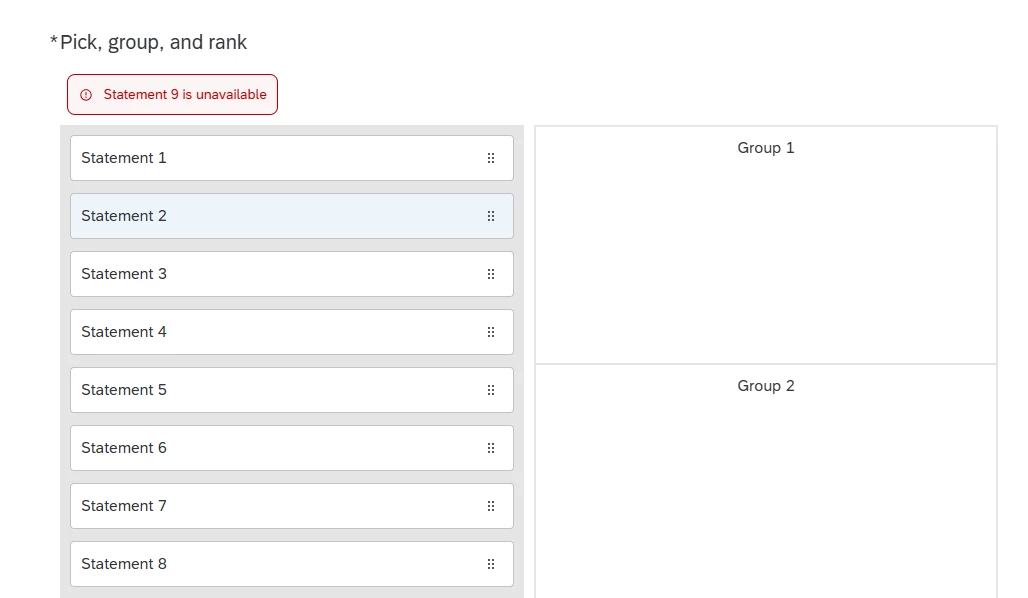
I’m using a Pick Group Rank question for 9 possible options across 3 groups. Respondents need to pick 1 option for each group. The validation is set for each group to contain a minimum and maximum of 1. All of that works fine.
But I ALSO want to add a custom validation so if the respondent chooses a specific option, they get an error message (that option is sold out). I know I can just remove that option or use display logic to prevent it being displayed at all, but I want that option to remain on the list and for the validation to fail if it’s selected. I can’t figure out how to add that custom validation on top of the “each group contains” validation. The Qualtrics interface really makes it seem like one or the other.
Appreciate any guidance you may have!
Best answer by vgayraud
Hi,
The code to hide the ranks seems to be for classic layouts, not for the New Survey Taking Experience.
In any case, you can start with this in the New Survey Taking Experience. You can specify the choices you want to block and the message fade-out delay at the beginning.
The script prevents the choices you specify to be clicked or dragged, insert an alert (based on the choice’s label) similar to Qualtrics’ validation message below the question’s text, auto-scroll into view and removes it after the specified duration.
Haven’t extensively tested in multiple browser.
Good luck!
Qualtrics.SurveyEngine.addOnload(function () {
// CONFIGURATION var blockedChoices = [8, 9]; var fadeDuration = 5000;
var that = this;
// Display a styled alert message below the question text function showMessage(msg) { var displayEl = document.getElementById("question-display-" + that.questionId); var old = displayEl.nextElementSibling; if (old && old.classList && old.classList.contains("error-message-container")) old.remove();
// Get label of selected choice function getChoiceLabel(choiceId) { var labelSelector = '#choice-display-' + that.questionId + '-' + choiceId + ' .display-with-image-display.rich-text'; var labelEl = document.querySelector(labelSelector); return labelEl ? labelEl.textContent.trim() : "This choice"; }
// Prevent click/drag and show alert function blockAndAlert(ev, choiceId) { var label = getChoiceLabel(choiceId); showMessage(label + " is unavailable"); ev.preventDefault(); ev.stopPropagation(); return false; }
// Apply behavior to blocked choices var container = document.getElementById("question-" + this.questionId); blockedChoices.forEach(function (choiceId) { var instr = container.querySelector( '[id="' + that.questionId + '-' + choiceId + '-draggable-list-instructions"]' ); if (!instr) return;
var li = instr.closest(".draggable-list-item-container"); if (!li) return;
You could theoretically use a custom validation with logic sets with a structure like this (assuming OPTION9 is the sold out choice):
OPTION1A AND NOT OPTION2A ... AND NOT OPTION8A
OR
NOT OPTION1A AND OPTION2A ... AND NOT OPTION8A
OR
...
NOT OPTION1C ... AND OPTION8A
AND
NOT OPTION9A AND NOT OPTION9B AND NOT OPTION9C
That would be relatively painful to set up manually, and I’m not sure the platform even allows for that number of conditions.
The easier way would be to set the validation to min-max 1 for each group like you already are but add a custom script that would listen for events on your sold out option (probably click or dragstart), pop out an alert or display a message when triggered, and prevent it to be dragged.
Thanks for the quick response! I had wondered if I could do something along the lines you suggested with the custom validation, but the endless permutations gave me pause.
Your custom script idea that prevents the option from even being selected would actually be preferable to a failed validation, but I’m such a novice with JS that I wouldn’t know where to start.
I’m using a Pick Group Rank question for 9 possible options across 3 groups. Respondents need to pick 1 option for each group. The validation is set for each group to contain a minimum and maximum of 1. All of that works fine.
But I ALSO want to add a custom validation so if the respondent chooses a specific option, they get an error message (that option is sold out). I know I can just remove that option or use display logic to prevent it being displayed at all, but I want that option to remain on the list and for the validation to fail if it’s selected. I can’t figure out how to add that custom validation on top of the “each group contains” validation. The Qualtrics interface really makes it seem like one or the other.
Appreciate any guidance you may have!
If you need alert or something right after the selection, then you need to use custom validation using JS. Qualtrics validation will do only after the respondent hit the next button or tries to move forward.
Yes, I’m using the New Survey Taking Experience, though I could disable that if necessary. I’m currently using JS on the PGR question to hide the rank digits when the options are placed into their respective groups. Only noting this in case it interferes with anything you might suggest:
The code to hide the ranks seems to be for classic layouts, not for the New Survey Taking Experience.
In any case, you can start with this in the New Survey Taking Experience. You can specify the choices you want to block and the message fade-out delay at the beginning.
The script prevents the choices you specify to be clicked or dragged, insert an alert (based on the choice’s label) similar to Qualtrics’ validation message below the question’s text, auto-scroll into view and removes it after the specified duration.
Haven’t extensively tested in multiple browser.
Good luck!
Qualtrics.SurveyEngine.addOnload(function () {
// CONFIGURATION var blockedChoices = [8, 9]; var fadeDuration = 5000;
var that = this;
// Display a styled alert message below the question text function showMessage(msg) { var displayEl = document.getElementById("question-display-" + that.questionId); var old = displayEl.nextElementSibling; if (old && old.classList && old.classList.contains("error-message-container")) old.remove();
// Get label of selected choice function getChoiceLabel(choiceId) { var labelSelector = '#choice-display-' + that.questionId + '-' + choiceId + ' .display-with-image-display.rich-text'; var labelEl = document.querySelector(labelSelector); return labelEl ? labelEl.textContent.trim() : "This choice"; }
// Prevent click/drag and show alert function blockAndAlert(ev, choiceId) { var label = getChoiceLabel(choiceId); showMessage(label + " is unavailable"); ev.preventDefault(); ev.stopPropagation(); return false; }
// Apply behavior to blocked choices var container = document.getElementById("question-" + this.questionId); blockedChoices.forEach(function (choiceId) { var instr = container.querySelector( '[id="' + that.questionId + '-' + choiceId + '-draggable-list-instructions"]' ); if (!instr) return;
var li = instr.closest(".draggable-list-item-container"); if (!li) return;
Thank you so much for this! It works beautifully and I was able to substitute the choices and the error message to suit the survey. This was a big help, someday people will write songs about you.
(You were right of course about the legacy code. I had added that to the survey before converting to the New Survey Taking Experience, but apparently that update wasn’t saved for some reason and I hadn’t realized it, which allowed that code to still work.)