Pre-filling a single choice question with embedded data | Experience Community
Skip to main content
Solved

Pre-filling a single choice question with embedded data

  • January 27, 2026
  • 6 replies
  • 25 views

Forum|alt.badge.img+1

Hello,

I want to create a survey where the first question (NPS) is already answered for them based on the embedded data. I am aware I can not use the existing functions of qualtrics to do this and will need jafa script. Has anyone already done this code and is able to share it with me?

e.g. Embedded data shows 8 in the URL string. Q1.NPS, has 8 pre-selected. 

Ideally I would like this for the NPS question type, but open to it being a single choice question to reflect the NPS format. 

Thank you. 
Best answer by vgayraud

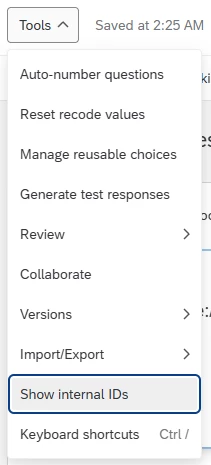
Yes, your parameter is wrong but like that it would work ?Q_PopulateResponse={"QID1":"8"} (as long as your NPS question is QID1 of course).

You can turn on the QIDs in the survey builder’s tools section:


6 replies

vgayraud
QPN Level 7 ●●●●●●●
Forum|alt.badge.img+60
  • QPN Level 7 ●●●●●●●
  • January 27, 2026

Hi,

You don’t need custom code if you’re already going to pass the information in the URL. See Q_PopulateResponse.


Forum|alt.badge.img+1
  • Author
  • January 27, 2026

Thanks, ​@vgayraud

Hopefully this works! Just getting my head around the HowTo guide. I can see how to input the NPS score using the Q_EED. However, I can not see how to then use that to pre-select the answer. If the Q_EED tells Qualtrics their NPS score is 8, how do I think tell Qualtrics to pre-select the answer 8 in the question? Or will it just show on their exported responses instead?


vgayraud
QPN Level 7 ●●●●●●●
Forum|alt.badge.img+60
  • QPN Level 7 ●●●●●●●
  • January 27, 2026

I don’t think you can obfuscate the Q_PopulateResponse parameter, but you can use them in conjunction.

https://xxx.qualtrics.com/jfe/form/SV_1234?Q_EED=eyJlbWJlZGRlZERhdGExIjoiMSJ9&Q_PopulateResponse={"QID2":"8"}

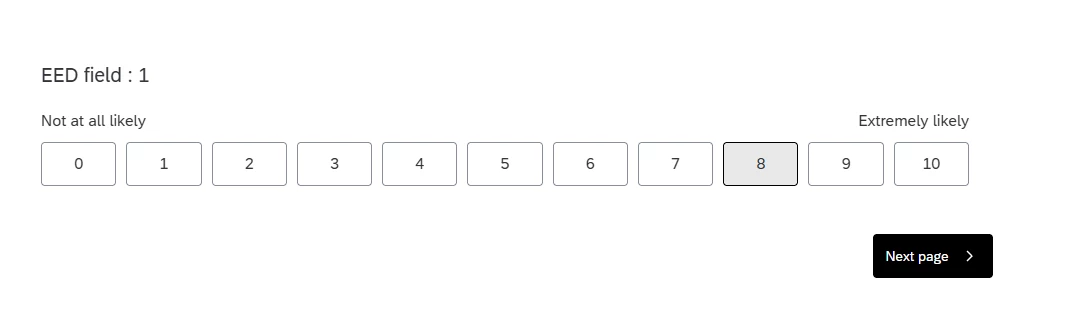
This would pass the obfuscated {"embeddedData1":"1"} and punch QID2 with 8. Your respondent would see this:


Forum|alt.badge.img+1
  • Author
  • January 27, 2026

Ooh ok. Could it just be done with the populate response option then? 

...qualtrics.com/jfe/form/SV_1TtxzJcnbtz7LCe?PopulateResponse={"QID1":"8")

This URL string doesnt work, but could it?


vgayraud
QPN Level 7 ●●●●●●●
Forum|alt.badge.img+60
  • QPN Level 7 ●●●●●●●
  • Answer
  • January 27, 2026

Yes, your parameter is wrong but like that it would work ?Q_PopulateResponse={"QID1":"8"} (as long as your NPS question is QID1 of course).

You can turn on the QIDs in the survey builder’s tools section:


Forum|alt.badge.img+1
  • Author
  • January 27, 2026

IT WORKS! thank you so much ​@vgayraud 
I think this will do it, but if we wanted to push it further, could it pre-populate the answer and it be submitted when they click through. 

e.g. if NPS is Q1 on block 1. Can I send them straight into Block 2 and the answers for Q1 will be automatically submitted?