Relocate In validation error message from top to bottom of page | Experience Community
Skip to main content
Solved

Relocate In validation error message from top to bottom of page

  • Sep 28, 2023 10:05 PM UTC
  • 2 replies
  • 256 views

Forum|alt.badge.img+1

Hi All,

I would like to relocate the validation error message from its default position at top of page to bottom (desired position shown in image below).
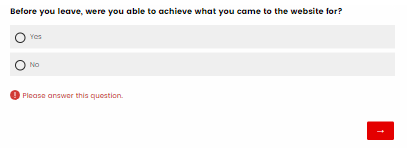
 

When using the following JS it is not running.  However, this code is running when applied to the live console - hence able to produce the screenshot above.

	const skinDiv = document.getElementById('SkinContent'); 
const errorDiv = document.querySelectorAll('.ValidationError')
if (errorDiv !== null) {
skinDiv.insertBefore(errorDiv, skinDiv.children[1])
}

Hoping to get any tips on how to adjust the code.  Note that I have reached out to Qualtrics directly on this, who referred me to this page.  Unfortunately, I am not the author of the JS code and struggle to resolve it.  I am working with a front-end dev who has limited experience on Qualtrics as well as access.


Appreciate support in advance :)

 

Best answer by TomG

@TimQantas, 

This should do it:

Qualtrics.SurveyEngine.addOnload(function() {
var q = jQuery(this.questionContainer);
q.children(".ValidationError").each(function() { q.append(jQuery(this)); });
});


View original

2 replies

TomG
Level 8 ●●●●●●●●
Forum|alt.badge.img+27
  • Level 8 ●●●●●●●●
  • Answer
  • Sep 28, 2023 11:29 PM UTC

@TimQantas, 

This should do it:

Qualtrics.SurveyEngine.addOnload(function() {
var q = jQuery(this.questionContainer);
q.children(".ValidationError").each(function() { q.append(jQuery(this)); });
});


Forum|alt.badge.img+1
  • Author
  • Sep 29, 2023 12:02 AM UTC

@TomG thank you very much!  I have applied the change and it is working !


Appreciate your quick support!