

Hi All,
I have created a survey with multiple questions. I then concatenate the selections made in these multiple choices separated by a |. Some answers may not be answered and so I'd like to tidy up the double instance of the | and then pass this back to the embedded field to then be used in say a CX dashboard where I can define the delimeter. I've not tested whether have multiple delimeters with no data (empty arrays) might upset the qualtrics widgets so I thought it would be easy to use some simple regex to conver it.
Below is the formula I'm using in a survey flow to concatenate the fields together.
${q://QID37/ChoiceGroup/SelectedChoices}|${q://QID39/ChoiceGroup/SelectedChoices}|${q://QID41/ChoiceGroup/SelectedChoices}|${q://QID43/ChoiceGroup/SelectedChoices}|${q://QID45/ChoiceGroup/SelectedChoices}|${q://QID47/ChoiceGroup/SelectedChoices}|${q://QID49/ChoiceGroup/SelectedChoices}|${q://QID50/ChoiceGroup/SelectedChoices}
Exporting the data into excel (see pic below) you can see the way the code looks ('Team|||Hi||||Health & Safety') and using some simple regex: '[|]{2,}' replace with '|', you can ensure that only one | is in between everything else giving you: ('Team|Hi|Health & Safety'). Nice huh?! :D However, please could you help me work out how to use regex with javascript / qualtrics as I'm unsure how you do this. I found some pages getting the value of a field into a JS variable but my problem is using regex (I'm assuming JS does have regex) and then uploading the change back into the survey flow so to speak). I've read some people have had issues updating the value so would be keen to know what issues I may experience along the way.
Thanks
Rod Pestell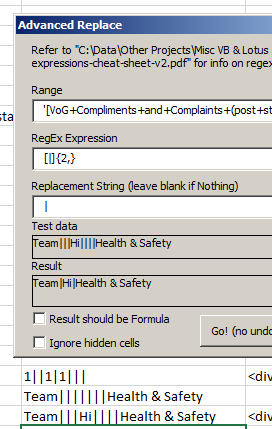

Tidy up an embedded field using regex and then update
Sign up
Already have an account? Login

Welcome! To join the Qualtrics Experience Community, log in with your existing Qualtrics credentials below.
Confirm your username, share a bit about yourself, Once your account has been approved by our admins then you're ready to explore and connect .
Free trial account? No problem. Log in with your trial credentials to join.
No free trial account? No problem! Register here
Already a member? Hi and welcome back! We're glad you're here 🙂
You will see the Qualtrics login page briefly before being taken to the Experience Community
Login with Qualtrics
Welcome! To join the Qualtrics Experience Community, log in with your existing Qualtrics credentials below.
Confirm your username, share a bit about yourself, Once your account has been approved by our admins then you're ready to explore and connect .
Free trial account? No problem. Log in with your trial credentials to join. No free trial account? No problem! Register here
Already a member? Hi and welcome back! We're glad you're here 🙂
You will see the Qualtrics login page briefly before being taken to the Experience Community
Login to the Community
Welcome! To join the Qualtrics Experience Community, log in with your existing Qualtrics credentials below.
Confirm your username, share a bit about yourself, Once your account has been approved by our admins then you're ready to explore and connect .
Free trial account? No problem. Log in with your trial credentials to join.
No free trial account? No problem! Register here
Already a member? Hi and welcome back! We're glad you're here 🙂
You will see the Qualtrics login page briefly before being taken to the Experience Community
Login with Qualtrics
Welcome! To join the Qualtrics Experience Community, log in with your existing Qualtrics credentials below.
Confirm your username, share a bit about yourself, Once your account has been approved by our admins then you're ready to explore and connect .
Free trial account? No problem. Log in with your trial credentials to join. No free trial account? No problem! Register here
Already a member? Hi and welcome back! We're glad you're here 🙂
You will see the Qualtrics login page briefly before being taken to the Experience Community
Enter your E-mail address. We'll send you an e-mail with instructions to reset your password.