

Hi
Qualtrics CX question
What we want to achieve: We would like to AUTOMATICALLY assign view access to a particular dashboard to all the CURRENT and FUTURE users of a specific user type in Qualtrics.
We have successfully setup SSO. enabled "just in time" user provisioning and assign a particular user type to all new users.
I tried using "Automate role assignment" but it looks like I am unable to set it up correctly.
We do not have specific attribute in AAD which can be related to dashboard user group. These users are mix of multiple locations and departments.
Has anyone in the community tried it.

Solved
Automatic role assignment to new SSO users
Best answer by bgooldfed
https://community.qualtrics.com/XMcommunity/discussion/comment/48467#Comment_48467It sounds like you are on the right track. I usually just click on a user and then hit "Add Attribute" to put a new field in: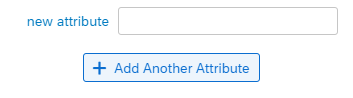 Or (more commonly) I import a bulk list of users with the new column in it.
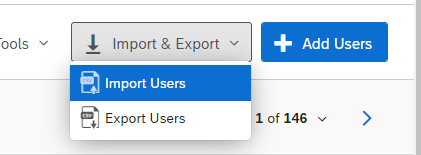 There is an example document that appears on the import screen if you're not sure how to structure the file. Note that if your organisation uses SSO, you will need to provide the usernames as well (in a column titled username). If you don't do this, it will stuff up the logins for all the email addresses provided. I've learned this the hard way!
Good luck!



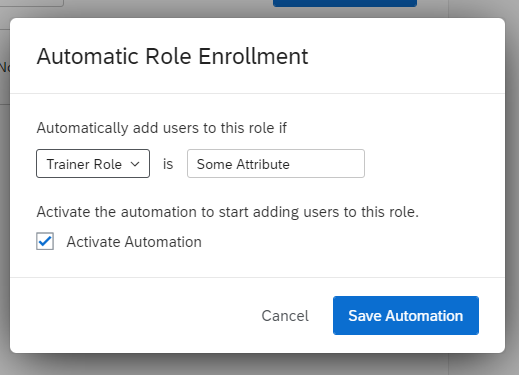 In the case of the above screenshot, it would add anybody with value "Some Attribute" in the "Trainer Role" column.




Sign up
Already have an account? Login

Welcome! To join the Qualtrics Experience Community, log in with your existing Qualtrics credentials below.
Confirm your username, share a bit about yourself, Once your account has been approved by our admins then you're ready to explore and connect .
Free trial account? No problem. Log in with your trial credentials to join.
No free trial account? No problem! Register here
Already a member? Hi and welcome back! We're glad you're here 🙂
You will see the Qualtrics login page briefly before being taken to the Experience Community
Login with Qualtrics
Welcome! To join the Qualtrics Experience Community, log in with your existing Qualtrics credentials below.
Confirm your username, share a bit about yourself, Once your account has been approved by our admins then you're ready to explore and connect .
Free trial account? No problem. Log in with your trial credentials to join. No free trial account? No problem! Register here
Already a member? Hi and welcome back! We're glad you're here 🙂
You will see the Qualtrics login page briefly before being taken to the Experience Community
Login to the Community
Welcome! To join the Qualtrics Experience Community, log in with your existing Qualtrics credentials below.
Confirm your username, share a bit about yourself, Once your account has been approved by our admins then you're ready to explore and connect .
Free trial account? No problem. Log in with your trial credentials to join.
No free trial account? No problem! Register here
Already a member? Hi and welcome back! We're glad you're here 🙂
You will see the Qualtrics login page briefly before being taken to the Experience Community
Login with Qualtrics
Welcome! To join the Qualtrics Experience Community, log in with your existing Qualtrics credentials below.
Confirm your username, share a bit about yourself, Once your account has been approved by our admins then you're ready to explore and connect .
Free trial account? No problem. Log in with your trial credentials to join. No free trial account? No problem! Register here
Already a member? Hi and welcome back! We're glad you're here 🙂
You will see the Qualtrics login page briefly before being taken to the Experience Community
Enter your E-mail address. We'll send you an e-mail with instructions to reset your password.