My survey rates workers on different criteria on a scale from 1 to 4. I want to group certain questions onto one bar chart. I've created a field group in the Dashboard data, but can't figure out how to make the appropriate widget. Creating a simple chart with a Count metric just displays how many people answered each question, but I want to see how many people (or what percent of people) were at a 1, 2, 3, or 4 for each question.

Solved
How do I group different questions onto one bar chart?
Best answer by Rich_Boits_Walker
Hi cryan01 ,
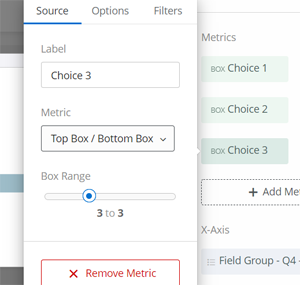
You're on the right track here. The simplest way I've found to make a good visualization for this is to use the field group and horizontal bar - simple chart.
- Set the X-Axis to your field group
- Then setup up your metric using the Top Box / Bottom Box metric type and move the option bar to just include a single choice. You will want to label it appropriately as it will display in the key.
- Add a separate metric for each of the remaining choice values.
- Then select Stack Chart from graph options at the bottom
This will give you a stacked bar for each questions broken by choice value.





Sign up
Already have an account? Login

Welcome! To join the Qualtrics Experience Community, log in with your existing Qualtrics credentials below.
Confirm your username, share a bit about yourself, Once your account has been approved by our admins then you're ready to explore and connect .
Free trial account? No problem. Log in with your trial credentials to join.
No free trial account? No problem! Register here
Already a member? Hi and welcome back! We're glad you're here 🙂
You will see the Qualtrics login page briefly before being taken to the Experience Community
Login with Qualtrics
Welcome! To join the Qualtrics Experience Community, log in with your existing Qualtrics credentials below.
Confirm your username, share a bit about yourself, Once your account has been approved by our admins then you're ready to explore and connect .
Free trial account? No problem. Log in with your trial credentials to join. No free trial account? No problem! Register here
Already a member? Hi and welcome back! We're glad you're here 🙂
You will see the Qualtrics login page briefly before being taken to the Experience Community
Login to the Community
Welcome! To join the Qualtrics Experience Community, log in with your existing Qualtrics credentials below.
Confirm your username, share a bit about yourself, Once your account has been approved by our admins then you're ready to explore and connect .
Free trial account? No problem. Log in with your trial credentials to join.
No free trial account? No problem! Register here
Already a member? Hi and welcome back! We're glad you're here 🙂
You will see the Qualtrics login page briefly before being taken to the Experience Community
Login with Qualtrics
Welcome! To join the Qualtrics Experience Community, log in with your existing Qualtrics credentials below.
Confirm your username, share a bit about yourself, Once your account has been approved by our admins then you're ready to explore and connect .
Free trial account? No problem. Log in with your trial credentials to join. No free trial account? No problem! Register here
Already a member? Hi and welcome back! We're glad you're here 🙂
You will see the Qualtrics login page briefly before being taken to the Experience Community
Enter your E-mail address. We'll send you an e-mail with instructions to reset your password.