Multi-value text set dashboard filtering | XM Community
Skip to main content
Question

Multi-value text set dashboard filtering

  • December 15, 2025
  • 6 replies
  • 25 views

Forum|alt.badge.img+1

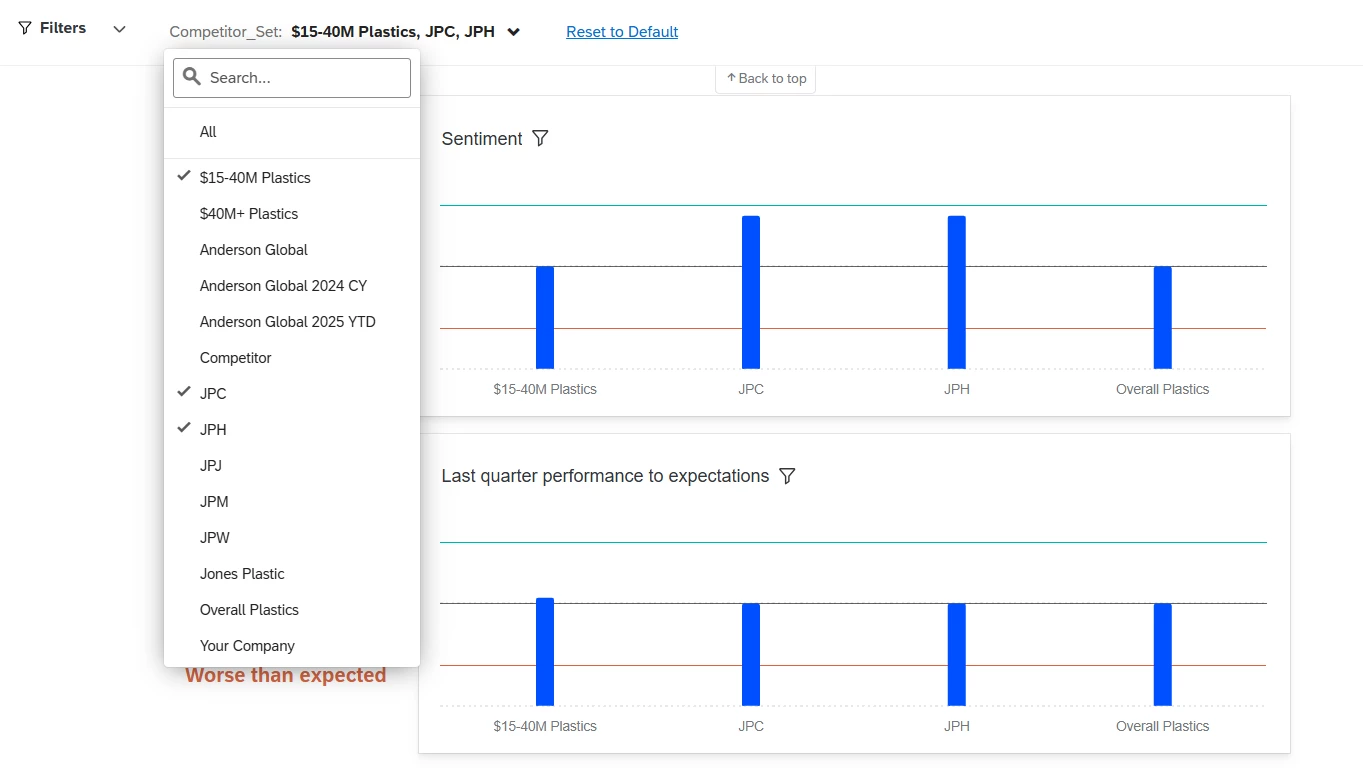
Hello! I have a dashboard with a multi-value text set filter. The multiple values are A, B, C, and D. I’ve filtered on A and B. Since there are survey responses with A+C answered and B+D answered, all A, B, C, and D show up in the charts even though only A and B are selected in the filter. How do I get only A and B to show up in the charts?


I know there is the exclusively option, but that’s not quite what I’m looking for - I still want to see the As where something else is also selected.


6 replies

Forum|alt.badge.img+7
  • QPN Level 4 ●●●●
  • December 17, 2025

Hi Ben,


To have a regular page filter where users can filter to responses where A+B specifically were both selected, you would need to set your field as regular text set field instead of multi-value text set. This will treat each permutation / unique combination of selected values as its own filter selection.

A separate option to still use the multi-value text set would be to create an Advanced filter to filter specifically where the response includes A and B but does not include B, C, or D, etc.


Forum|alt.badge.img+1
  • Author
  • December 17, 2025

Thank you for the response! The filter itself isn’t the issue, it’s what’s showing up in the chart. In the image below, Overall Plastics isn’t selected but it’s still showing in the chart. I don’t want it to show in the chart, but I do want to include the responses that overlap with another group in the x axis.


Forum|alt.badge.img+7
  • QPN Level 4 ●●●●
  • December 17, 2025

Ah I see. The page level filter filters which records are included in the data behind each widget. Since you still want to include the records where “Overall Plastics” is selected with the other 3 selections, “Overall Plastics” will display on the chart.

Unfortunately, I don’t think your desired functionality will be possible without changing the data visibility settings in the widget configuration to remove unwanted values each time you change the page filter.


Thank you for the response! The filter itself isn’t the issue, it’s what’s showing up in the chart. In the image below, Overall Plastics isn’t selected but it’s still showing in the chart. I don’t want it to show in the chart, but I do want to include the responses that overlap with another group in the x axis.


Forum|alt.badge.img+1
  • Author
  • December 17, 2025

Thank you - I was hoping for something more automated, but that does help.


vgayraud
QPN Level 7 ●●●●●●●
Forum|alt.badge.img+59
  • QPN Level 7 ●●●●●●●
  • December 18, 2025

Hi,

I might be wrong since I don’t have the overall picture for your project and setup, but it looks to me like you’re trying to replicate BX Program features without actually using one. BX programs allow you to use stacked datasets (in which you have one row for each brand for each respondent), and probably the kind of filtering you have in mind.


BX Programs

Filtering BX Dashboards


  • Level 4 ●●●●
  • December 18, 2025

Thank you - I was hoping for something more automated, but that does help.

Hi,


You should probably change “multi value field” to “text set” in the data settings.