
Multiple Yes/No Questions in One Widget | XM Community
Skip to main content
Solved

Multiple Yes/No Questions in One Widget

  • March 5, 2020
  • 4 replies
  • 279 views

Forum|alt.badge.img+2
Hello .. I am trying to configure one widget with multiple yes/no questions, and present the data in stacked column format. Imagine a single widget with multiple breakdowns. I have grouped my questions in a Measure Group, and can display as individual bars within the widget, but am struggling to show the yes/no breakdown for each bar. Thank you for the help, Mark

Best answer by PraDeepKotian_XM

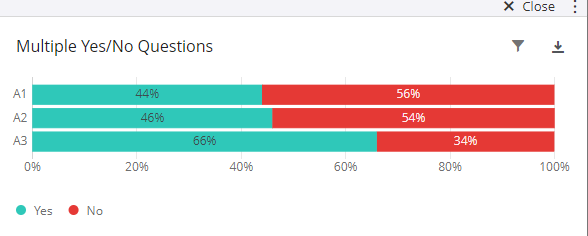
In that case, you can use the already mapped measure group and make sure all the fields are number set (let say Yes=1 and No=0). In dashboard, map the field in simple chart wherein you will add the measure group in X-axis and in metrics you will use top/bottom box. Using top/ bottom box you need to set the scale value "1" for Yes metrics and similarly value "0" for No. Below is how it will look:!


4 replies

PraDeepKotian_XM
QPN Level 5 ●●●●●
Forum|alt.badge.img+21
  • QPN Level 5 ●●●●●
  • March 6, 2020
Hi @Cosmo , could you please share the questions type here... If it is matrix table with yes/no then it should work with measure group.

Forum|alt.badge.img+2
  • Author
  • March 6, 2020
Thank you for the reply. Each question is a multiple choice question, not a matrix table.

PraDeepKotian_XM
QPN Level 5 ●●●●●
Forum|alt.badge.img+21
  • QPN Level 5 ●●●●●
  • Answer
  • March 9, 2020
In that case, you can use the already mapped measure group and make sure all the fields are number set (let say Yes=1 and No=0). In dashboard, map the field in simple chart wherein you will add the measure group in X-axis and in metrics you will use top/bottom box. Using top/ bottom box you need to set the scale value "1" for Yes metrics and similarly value "0" for No. Below is how it will look:!

Forum|alt.badge.img+2
  • Author
  • March 12, 2020
Thanks so much. I appreciate the help.