
Hello, I am using the slider question with the slider type. There are little clickable radio style buttons to select your score. They are currently blue and the first one sits on the zero but is a faded blue. It appears to the customer that this could be the default selection so I would like to make the first selector on 0 the color dark or light gray vs the blue for the rest. Thank you!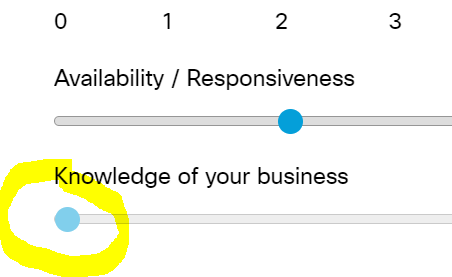

Solved
Change the slider question clickable buttons to be a different color for first position only
Best answer by Tom_1842
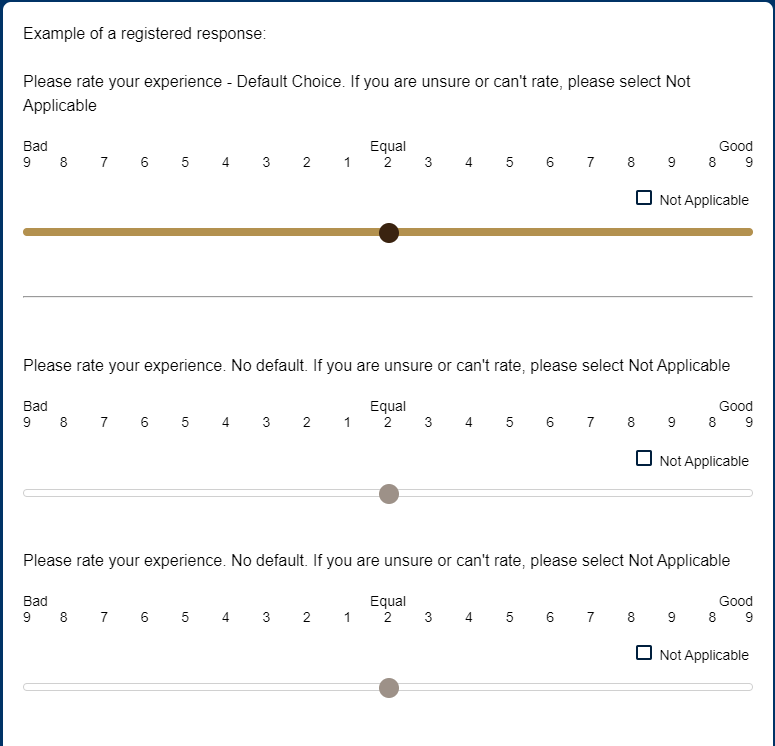
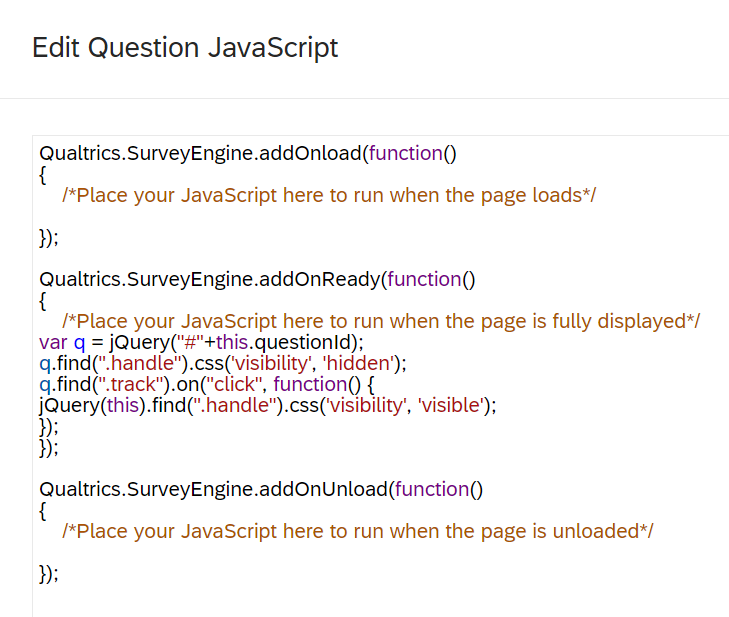
There is! Below is what I came up with and I commented in the code what each line is doing. I do like this better than what I went with back when I was doing my survey that used sliders, lol
var q = jQuery("#"+this.questionId); //*defines what q is
var clicked = "no" //*creates a clicked variable and sets it equal to no
q.find(".handle").css('visibility', 'hidden'); //*sets the handle to invisible by default
q.find(".track").on("mouseenter", function() {
if(clicked == "no"){
jQuery(this).find(".handle").css('visibility', 'visible');
}
}); //*makes the handle visible when the mouse hovers over it, if clicked is no
q.find(".track").on("mouseleave", function() {
if(clicked == "no"){
jQuery(this).find(".handle").css('visibility', 'hidden');
}
}); //*returns the handle to invisible again when the mouse hover leaves, if clicked is no
q.find(".track").on("click", function() {
clicked = "yes"
}); //*sets clicked equal to yes upon click
q.find(".track").on("click", function() {
if(clicked == "yes"){
jQuery(this).find(".handle").css('visibility', 'visible');
}
}); //* makes handle visible and stay that way upon click, if clicked is yes



Sign up
Already have an account? Login

Welcome! To join the Qualtrics Experience Community, log in with your existing Qualtrics credentials below.
Confirm your username, share a bit about yourself, Once your account has been approved by our admins then you're ready to explore and connect .
Free trial account? No problem. Log in with your trial credentials to join.
No free trial account? No problem! Register here
Already a member? Hi and welcome back! We're glad you're here 🙂
You will see the Qualtrics login page briefly before being taken to the Experience Community
Login with Qualtrics
Welcome! To join the Qualtrics Experience Community, log in with your existing Qualtrics credentials below.
Confirm your username, share a bit about yourself, Once your account has been approved by our admins then you're ready to explore and connect .
Free trial account? No problem. Log in with your trial credentials to join. No free trial account? No problem! Register here
Already a member? Hi and welcome back! We're glad you're here 🙂
You will see the Qualtrics login page briefly before being taken to the Experience Community
Login to the Community
Welcome! To join the Qualtrics Experience Community, log in with your existing Qualtrics credentials below.
Confirm your username, share a bit about yourself, Once your account has been approved by our admins then you're ready to explore and connect .
Free trial account? No problem. Log in with your trial credentials to join.
No free trial account? No problem! Register here
Already a member? Hi and welcome back! We're glad you're here 🙂
You will see the Qualtrics login page briefly before being taken to the Experience Community
Login with Qualtrics
Welcome! To join the Qualtrics Experience Community, log in with your existing Qualtrics credentials below.
Confirm your username, share a bit about yourself, Once your account has been approved by our admins then you're ready to explore and connect .
Free trial account? No problem. Log in with your trial credentials to join. No free trial account? No problem! Register here
Already a member? Hi and welcome back! We're glad you're here 🙂
You will see the Qualtrics login page briefly before being taken to the Experience Community
Enter your E-mail address. We'll send you an e-mail with instructions to reset your password.