Hello Qualtrics Community!
I'm a newbie here and searched both this forum and Google, but couldn't find the answer to what should be a simple problem to solve.
I have a survey which has 36 questions. 32 of them are Yes/No. The remaining 4 are Yes/No/NA, so the total score will range from 32 to 36 out of 32 to 36 questions (depending on how many N/A's are selected). I am able to setup reporting to calculate the Mean along with the Maximum to see how many questions were answered. What I need to see is the percentage out of 100. For example, in the attached screenshot, Region 1 has a Mean of 33.78 out of 36.00. I'd like to see this represented as 93.83% (33.78 / 36.00 = .9383) in one of the reporting widgets.
I was able to find instructions on how to set up Math Operations in Embedded Data, but that doesn't fit the use case here where I'm trying to have the total percentage represented in reporting vs. Piped Text.
Is there any easy way to represent scores in Qualtrics Reporting as a percentage of 100? Or does Qualtrics only report the total score of 33.78 vs. the percentage of 93.83%?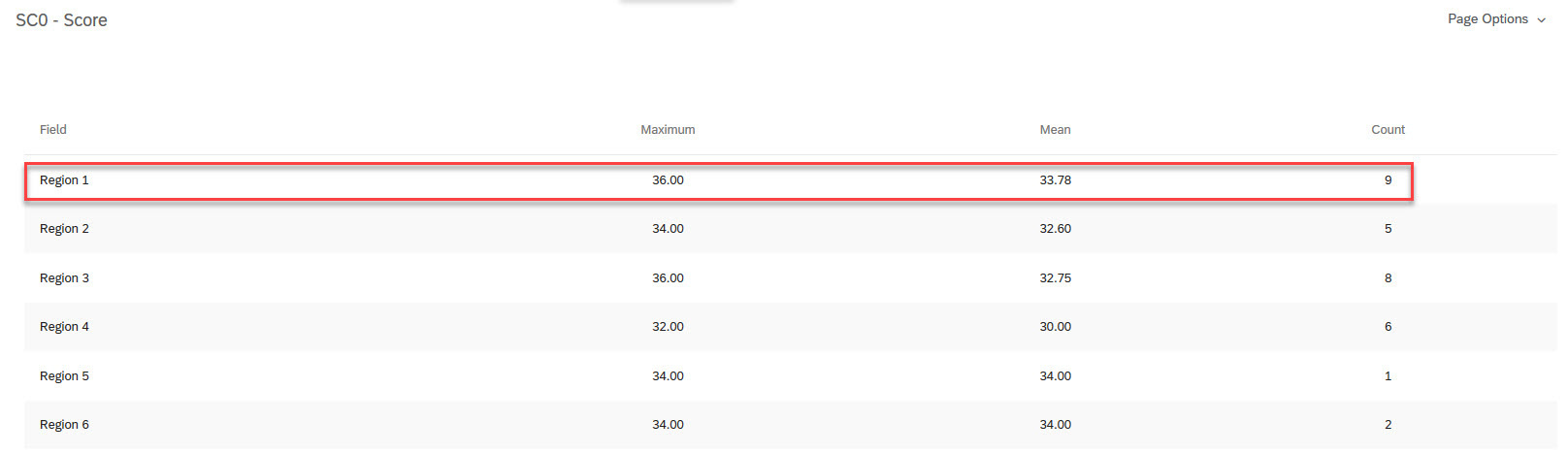

Is there an easy way to represent scores as a percentage of 100 in Qualtrics Reporting widgets?



Sign up
Already have an account? Login

Welcome! To join the Qualtrics Experience Community, log in with your existing Qualtrics credentials below.
Confirm your username, share a bit about yourself, Once your account has been approved by our admins then you're ready to explore and connect .
Free trial account? No problem. Log in with your trial credentials to join.
No free trial account? No problem! Register here
Already a member? Hi and welcome back! We're glad you're here 🙂
You will see the Qualtrics login page briefly before being taken to the Experience Community
Login with Qualtrics
Welcome! To join the Qualtrics Experience Community, log in with your existing Qualtrics credentials below.
Confirm your username, share a bit about yourself, Once your account has been approved by our admins then you're ready to explore and connect .
Free trial account? No problem. Log in with your trial credentials to join. No free trial account? No problem! Register here
Already a member? Hi and welcome back! We're glad you're here 🙂
You will see the Qualtrics login page briefly before being taken to the Experience Community
Login to the Community
Welcome! To join the Qualtrics Experience Community, log in with your existing Qualtrics credentials below.
Confirm your username, share a bit about yourself, Once your account has been approved by our admins then you're ready to explore and connect .
Free trial account? No problem. Log in with your trial credentials to join.
No free trial account? No problem! Register here
Already a member? Hi and welcome back! We're glad you're here 🙂
You will see the Qualtrics login page briefly before being taken to the Experience Community
Login with Qualtrics
Welcome! To join the Qualtrics Experience Community, log in with your existing Qualtrics credentials below.
Confirm your username, share a bit about yourself, Once your account has been approved by our admins then you're ready to explore and connect .
Free trial account? No problem. Log in with your trial credentials to join. No free trial account? No problem! Register here
Already a member? Hi and welcome back! We're glad you're here 🙂
You will see the Qualtrics login page briefly before being taken to the Experience Community
Enter your E-mail address. We'll send you an e-mail with instructions to reset your password.