Hi,
In our survey, we have 3 branches based on the frequency of the usage of a product (Never, a few times, and frequent).
In the "a few times" and "never" branch, there is a text set question "do you wish to receive more info on how to use the product?". So the same question phrase occurs in both branches, but they are two different "questions" technically (so QID5 and QID10 let's say).
(yes, we should have put that question into a block, and repeated the same block in both branches, but the survey is already done)
Likewise in the "a few times" and "frequent" branches, there is a multi-answer question "what type of data are you looking for in the product"? that was asked in two different QID's.
How can we combine such questions for use in the dashboard? A Measure Group doesn't work as they are not numeric.
We want to have a widget that shows a breakout of the "what type of data are you looking for in the product" by the usage Frequency.
(so to see that people looking for Data_A are mostly frequent users, wile people looking for Data_B are mostly "a few times" users).
Likewise also for the "do you want more info", we want to see how many people want more info per usage frequency.

How to combine multiple Text Set or Multi-Answer questions for dashboards


 +27
+27Best answer by chasemcl
JoycaV yes that is the unfortunate part - you have to import the responses and then delete out all the old responses. I have done this several times as it often is the most efficient way of doing it. But it is simple enough to just delete all responses with a recorded date before the import. Just be sure to use start or end date rather than recorded date if you need it for reporting purposes


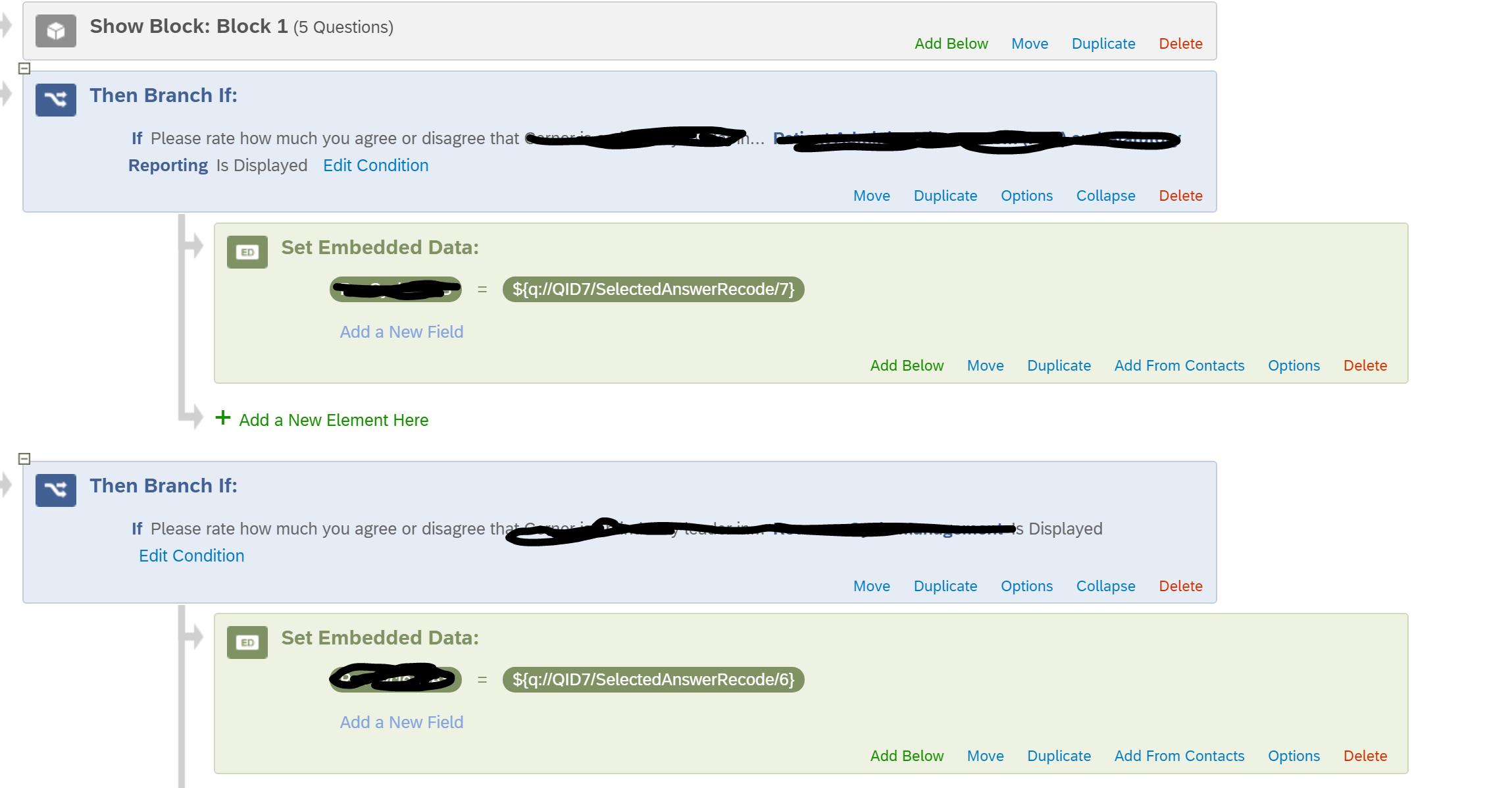 This would record the data in one field going forward. Moving the previously collected data into this field may have to be manual. I am not sure what the most efficient way would be without knowing the data set.


Sign up
Already have an account? Login

Welcome! To join the Qualtrics Experience Community, log in with your existing Qualtrics credentials below.
Confirm your username, share a bit about yourself, Once your account has been approved by our admins then you're ready to explore and connect .
Free trial account? No problem. Log in with your trial credentials to join.
No free trial account? No problem! Register here
Already a member? Hi and welcome back! We're glad you're here 🙂
You will see the Qualtrics login page briefly before being taken to the Experience Community
Login with Qualtrics
Welcome! To join the Qualtrics Experience Community, log in with your existing Qualtrics credentials below.
Confirm your username, share a bit about yourself, Once your account has been approved by our admins then you're ready to explore and connect .
Free trial account? No problem. Log in with your trial credentials to join. No free trial account? No problem! Register here
Already a member? Hi and welcome back! We're glad you're here 🙂
You will see the Qualtrics login page briefly before being taken to the Experience Community
Login to the Community
Welcome! To join the Qualtrics Experience Community, log in with your existing Qualtrics credentials below.
Confirm your username, share a bit about yourself, Once your account has been approved by our admins then you're ready to explore and connect .
Free trial account? No problem. Log in with your trial credentials to join.
No free trial account? No problem! Register here
Already a member? Hi and welcome back! We're glad you're here 🙂
You will see the Qualtrics login page briefly before being taken to the Experience Community
Login with Qualtrics
Welcome! To join the Qualtrics Experience Community, log in with your existing Qualtrics credentials below.
Confirm your username, share a bit about yourself, Once your account has been approved by our admins then you're ready to explore and connect .
Free trial account? No problem. Log in with your trial credentials to join. No free trial account? No problem! Register here
Already a member? Hi and welcome back! We're glad you're here 🙂
You will see the Qualtrics login page briefly before being taken to the Experience Community
Enter your E-mail address. We'll send you an e-mail with instructions to reset your password.