


Linkining widgets to each other in CX dashboard | XM Community
Skip to main content
Solved

Linkining widgets to each other in CX dashboard

  • April 21, 2023
  • 2 replies
  • 107 views

JohannesCE
Level 6 ●●●●●●
Forum|alt.badge.img+12

Hi! Is there a way to link widgets to each other in a dashboard?

I have two normal Tables and a Horizontal bars graph showing information about the same metrics in different ways, but I can't manage to do 3 things:

  • When I sort one table, I would like the others to follow 
  • I would like to have the rows of the table aligned with the horizontal bars
  • I would like ro remove the labels in the second table
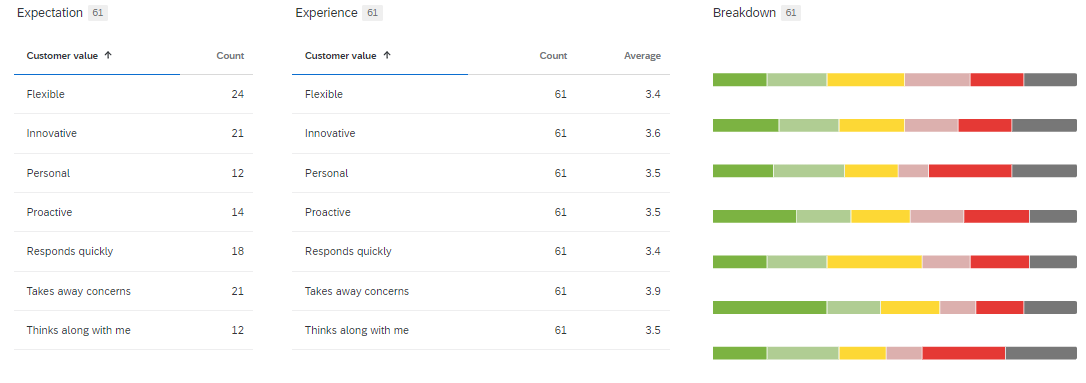
Is there a way to do this?

Best answer by CxEx

As Deepak mentioned you can not but i would suggest to show maximum columns in one table so whole table will update with one column sorting.

2 replies

Deepak
QPN Level 8 ●●●●●●●●
Forum|alt.badge.img+46
  • April 21, 2023

@JohannesCE 

Unfortunately, Qualtrics doesn’t provide linked widgets as a feature. You will have to manually do the process.


CxEx
Level 5 ●●●●●
Forum|alt.badge.img+13
  • Level 5 ●●●●●
  • Answer
  • April 23, 2023

As Deepak mentioned you can not but i would suggest to show maximum columns in one table so whole table will update with one column sorting.