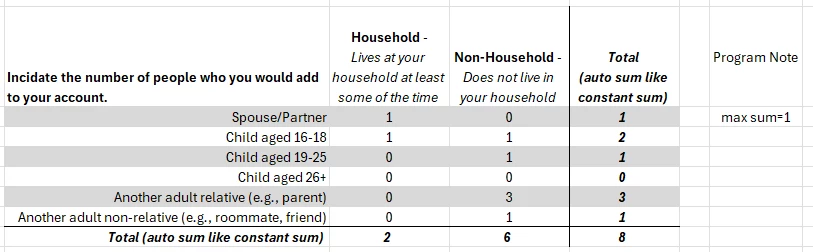
I’m probably asking for the impossible but you are also so creative, maybe you know how to make this happen.
Essentially, I want to create the table below as a question. A constant sum with two columns--preferably with columns AND rows summed if possible.
Best answer by Tom_1842
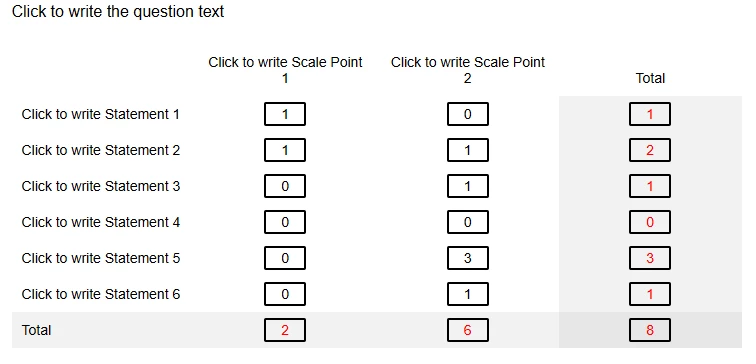
TomG's solution is more robust and flexible, but I was also able to put something together that does this. To give it a try, first use a Flat, Classic, or Modern layout. I tried it with Classic. Create a Matrix question and change its type to "Constant Sum". Give it 6 statements, 3 scale points, check "Add total box" and make its Position "Scale points" (to sum the columns). Change the third column's scale point to "Total", and then add the below JS to the OnReady section to add a row summing function and a bit of styling.
Qualtrics.SurveyEngine.addOnReady(function () {

  var SUMMED_COLUMN_INDEXES = [1, 2];   // columns to sum for row total
  var ROW_TOTAL_COLUMN_INDEX = 3;       // column where the row total should appear
  var TREAT_BLANK_AS_ZERO = true;       // blank inputs count as 0

  var qid = this.questionId;
  var q = jQuery('#' + qid);

  // Parse numbers function for summing
  function toNumber(val) {
    if (val === null || val === undefined) return 0;
    var s = String(val).trim();
    if (TREAT_BLANK_AS_ZERO && s === '') return 0;
    // Remove commas and non-numeric trailing chars; allow negative and decimal
    s = s.replace(/,/g, '');
    var n = parseFloat(s);
	if (isNaN(n)) {
      return 0;
    } else {
      return n;
    }
  }

  // Get all data entry rows
  var choiceRows = q.find('tr.ChoiceRow');

  choiceRows.each(function () {
    var row = jQuery(this);

    // Find the row total cell
    var rowTotalInput = row.find('td').eq(ROW_TOTAL_COLUMN_INDEX - 1).find('input[type="text"]');

    // Row total cell is read-only and styled
    if (rowTotalInput.length) {
      rowTotalInput.prop('readonly', true);
      rowTotalInput.attr('aria-readonly', 'true');
      rowTotalInput.css({ color: 'red' });
    }

    // Attach input listeners to each cell that contributes to the row total
    SUMMED_COLUMN_INDEXES.forEach(function (colIdx) {
      var cellInput = row.find('td').eq(colIdx - 1).find('input[type="text"]');
      if (cellInput.length) {
        // React to typing, pasting, and changes
        cellInput.on('input change blur', function () {
          updateRowTotal(row);
        });
      }
    });

    // Initialize the total on load
    updateRowTotal(row);
  });

  function updateRowTotal(row) {
    var sum = 0;

    // Sum the configured columns
    SUMMED_COLUMN_INDEXES.forEach(function (colIdx) {
      var cellInput = row.find('td').eq(colIdx - 1).find('input[type="text"]');
      if (cellInput.length) {
        sum += toNumber(cellInput.val());
      }
    });

    // Write into the row's total column
    var rowTotalInput = row.find('td').eq(ROW_TOTAL_COLUMN_INDEX - 1).find('input[type="text"]');
    if (rowTotalInput.length) {
      rowTotalInput.val(sum);
      rowTotalInput.trigger('change');
    }
  }

});
Finally, add the below CSS to the Style section of the Look and Feel to change the background of the last (Total) column, updating for the QID of your question:
TomG's solution is more robust and flexible, but I was also able to put something together that does this. To give it a try, first use a Flat, Classic, or Modern layout. I tried it with Classic. Create a Matrix question and change its type to "Constant Sum". Give it 6 statements, 3 scale points, check "Add total box" and make its Position "Scale points" (to sum the columns). Change the third column's scale point to "Total", and then add the below JS to the OnReady section to add a row summing function and a bit of styling.
Qualtrics.SurveyEngine.addOnReady(function () {

  var SUMMED_COLUMN_INDEXES = [1, 2];   // columns to sum for row total
  var ROW_TOTAL_COLUMN_INDEX = 3;       // column where the row total should appear
  var TREAT_BLANK_AS_ZERO = true;       // blank inputs count as 0

  var qid = this.questionId;
  var q = jQuery('#' + qid);

  // Parse numbers function for summing
  function toNumber(val) {
    if (val === null || val === undefined) return 0;
    var s = String(val).trim();
    if (TREAT_BLANK_AS_ZERO && s === '') return 0;
    // Remove commas and non-numeric trailing chars; allow negative and decimal
    s = s.replace(/,/g, '');
    var n = parseFloat(s);
	if (isNaN(n)) {
      return 0;
    } else {
      return n;
    }
  }

  // Get all data entry rows
  var choiceRows = q.find('tr.ChoiceRow');

  choiceRows.each(function () {
    var row = jQuery(this);

    // Find the row total cell
    var rowTotalInput = row.find('td').eq(ROW_TOTAL_COLUMN_INDEX - 1).find('input[type="text"]');

    // Row total cell is read-only and styled
    if (rowTotalInput.length) {
      rowTotalInput.prop('readonly', true);
      rowTotalInput.attr('aria-readonly', 'true');
      rowTotalInput.css({ color: 'red' });
    }

    // Attach input listeners to each cell that contributes to the row total
    SUMMED_COLUMN_INDEXES.forEach(function (colIdx) {
      var cellInput = row.find('td').eq(colIdx - 1).find('input[type="text"]');
      if (cellInput.length) {
        // React to typing, pasting, and changes
        cellInput.on('input change blur', function () {
          updateRowTotal(row);
        });
      }
    });

    // Initialize the total on load
    updateRowTotal(row);
  });

  function updateRowTotal(row) {
    var sum = 0;

    // Sum the configured columns
    SUMMED_COLUMN_INDEXES.forEach(function (colIdx) {
      var cellInput = row.find('td').eq(colIdx - 1).find('input[type="text"]');
      if (cellInput.length) {
        sum += toNumber(cellInput.val());
      }
    });

    // Write into the row's total column
    var rowTotalInput = row.find('td').eq(ROW_TOTAL_COLUMN_INDEX - 1).find('input[type="text"]');
    if (rowTotalInput.length) {
      rowTotalInput.val(sum);
      rowTotalInput.trigger('change');
    }
  }

});
Finally, add the below CSS to the Style section of the Look and Feel to change the background of the last (Total) column, updating for the QID of your question: