Embedded data adding "Custom Value" after value | Experience Community
Skip to main content
Question

Embedded data adding "Custom Value" after value

  • February 17, 2026
  • 3 replies
  • 57 views

Forum|alt.badge.img+1

I have a simple 1-question survey with 2 answer options (yes/no). I have embedded data in the survey, pulled in from the contact list I uploaded.
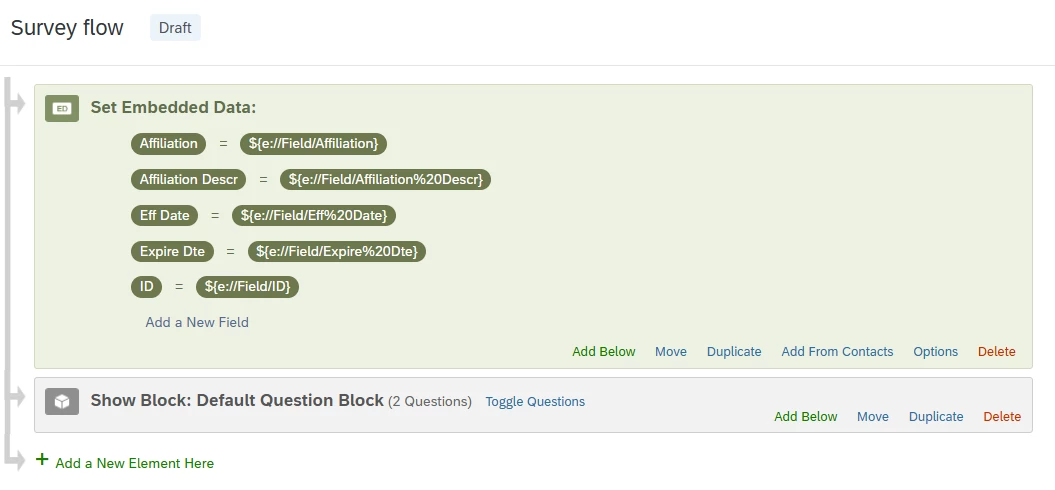
 

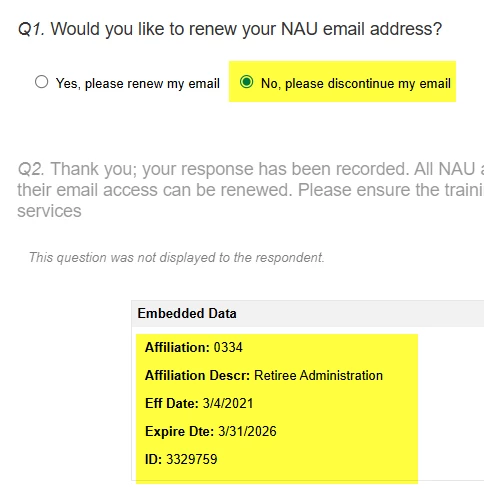
As a respondent, when I select the “No” answer, everything looks fine. However, when I select yes, it adds “custom value” behind the actual value of the embedded data. Here’s the “No” response:
 

Vs a “Yes” response:
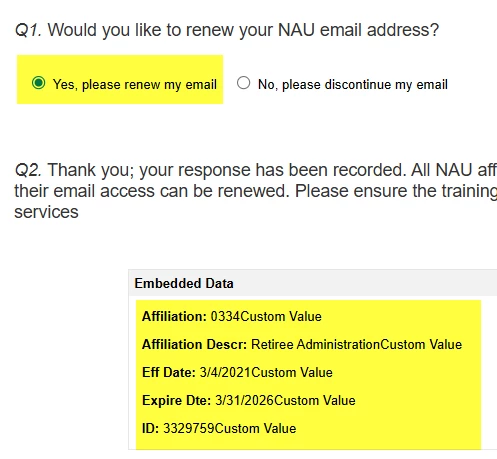
 

It’s a problem because I use this embedded data in an email response to the respondent, and it comes through in the email with “custom value” included. I have done it several times with the same results. I’ve also deleted myself from the distribution list and re-uploaded myself, still the same results. At this point I have no idea what else to do to troubleshoot. Ideas?


 

3 replies

Forum|alt.badge.img+4
  • Level 2 ●●
  • February 18, 2026

When the field name for a user in the contact list and the field name in survey flow are same, then the value of that field will be captured automatically. There is no need to pipe in the field names to set a value in embedded data.

Is there any reason for pipe in the fields to set a value for these embedded data? If there is no specific reason, you can remove the values you have piped in and test it once. It should directly record the values from directory into the survey.


Forum|alt.badge.img+1
  • Author
  • February 19, 2026

Thank you, that information is helpful; I just wasn’t sure so I had added it. However, that didn’t resolve my issue (even after deleting and re-adding both the contact and distribution link).


nikamshubham73
Level 2 ●●
Forum|alt.badge.img+2

Hi ​@APeck,

I'm unsure why this issue continues to occur for you. However, there is a workaround that may resolve it. Since the variable is being used in the email, you can create a new variable to store the ID data and manage it using JavaScript in the question where the respondent is displayed. 
The JS code removes any string character in the newly declared variable.

Step 1: Declare a new variable “ID_new” in the survey flow.

Step 2: Add the below code in the one question you are asking to the respondent.

Qualtrics.SurveyEngine.addOnReady(function()
{
/*Place your JavaScript here to run when the page is fully displayed*/
var num = parseInt("${e://Field/ID}");
Qualtrics.SurveyEngine.setEmbeddedData("ID_new", num);
});

Step 3: You can use the pipe-text of the new declared variable “${e://Field/ID_new}” in the email template wherever you need.