I have a list of IDS and need to validate a respondent based on their inputting their ID information.
Support says I need JS and that they don't support that. I don't know JS yet, so I'm looking for some assistance.
I basically need to validate ID 1234567 against a known list of 100-200 IDs.
Any suggestions?
Thanks
Paul

Solved
I have a list of IDs that need to be validated
 +1
+1Best answer by CarolK
Oh, you can customize the content on the page, by using custom messages.
For example:
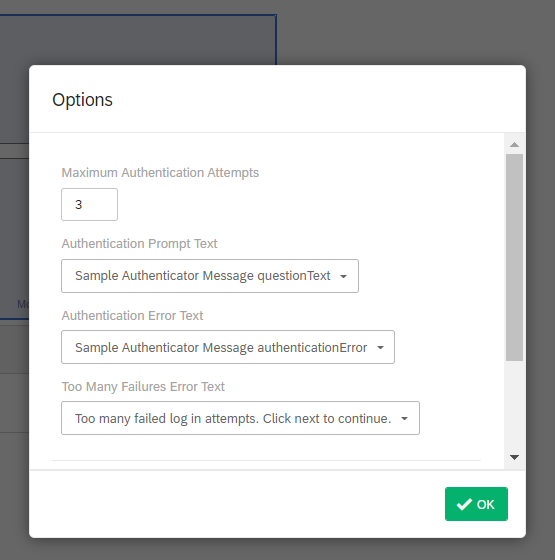
Authentication step. Note that I didn't select Password OR Pre-fill, they aren't required but are available if needed. For your example, I set the EDR to be labeled on the form as ID: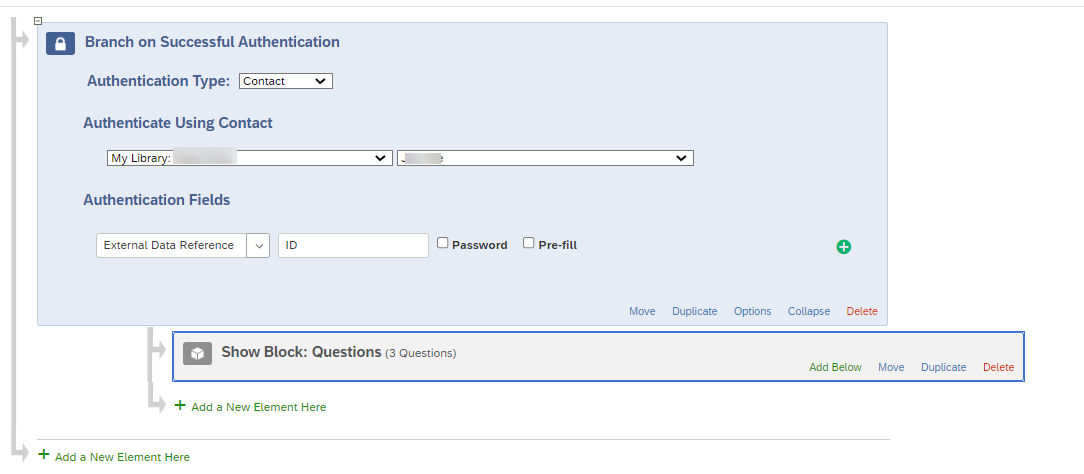 Options on the authenticator step. I set Options to use a custom message for both the prompt (to ask for an ID) and for the error (to make it clear it's the ID that they are failing on):
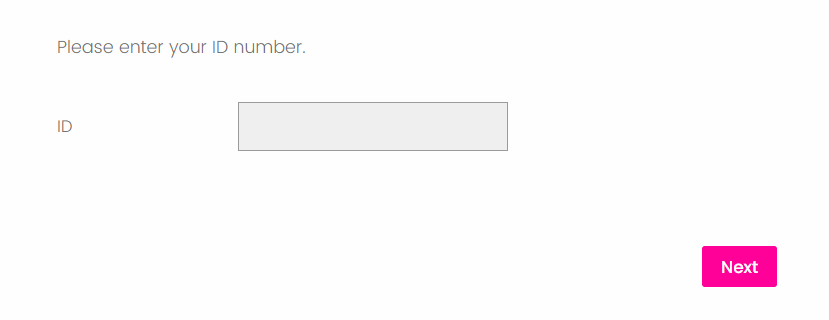
 We have our look and feel applied but below is how that page now displays in my example. Obviously, I could have put more content ahead of "Please enter your ID number." -- a whole introduction etc if needed, but I kept it basic for this example.
 In my example, they can try 3 times before I'm going to path them out (out of the survey or to another, alternative path, whatever), so I also created a custom error message for those tries:
 Hopefully some of that will help. If not, there are a lot of JS experts here, I'm just not one of them!
:) Good luck!



Sign up
Already have an account? Login

Welcome! To join the Qualtrics Experience Community, log in with your existing Qualtrics credentials below.
Confirm your username, share a bit about yourself, Once your account has been approved by our admins then you're ready to explore and connect .
Free trial account? No problem. Log in with your trial credentials to join.
No free trial account? No problem! Register here
Already a member? Hi and welcome back! We're glad you're here 🙂
You will see the Qualtrics login page briefly before being taken to the Experience Community
Login with Qualtrics
Welcome! To join the Qualtrics Experience Community, log in with your existing Qualtrics credentials below.
Confirm your username, share a bit about yourself, Once your account has been approved by our admins then you're ready to explore and connect .
Free trial account? No problem. Log in with your trial credentials to join. No free trial account? No problem! Register here
Already a member? Hi and welcome back! We're glad you're here 🙂
You will see the Qualtrics login page briefly before being taken to the Experience Community
Login to the Community
Welcome! To join the Qualtrics Experience Community, log in with your existing Qualtrics credentials below.
Confirm your username, share a bit about yourself, Once your account has been approved by our admins then you're ready to explore and connect .
Free trial account? No problem. Log in with your trial credentials to join.
No free trial account? No problem! Register here
Already a member? Hi and welcome back! We're glad you're here 🙂
You will see the Qualtrics login page briefly before being taken to the Experience Community
Login with Qualtrics
Welcome! To join the Qualtrics Experience Community, log in with your existing Qualtrics credentials below.
Confirm your username, share a bit about yourself, Once your account has been approved by our admins then you're ready to explore and connect .
Free trial account? No problem. Log in with your trial credentials to join. No free trial account? No problem! Register here
Already a member? Hi and welcome back! We're glad you're here 🙂
You will see the Qualtrics login page briefly before being taken to the Experience Community
Enter your E-mail address. We'll send you an e-mail with instructions to reset your password.