
Hello,
I am working on a multi-site project and I have created different versions of the same survey.
Let's say I want to distribute a different link according to each different site. Let's say that the site is called: Rome. the link would be: https:blablalink? Q_Language=Rome. So I have to only add ?Q_Language=Rome (or the other name of the sites).
However I also need to store the IDs of participants for the Sona System for which I should add the following line of code in the link: ?id=%SURVEY_CODE%.
However If I combine the two in the main link, like: https:blablalink? Q_Language=Rome??id=%SURVEY_CODE%.
IT won't work! How can I do that? I want to have a different link for each translations, but I want that each translations keep track of the SONA ID too.
Thank you for your help!

Q_Language & SONA ID combined
Best answer by CarolK
First I would note that "Rome" is not a valid entry for Q_Language. Q_Language or Q_lang will be looking for a code that represents a language (EN, IT, FR, ZH-T, etc)
That aside, if you want your link to include multiple Query Strings, one for site / location (let's say, Location=Rome, just to avoid the Q_Language confusion), and one for the the Sona ID (let's say, that is called SID in your embedded data and an example is SID=12345678)
Then the syntax of your link is going to be (pardon the spaces to ensure this will post)
https: //company. qualtrics.com / jfe/form/SV_xxxxxxxxxxxxx?Location=Rome&SID=12345678
So if you ALSO wanted the survey link to include a language (eg. Language=English(EN) or Italian (IT), I use English below and Location=Rome and Sona ID=12345678) then you would use
https: //company. qualtrics.com / jfe/form/SV_xxxxxxxxxxxxx?Q_lang=EN&Location=Rome&SID=12345678
So basically, the FIRST query string is attached to your survey URL by a ?
Any/all additional query strings are attached to your survey URL with an & (not with ?? as in your example above)
I hope that helps!



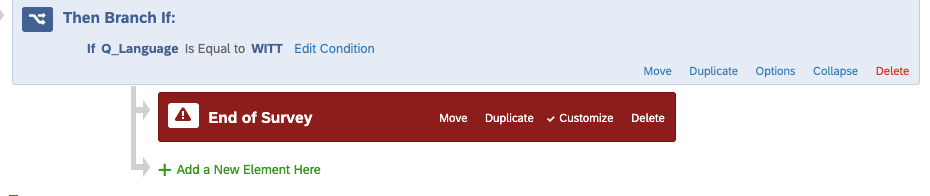 and this works. If i press to that link participants will have a different version of the main survey. HOWEVER what is not working is the redirect link that I put when I customize the survey.
Sign up
Already have an account? Login

Welcome! To join the Qualtrics Experience Community, log in with your existing Qualtrics credentials below.
Confirm your username, share a bit about yourself, Once your account has been approved by our admins then you're ready to explore and connect .
Free trial account? No problem. Log in with your trial credentials to join.
No free trial account? No problem! Register here
Already a member? Hi and welcome back! We're glad you're here 🙂
You will see the Qualtrics login page briefly before being taken to the Experience Community
Login with Qualtrics
Welcome! To join the Qualtrics Experience Community, log in with your existing Qualtrics credentials below.
Confirm your username, share a bit about yourself, Once your account has been approved by our admins then you're ready to explore and connect .
Free trial account? No problem. Log in with your trial credentials to join. No free trial account? No problem! Register here
Already a member? Hi and welcome back! We're glad you're here 🙂
You will see the Qualtrics login page briefly before being taken to the Experience Community
Login to the Community
Welcome! To join the Qualtrics Experience Community, log in with your existing Qualtrics credentials below.
Confirm your username, share a bit about yourself, Once your account has been approved by our admins then you're ready to explore and connect .
Free trial account? No problem. Log in with your trial credentials to join.
No free trial account? No problem! Register here
Already a member? Hi and welcome back! We're glad you're here 🙂
You will see the Qualtrics login page briefly before being taken to the Experience Community
Login with Qualtrics
Welcome! To join the Qualtrics Experience Community, log in with your existing Qualtrics credentials below.
Confirm your username, share a bit about yourself, Once your account has been approved by our admins then you're ready to explore and connect .
Free trial account? No problem. Log in with your trial credentials to join. No free trial account? No problem! Register here
Already a member? Hi and welcome back! We're glad you're here 🙂
You will see the Qualtrics login page briefly before being taken to the Experience Community
Enter your E-mail address. We'll send you an e-mail with instructions to reset your password.