

Scoring Using Multiple Scoring Types | Experience Community
Skip to main content
Solved

Scoring Using Multiple Scoring Types

  • February 4, 2026
  • 2 replies
  • 25 views

Forum|alt.badge.img+1

Hello! 

I am trying to create an assessment using multiple scoring categories. We are trying to have it generate a different results page based on the highest scoring categories. I have it worked out for 1 scoring type at a time, but I can’t figure out how to have all 4 of my scoring categories be used at the same time.

It is only using the one that is selected in the Scoring part of the settings and I can’t find a way to select multiple? I don’t know if I’m missing something on that end of it its with the flow. 

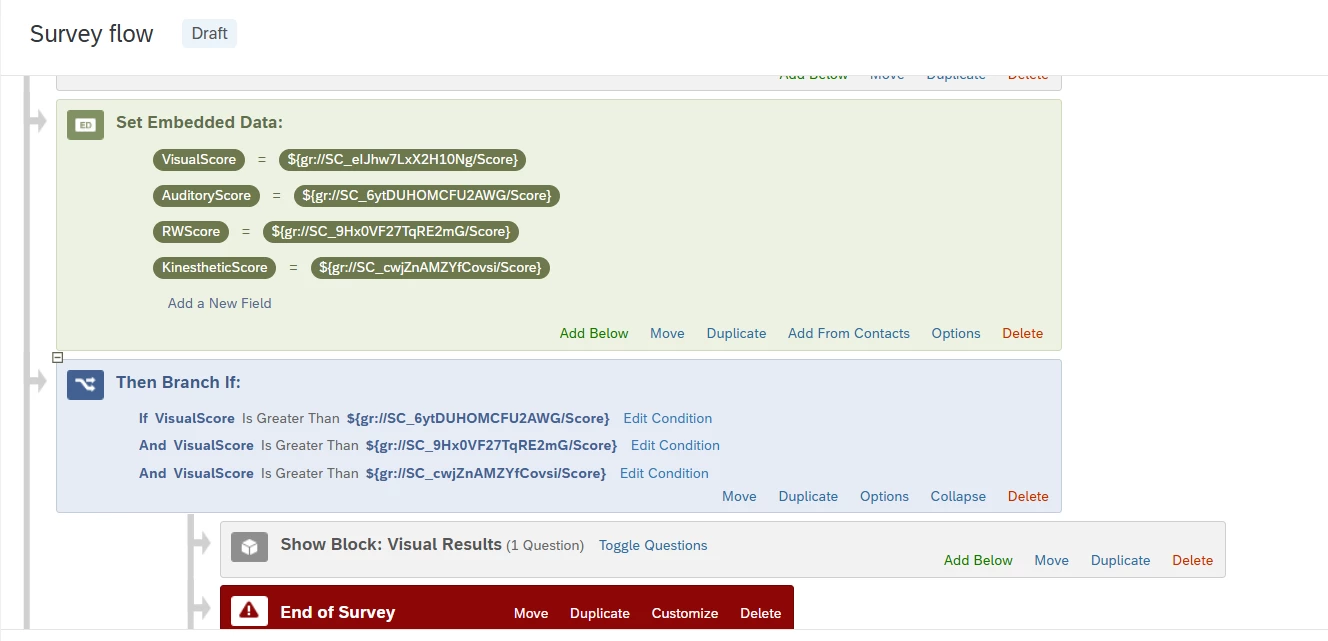
I embedded all of the scoring types into the survey flow & since it works with each one when selected, I don’t think it’s something with the flow. But who knows. I included an image below of part of the flow. I used the same branching style for the others.

Any assistance would be appreciated! 


Best answer by TomG

I’ve previously used multiple scoring categories at the same time and didn’t have an issue. I would:

  1. Temporarily add a block immediately after the embedded data assignment to pipe the embedded fields for all four scores to make sure they are populating.
  2. Base the branches off the embedded data fields. If nothing else, it makes the logic easier to understand (e.g., if VisualScore is Greater Than ${e://Field/AuditoryScore} And ...) 

2 replies

Forum|alt.badge.img+26

...but I can’t figure out how to have all 4 of my scoring categories be used at the same time.

It is only using the one that is selected in the Scoring part of the settings and I can’t find a way to select multiple? ...

Can you elaborate a little more on this portion as it is rather unclear?

What kind of action do you want to perform or what kind of result do you want to see when you "use" the 4 scoring categories?


TomG
Level 8 ●●●●●●●●
Forum|alt.badge.img+27
  • Level 8 ●●●●●●●●
  • Answer
  • February 4, 2026

I’ve previously used multiple scoring categories at the same time and didn’t have an issue. I would:

  1. Temporarily add a block immediately after the embedded data assignment to pipe the embedded fields for all four scores to make sure they are populating.
  2. Base the branches off the embedded data fields. If nothing else, it makes the logic easier to understand (e.g., if VisualScore is Greater Than ${e://Field/AuditoryScore} And ...)





