Hi all,
I have a side by side question (see below) where I want to force response column A but leave column B optional.
I cannot seem to find a solution in custom validation except listing all the possibilities where count(option 1) + count(option 2) + count(option 3) = 6 (that's 28 combinations * 3 lines per combination). I wonder whether there is an easier way to do this, possibly with custom code.
Thanks!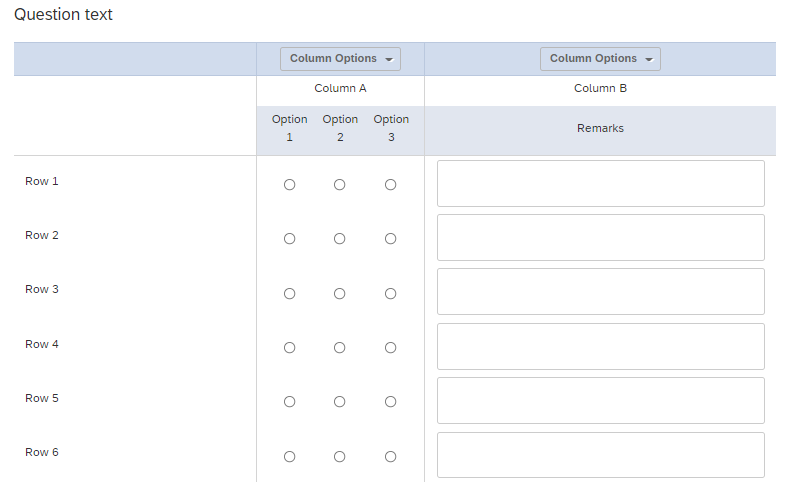

Solved
Side-by-side question: Force response on one column only
 +1
+1Best answer by CarolK
OK, what you want is to use custom validation for each Row. I set up a similar question with just 3 rows and applied as follows: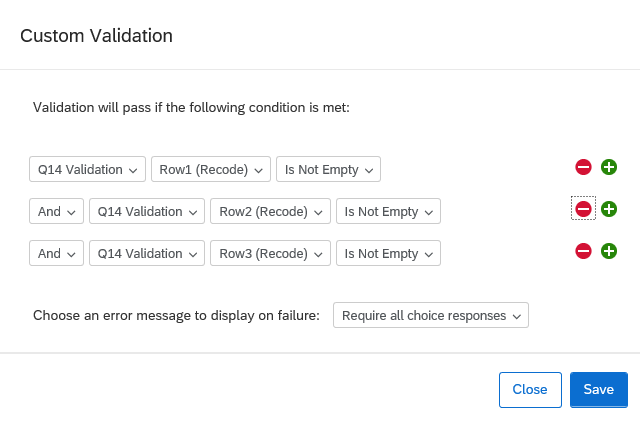 (The text of my question is just "Validation" so that is why it looks as it does in the logic there, see preview below)
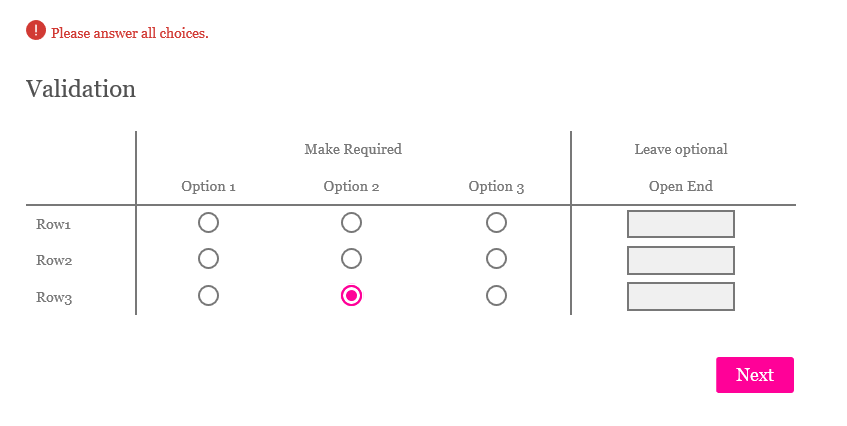 Basically, you need to set for each of your ROWS, that the recode value of the response to that row can't be blank (and make sure AND logic, so that ALL the rows are required, not a subset). The open end for the row has no recode value applied, so putting content into that column doesn't impact the logic.





Sign up
Already have an account? Login

Welcome! To join the Qualtrics Experience Community, log in with your existing Qualtrics credentials below.
Confirm your username, share a bit about yourself, Once your account has been approved by our admins then you're ready to explore and connect .
Free trial account? No problem. Log in with your trial credentials to join.
No free trial account? No problem! Register here
Already a member? Hi and welcome back! We're glad you're here 🙂
You will see the Qualtrics login page briefly before being taken to the Experience Community
Login with Qualtrics
Welcome! To join the Qualtrics Experience Community, log in with your existing Qualtrics credentials below.
Confirm your username, share a bit about yourself, Once your account has been approved by our admins then you're ready to explore and connect .
Free trial account? No problem. Log in with your trial credentials to join. No free trial account? No problem! Register here
Already a member? Hi and welcome back! We're glad you're here 🙂
You will see the Qualtrics login page briefly before being taken to the Experience Community
Login to the Community
Welcome! To join the Qualtrics Experience Community, log in with your existing Qualtrics credentials below.
Confirm your username, share a bit about yourself, Once your account has been approved by our admins then you're ready to explore and connect .
Free trial account? No problem. Log in with your trial credentials to join.
No free trial account? No problem! Register here
Already a member? Hi and welcome back! We're glad you're here 🙂
You will see the Qualtrics login page briefly before being taken to the Experience Community
Login with Qualtrics
Welcome! To join the Qualtrics Experience Community, log in with your existing Qualtrics credentials below.
Confirm your username, share a bit about yourself, Once your account has been approved by our admins then you're ready to explore and connect .
Free trial account? No problem. Log in with your trial credentials to join. No free trial account? No problem! Register here
Already a member? Hi and welcome back! We're glad you're here 🙂
You will see the Qualtrics login page briefly before being taken to the Experience Community
Enter your E-mail address. We'll send you an e-mail with instructions to reset your password.