

Hi all,
I have created a survey which uses Randomizer (in Survey Flow) to present question blocks in a random order. I want to add incrementing question numbers to the title of the question blocks that are randomly displayed (e.g., "Question 1 of 10") so participants can see their progress. I tried searching for previous answers, and can see there is this answer:
https://www.qualtrics.com/community/discussion/comment/24445#Comment_24445However I don't quite understand how to do this. Please could anyone provide a more detailed explanation (i.e., where do you increment the embedded data?) or provide an alternative solution?
Thanks for your help,
Sam

Solved
Adding Question Numbers to Randomized Blocks
 +1
+1Best answer by TomG
You increment the counter in survey flow:
Randomizer
Group A
Embedded Data: counter = $e{ e://Field/counter + 1 }
Block A
Group B
...etc...
Pipe counter into first question is each block as ${e://Field/counter}



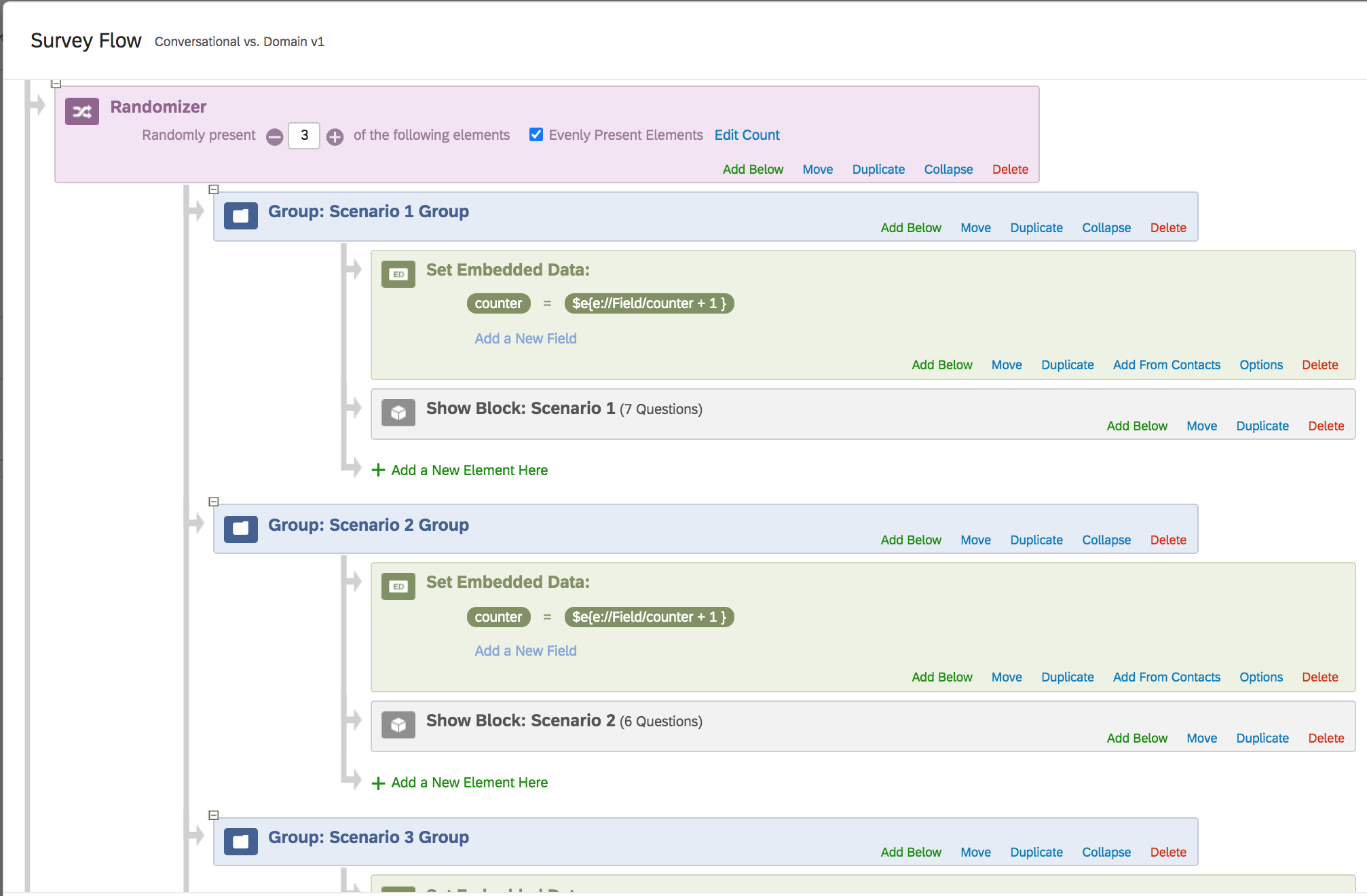 Cheers!
Sign up
Already have an account? Login

Welcome! To join the Qualtrics Experience Community, log in with your existing Qualtrics credentials below.
Confirm your username, share a bit about yourself, then you're ready to explore and connect .
Free trial account? No problem. Log in with your trial credentials to join.
No free trial account? No problem! Register here
Already a member? Hi and welcome back! We're glad you're here 🙂
You will see the Qualtrics login page briefly before being taken to the Experience Community.
Login with Qualtrics
Welcome! To join the Qualtrics Experience Community, log in with your existing Qualtrics credentials below.
Confirm your username, share a bit about yourself, then you're ready to explore and connect .
Free trial account? No problem. Log in with your trial credentials to join. No free trial account? No problem! Register here
Already a member? Hi and welcome back! We're glad you're here 🙂
You will see the Qualtrics login page briefly before being taken to the Experience Community.
Login to the Community
Welcome! To join the Qualtrics Experience Community, log in with your existing Qualtrics credentials below.
Confirm your username, share a bit about yourself, then you're ready to explore and connect .
Free trial account? No problem. Log in with your trial credentials to join.
No free trial account? No problem! Register here
Already a member? Hi and welcome back! We're glad you're here 🙂
You will see the Qualtrics login page briefly before being taken to the Experience Community.
Login with Qualtrics
Welcome! To join the Qualtrics Experience Community, log in with your existing Qualtrics credentials below.
Confirm your username, share a bit about yourself, then you're ready to explore and connect .
Free trial account? No problem. Log in with your trial credentials to join. No free trial account? No problem! Register here
Already a member? Hi and welcome back! We're glad you're here 🙂
You will see the Qualtrics login page briefly before being taken to the Experience Community.
Enter your E-mail address. We'll send you an e-mail with instructions to reset your password.