- Experience Community
- Qualtrics Platform
- Survey Platform (Before March 2021)
- Return to Table of Contents after each block in the Table?

Return to Table of Contents after each block in the Table?

- April 9, 2019
- 14 replies
- 440 views
- Level 2 ●●
Best answer by NiC
Important - This code should be added on one of the questions on the last page.
3. Now if we need hide the TOC button , you can add the custom CSS in the Look & Feel Section
This would be the custom CSS:
#JumpButton{
visibility:hidden;
}14 replies

- QPN Level 5 ●●●●●
- Answer
- April 15, 2019
Important - This code should be added on one of the questions on the last page.
3. Now if we need hide the TOC button , you can add the custom CSS in the Look & Feel Section
This would be the custom CSS:
#JumpButton{
visibility:hidden;
}- Level 8 ●●●●●●●●
- April 15, 2019
- March 25, 2020
>
> Important - This code should be added on one of the questions on the last page.
>
> 3. Now if we need hide the TOC button , you can add the custom CSS in the Look & Feel Section
> This would be the custom CSS:
> #JumpButton{
> visibility:hidden;
> }
>
>
>
A few months on... and I tried to use this code.
I added it to the JS on the last question of each block under the Table of Contents, which appears to be incorrect, because my survey just gets into an endless loop. (The TOC appears as desired, but then the next button takes me back to the previous question?)
I guess this line is the important one:
> Important - This code should be added on one of the questions on the last page._
I'm not sure what it means.
Any help please?- Level 8 ●●●●●●●●
- March 25, 2020
- March 25, 2020
- Level 8 ●●●●●●●●
- March 25, 2020
- April 9, 2020
TomG said:
You can hide them in the TOC with JS that you put in the TOC library message. It has been a long time since I needed to do this, so the code I have is prototypejs where the name of the block is toc_sep:
var toctexts = $$('.TocText');
for(var i=0;i
if(toctext.innerHTML == "toc_sep") {
$(toctext).up().up().hide();
}
}
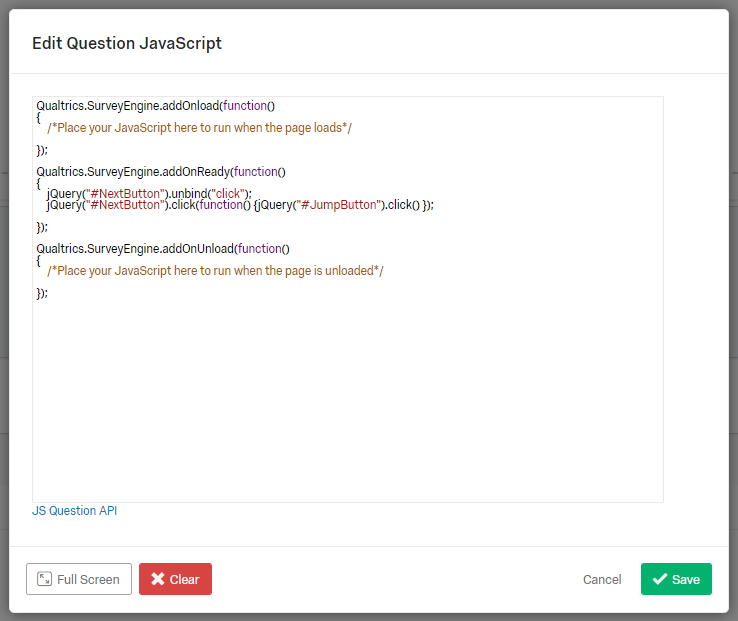
Thanks for all the great comments. I have created a blank "separator block" between each of the real blocks. I have also hidden the TOC button. My problem is that once I run this code on the "separator clock" question, I can't get it to automatically return back to the TOC page without clicking the next button. Shouldn't a click.JumpButton work?
jQuery("#NextButton").unbind("click");
jQuery("#NextButton").click(function() {jQuery("#JumpButton").click() });
Thanks
- Level 8 ●●●●●●●●
- April 9, 2020
In the toc_sep question, just click the Jump Button:
Qualtrics.SurveyEngine.addOnReady(function() {
jQuery("#JumpButton").click();
});
- April 10, 2020
TomG wrote:
In the toc_sep question, just click the Jump Button:
Qualtrics.SurveyEngine.addOnReady(function() {
jQuery("#JumpButton").click();
});
Thanks Tom!
I'm still trying to get a handle on this. I think I know just enough to be dangerous. But this now works like a charm! Except now I have a final problem. I think I understand what is happening but not sure how to fix it.
1) I have hidden the Return to TOC button in the Look & Feel CSS
2) I have a hidden 'toc_sep' block after each block I want evaluated.
3) It currently works very well until all blocks have been evaluated then it never goes to the end of survey page
I think this is because using the JumpButton leaves each of those blocks as incomplete.
I'm not sure how to get to the end of survey.
Todd
- Level 8 ●●●●●●●●
- April 10, 2020
Once you've completed all the blocks, only the top_sep block is left as incomplete. You can count the number of completed blocks and store it in an embedded variable then click the Next button in toc_sep when you have competed all the blocks. Say you have 5 blocks.
Count completed blocks in your TOC library message:
Qualtrics.SurveyEngine.setEmbeddedData("completeBlocks",jQuery("li.Complete").length);
In toc_sep:
if(parseInt("${e://Field/completeBlocks}") < 5) jQuery("#JumpButton").click();
else jQuery("#NextButton").click();
If you don't want to go back to the TOC after the last block is completed, change 5 to 4.
- April 18, 2021
HI TomG ,
Thanks so much for this great explanation.
I am just a bit stuck on putting the JS code into a Library Message. I can't seem to add JS into the html message block. Am I missing something?
Thanks so much!
Jess
- Level 8 ●●●●●●●●
- April 18, 2021
https://www.qualtrics.com/community/discussion/comment/36650#Comment_36650You have to put JS in a
Login to the Community
Welcome! To join the Qualtrics Experience Community, log in with your existing Qualtrics credentials below.
Confirm your username, share a bit about yourself, Once your account has been approved by our admins then you're ready to explore and connect .
Free trial account? No problem. Log in with your trial credentials to join.
No free trial account? No problem! Register here
Already a member? Hi and welcome back! We're glad you're here 🙂
You will see the Qualtrics login page briefly before being taken to the Experience Community
Login with Qualtrics
Welcome! To join the Qualtrics Experience Community, log in with your existing Qualtrics credentials below.
Confirm your username, share a bit about yourself, Once your account has been approved by our admins then you're ready to explore and connect .
Free trial account? No problem. Log in with your trial credentials to join. No free trial account? No problem! Register here
Already a member? Hi and welcome back! We're glad you're here 🙂
You will see the Qualtrics login page briefly before being taken to the Experience Community
Enter your E-mail address. We'll send you an e-mail with instructions to reset your password.
Scanning file for viruses.
Sorry, we're still checking this file's contents to make sure it's safe to download. Please try again in a few minutes.
OKThis file cannot be downloaded
Sorry, our virus scanner detected that this file isn't safe to download.
OK