
Hi everyone,
I've developed a survey that looks at the connections between members of two groups in New Zealand. I've got a question (see below) that asks for the type of the relationship. There are specific types that respondents can tick, but I had to move the option to indicate "other" in a new column, because I wanted to allow entry text, while the rest of the options do not need the open text.
Is there a way to either have them all in one column with different answer types (i.e. open ended or likert) or delete the line between the different types, so that it's understandable it's one single question?
Many thanks,
Lucia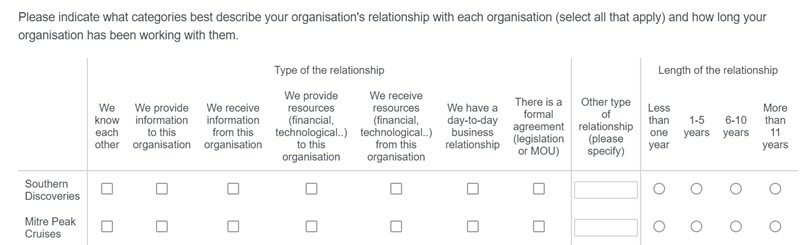

Solved
How to have Text-Entry Questions in a Side-By-Side but part of the same question?
Best answer by Tom_1842
Hi there, if you still need, I found a thread that I think will be helpful to you:
https://community.qualtrics.com/XMcommunity/discussion/15264/how-do-you-remove-the-borders-in-a-side-by-side-question
In that, ahmedA provides some JavaScript that will set the border to transparent. I'd recommend asking about 'length of relationship' in a different survey question. Your question might look like the below: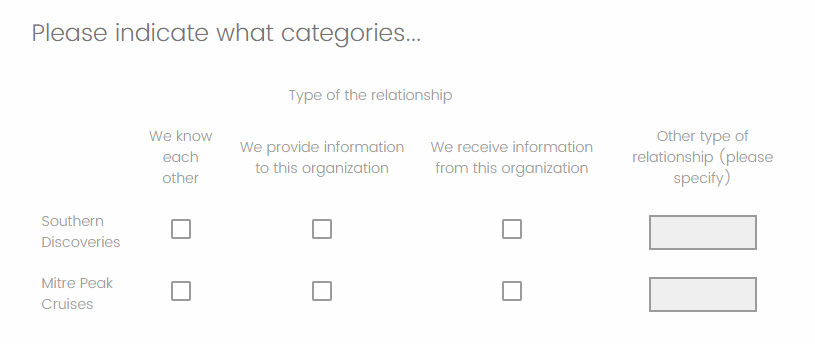



Sign up
Already have an account? Login

Welcome! To join the Qualtrics Experience Community, log in with your existing Qualtrics credentials below.
Confirm your username, share a bit about yourself, Once your account has been approved by our admins then you're ready to explore and connect .
Free trial account? No problem. Log in with your trial credentials to join.
No free trial account? No problem! Register here
Already a member? Hi and welcome back! We're glad you're here 🙂
You will see the Qualtrics login page briefly before being taken to the Experience Community
Login with Qualtrics
Welcome! To join the Qualtrics Experience Community, log in with your existing Qualtrics credentials below.
Confirm your username, share a bit about yourself, Once your account has been approved by our admins then you're ready to explore and connect .
Free trial account? No problem. Log in with your trial credentials to join. No free trial account? No problem! Register here
Already a member? Hi and welcome back! We're glad you're here 🙂
You will see the Qualtrics login page briefly before being taken to the Experience Community
Login to the Community
Welcome! To join the Qualtrics Experience Community, log in with your existing Qualtrics credentials below.
Confirm your username, share a bit about yourself, Once your account has been approved by our admins then you're ready to explore and connect .
Free trial account? No problem. Log in with your trial credentials to join.
No free trial account? No problem! Register here
Already a member? Hi and welcome back! We're glad you're here 🙂
You will see the Qualtrics login page briefly before being taken to the Experience Community
Login with Qualtrics
Welcome! To join the Qualtrics Experience Community, log in with your existing Qualtrics credentials below.
Confirm your username, share a bit about yourself, Once your account has been approved by our admins then you're ready to explore and connect .
Free trial account? No problem. Log in with your trial credentials to join. No free trial account? No problem! Register here
Already a member? Hi and welcome back! We're glad you're here 🙂
You will see the Qualtrics login page briefly before being taken to the Experience Community
Enter your E-mail address. We'll send you an e-mail with instructions to reset your password.