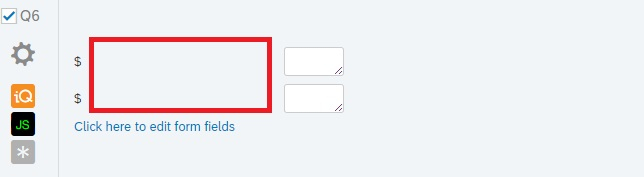
 I'm using Form as the text type in the response. I want to have a dollar sign to come before each text box, but the space between the dollar sign and the text box (indicated by the red box in the figure) does not go away.
I tried "Add Default Choices" and pre-populated the dollar sign in the text box, but that's not how I want. I don't want the participants to be able to remove the dollar sign.
I'm using Form as the text type in the response. I want to have a dollar sign to come before each text box, but the space between the dollar sign and the text box (indicated by the red box in the figure) does not go away.
I tried "Add Default Choices" and pre-populated the dollar sign in the text box, but that's not how I want. I don't want the participants to be able to remove the dollar sign.
Solved
How do you remove the space between the fixed text before the text box and the text box?
!
I'm using Form as the text type in the response. I want to have a dollar sign to come before each text box, but the space between the dollar sign and the text box (indicated by the red box in the figure) does not go away.
I tried "Add Default Choices" and pre-populated the dollar sign in the text box, but that's not how I want. I don't want the participants to be able to remove the dollar sign.
I'm using Form as the text type in the response. I want to have a dollar sign to come before each text box, but the space between the dollar sign and the text box (indicated by the red box in the figure) does not go away.
I tried "Add Default Choices" and pre-populated the dollar sign in the text box, but that's not how I want. I don't want the participants to be able to remove the dollar sign.Best answer by rondev
> @SLEE said:
> Thank you! the alignment however, didn't work...
> ! >
Hope you have pasted both the below lines
jQuery("#"+this.questionId+" .ChoiceStructure table tr:eq(0) td:eq(0)").hide();
jQuery("#"+this.questionId+". ChoiceStructure table tr:eq(1) td:eq(0)").hide();
>
Hope you have pasted both the below lines
jQuery("#"+this.questionId+" .ChoiceStructure table tr:eq(0) td:eq(0)").hide();
jQuery("#"+this.questionId+". ChoiceStructure table tr:eq(1) td:eq(0)").hide();
>
Hope you have pasted both the below lines
jQuery("#"+this.questionId+" .ChoiceStructure table tr:eq(0) td:eq(0)").hide();
jQuery("#"+this.questionId+". ChoiceStructure table tr:eq(1) td:eq(0)").hide();


 1. How do I align the text boxes to the left?
2. the greater than or equal to sign shows up as ">=" How do I make this into a proper inequality sign that has > stacked on the top of =?
1. How do I align the text boxes to the left?
2. the greater than or equal to sign shows up as ">=" How do I make this into a proper inequality sign that has > stacked on the top of =?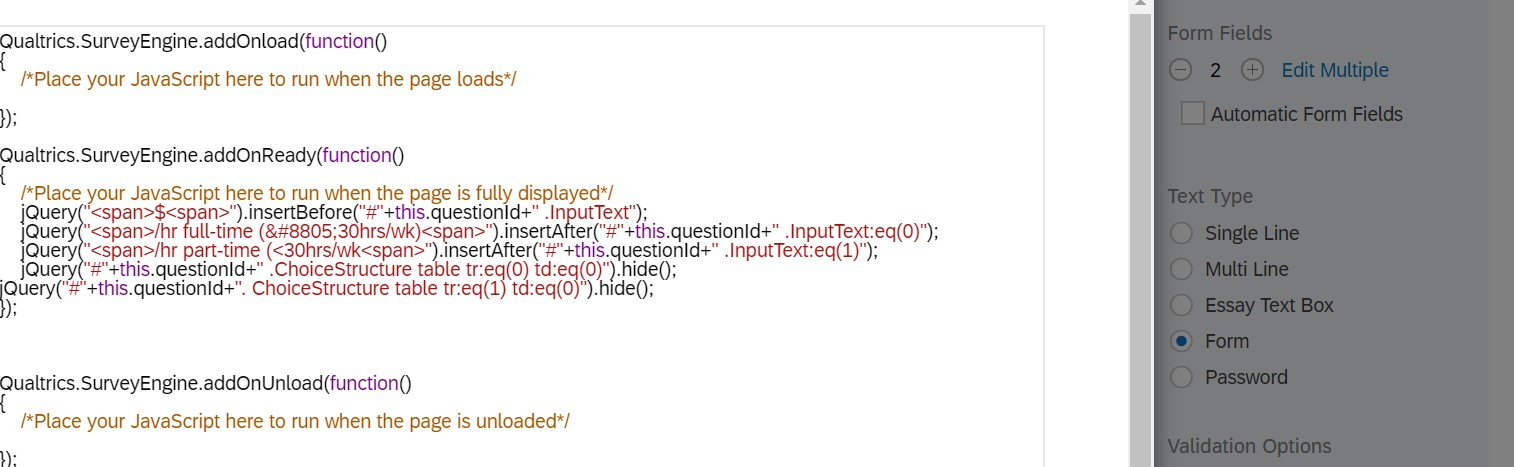
Sign up
Already have an account? Login

Welcome! To join the Qualtrics Experience Community, log in with your existing Qualtrics credentials below.
Confirm your username, share a bit about yourself, Once your account has been approved by our admins then you're ready to explore and connect .
Free trial account? No problem. Log in with your trial credentials to join.
No free trial account? No problem! Register here
Already a member? Hi and welcome back! We're glad you're here 🙂
You will see the Qualtrics login page briefly before being taken to the Experience Community
Login with Qualtrics
Welcome! To join the Qualtrics Experience Community, log in with your existing Qualtrics credentials below.
Confirm your username, share a bit about yourself, Once your account has been approved by our admins then you're ready to explore and connect .
Free trial account? No problem. Log in with your trial credentials to join. No free trial account? No problem! Register here
Already a member? Hi and welcome back! We're glad you're here 🙂
You will see the Qualtrics login page briefly before being taken to the Experience Community
Login to the Community
Welcome! To join the Qualtrics Experience Community, log in with your existing Qualtrics credentials below.
Confirm your username, share a bit about yourself, Once your account has been approved by our admins then you're ready to explore and connect .
Free trial account? No problem. Log in with your trial credentials to join.
No free trial account? No problem! Register here
Already a member? Hi and welcome back! We're glad you're here 🙂
You will see the Qualtrics login page briefly before being taken to the Experience Community
Login with Qualtrics
Welcome! To join the Qualtrics Experience Community, log in with your existing Qualtrics credentials below.
Confirm your username, share a bit about yourself, Once your account has been approved by our admins then you're ready to explore and connect .
Free trial account? No problem. Log in with your trial credentials to join. No free trial account? No problem! Register here
Already a member? Hi and welcome back! We're glad you're here 🙂
You will see the Qualtrics login page briefly before being taken to the Experience Community
Enter your E-mail address. We'll send you an e-mail with instructions to reset your password.