Hi Qualtrics Community,
I have a side-by-side matrix question type where I want to ask participants about their current medications. I want to ask them open-ended text questions and date questions. I have used a javascript for the flatpickr for dates however the javascript is applied to every column when I only need it for the 2 date columns. I was wondering how I would go about only using the flatpickr javascript for the date columns and leave the other columns open-ended text.
The current javascript I have is:
Qualtrics.SurveyEngine.addOnload(function()
{
jQuery("#"+this.questionId+" .InputText").flatpickr({enableTime: false, noCalendar: false, dateFormat: "Y-m-d"});
});
Here is a picture of what the columns look like: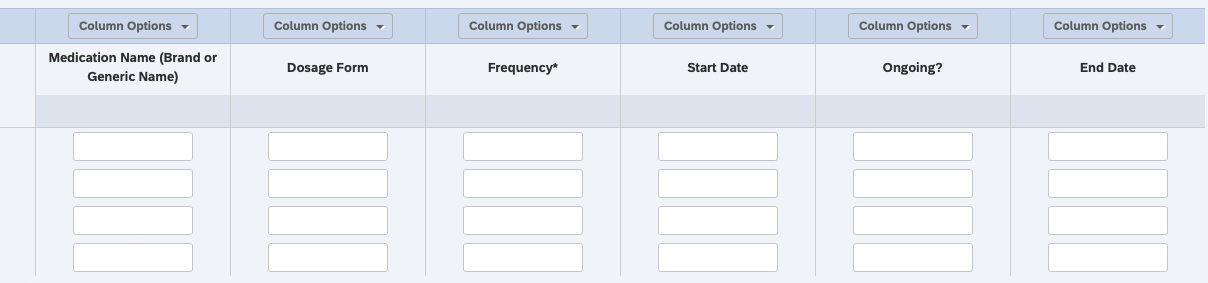 This is what I do not want (I want this to be open-ended text and only have the flatpickr for the date columns only):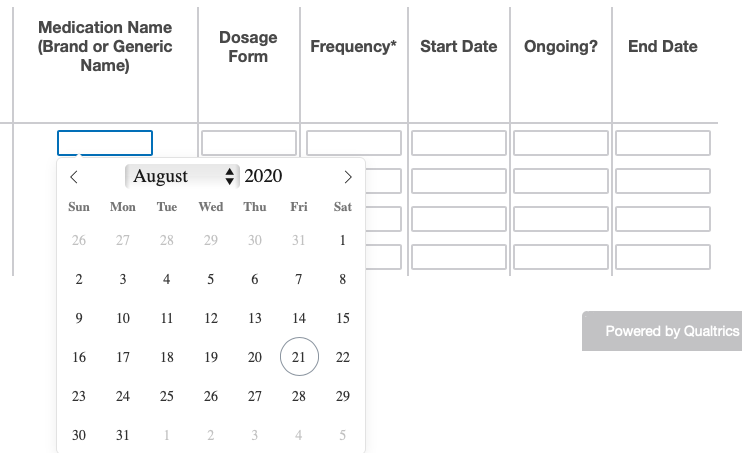
If anybody knows how to do this within javascript or what to select to get this to work it would be greatly appreciated!
Thanks in advance for the help!

How to use flatpickr for only 2 out of 6 columns in side-by-side matrix?
Best answer by MCBWise
Try this thread. The trick is properly identifying the columns when you go to Inspect your matrix. You can't do it visually because everything has a column identifier (e.g. the borders between the columns). Once I identified one column, the others were easy to figure out.
https://www.qualtrics.com/community/discussion/2014/how-to-add-timepicker-to-a-field-in-a-matrix-type-question


Sign up
Already have an account? Login

Welcome! To join the Qualtrics Experience Community, log in with your existing Qualtrics credentials below.
Confirm your username, share a bit about yourself, Once your account has been approved by our admins then you're ready to explore and connect .
Free trial account? No problem. Log in with your trial credentials to join.
No free trial account? No problem! Register here
Already a member? Hi and welcome back! We're glad you're here 🙂
You will see the Qualtrics login page briefly before being taken to the Experience Community
Login with Qualtrics
Welcome! To join the Qualtrics Experience Community, log in with your existing Qualtrics credentials below.
Confirm your username, share a bit about yourself, Once your account has been approved by our admins then you're ready to explore and connect .
Free trial account? No problem. Log in with your trial credentials to join. No free trial account? No problem! Register here
Already a member? Hi and welcome back! We're glad you're here 🙂
You will see the Qualtrics login page briefly before being taken to the Experience Community
Login to the Community
Welcome! To join the Qualtrics Experience Community, log in with your existing Qualtrics credentials below.
Confirm your username, share a bit about yourself, Once your account has been approved by our admins then you're ready to explore and connect .
Free trial account? No problem. Log in with your trial credentials to join.
No free trial account? No problem! Register here
Already a member? Hi and welcome back! We're glad you're here 🙂
You will see the Qualtrics login page briefly before being taken to the Experience Community
Login with Qualtrics
Welcome! To join the Qualtrics Experience Community, log in with your existing Qualtrics credentials below.
Confirm your username, share a bit about yourself, Once your account has been approved by our admins then you're ready to explore and connect .
Free trial account? No problem. Log in with your trial credentials to join. No free trial account? No problem! Register here
Already a member? Hi and welcome back! We're glad you're here 🙂
You will see the Qualtrics login page briefly before being taken to the Experience Community
Enter your E-mail address. We'll send you an e-mail with instructions to reset your password.