Hi everyone,
I’m trying to implement a reusable comprehension-check pattern in Qualtrics: allow up to N attempts on the same question, track the number of attempts, and screen out after N failures. I’m seeing inconsistent behavior and I’m not sure what’s the problem.
Desired behavior
- Q1 (Single Answer MCQ) is a comprehension check.
- If correct → proceed immediately to the next part of the survey.
- If incorrect → show the same question again, up to N=3 attempts.
- If still incorrect after 3 attempts → End of Survey (screen-out).
- Store Embedded Data:
- CC_Attempts (1..3)
- CC_Passed (0/1)
- CC_FailedMax (0/1)
Current setup
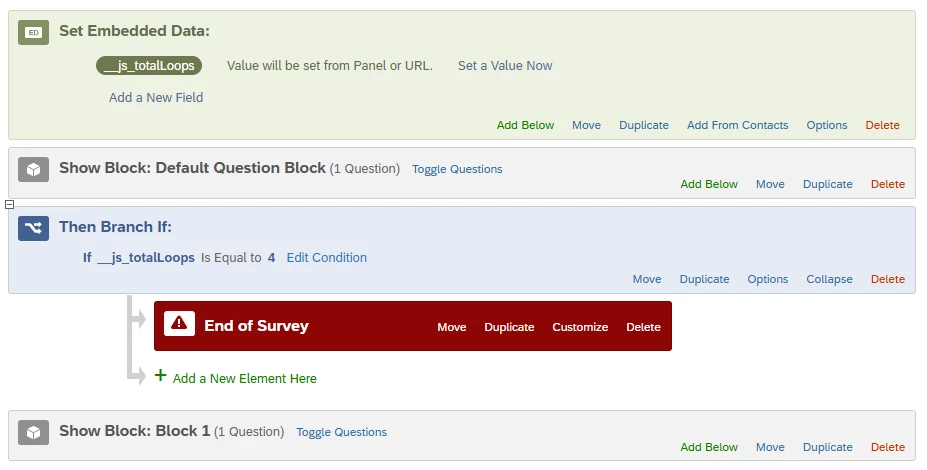
Embedded Data (Survey Flow, at start):CC_Attempts=0, CC_Passed=0, CC_FailedMax=0, CC_MaxAttempts=3
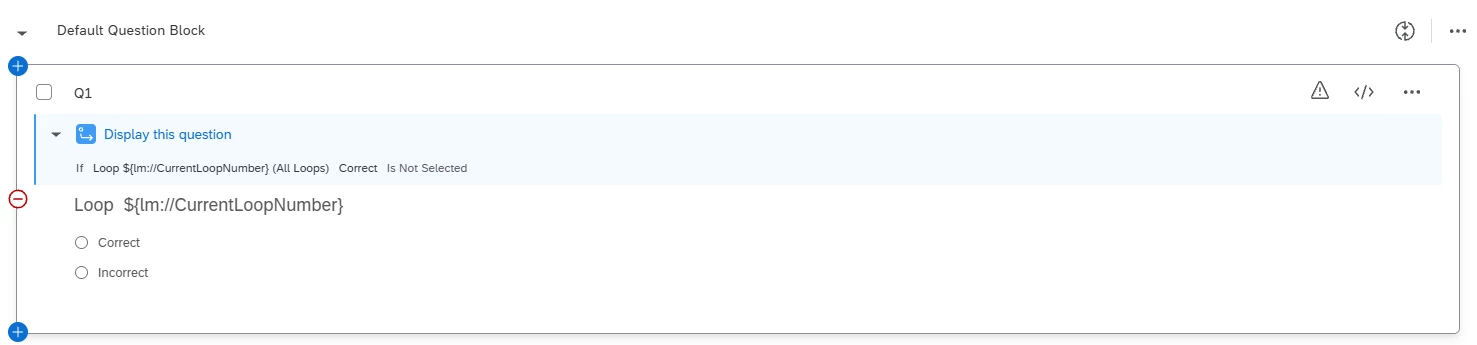
Block “Comprehension Q1”
-
Contains Q1 only
-
Loop & Merge ON for this block with 3 iterations (attempts)
-
Recode values: correct choice has recode=1, others=0
-
I tried Force Response OFF and Display Logic on Q1 (“show only if CC_Passed=0”).
Survey Flow screen-out (after the block):
If CC_Passed=0 AND CC_Attempts>=3 → set CC_FailedMax=1 → End of Survey
Else continue to next block (Q2).
Problem 1: can’t “stop” the loop after a correct answer
When Loop & Merge is enabled on the block, Qualtrics repeats the block internally. Even if the respondent answers correctly on iteration 1, Q1 is still presented again on iterations 2 and 3.
I attempted to set CC_Passed=1 via Survey Flow branching based on Q1, but it appears Survey Flow conditions/ED updates are evaluated only after the block finishes all iterations, so CC_Passed doesn’t become 1 “in time” to hide Q1 inside the remaining iterations.
Problem 2: attempt counter via Question JS is not reliable (New Survey Taking Experience)
I tried updating Embedded Data from Question JavaScript on Q1 using Qualtrics.SurveyEngine.addOnPageSubmit(function(type){...}) to:
-
increment
CC_Attemptsby 1 on each “Next” -
set
CC_Passed=1when the selected choice recode is 1
In the New Survey Taking Experience, the addOnPageSubmit handler seems to fire multiple times (or more than once per “Next”), causing CC_Attempts to jump to 3 on the first submit and triggering immediate screen-out, or otherwise producing inconsistent results. I also observed cases where embedded data is not updated as expected in the final dataset.
Questions
-
Is there an officially supported way to implement “retry up to N attempts” that is portable across surveys, without duplicating blocks, and that reliably tracks attempts?
-
Is there a recommended way to “break out” of Loop & Merge early when a correct answer occurs?
Thanks in advance!