 Thank you for your help and assistance!
Solved
Creating a Survey with 3+ different individual approvals?
Hello fantastic Qualtrics community!
I have another question due to my limited code understanding
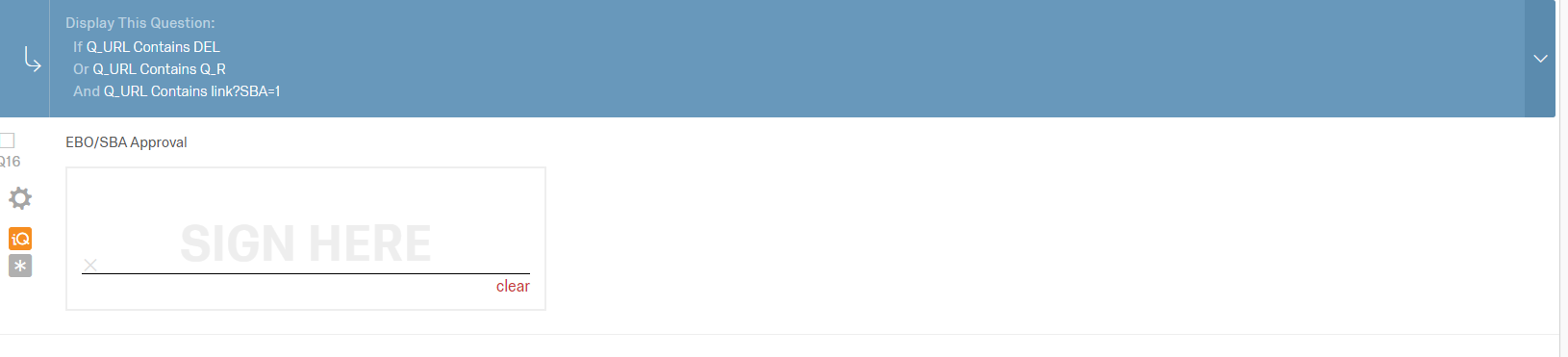
I am trying to build a survey that is completed by one person, and then follows a workflow and routes to other individuals, each who sign a signature field before the form moves to the next location.
https://www.qualtrics.com/community/discussion/1812/2-part-survey-that-needs-to-be-completed-by-different-people
This question was asked and the answer I am trying to build
"create 2 blocks in survey one for employee and one for HR, and for employee append your link with say employee=1 like link?employee=1
For hr use link like retake link?hr=1. Put these 2 blocks in branch logic's with employee=1 and hr=1"
I have made many surveys that just route to one person using the ?Q_R= method.
Taking the retake link and adding wvu.qualtrics.com/jfe/form/SV_7apytcoqfpYw6i1?Q_R=${e://Field/ResponseID}&Q_R_DEL=1link?SBA=1
does not seem to be working. I also tried to do it with actions and triggers and couldn't figure out a way to hide the signatures for the future users. I'm sure i just don't understand the code, could someone walk me through this or explain a better way to do this? I have attached my logic as well. !
Thank you for your help and assistance!
Thank you for your help and assistance!Best answer by TeachMeQualtrics
I just wanted to follow up on this, as we created a solution and I hope someone in the future can use it!
First, create different blocks with sign offs or approval for each of the approval levels you would like to have. !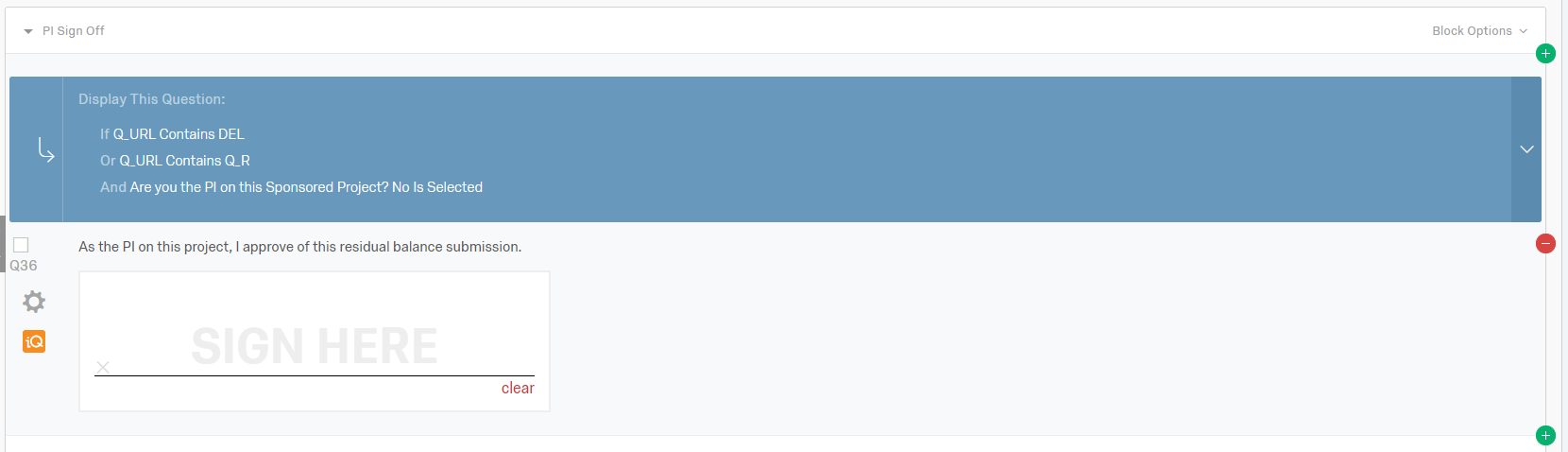 The Q_URL embedded data area hides the question from the user first taking the survey. I'll have a block for however many approval levels there are, so it could be 4-5 extra blocks beyond my original survey questions.
Next, go into survey flow
!
The Q_URL embedded data area hides the question from the user first taking the survey. I'll have a block for however many approval levels there are, so it could be 4-5 extra blocks beyond my original survey questions.
Next, go into survey flow
!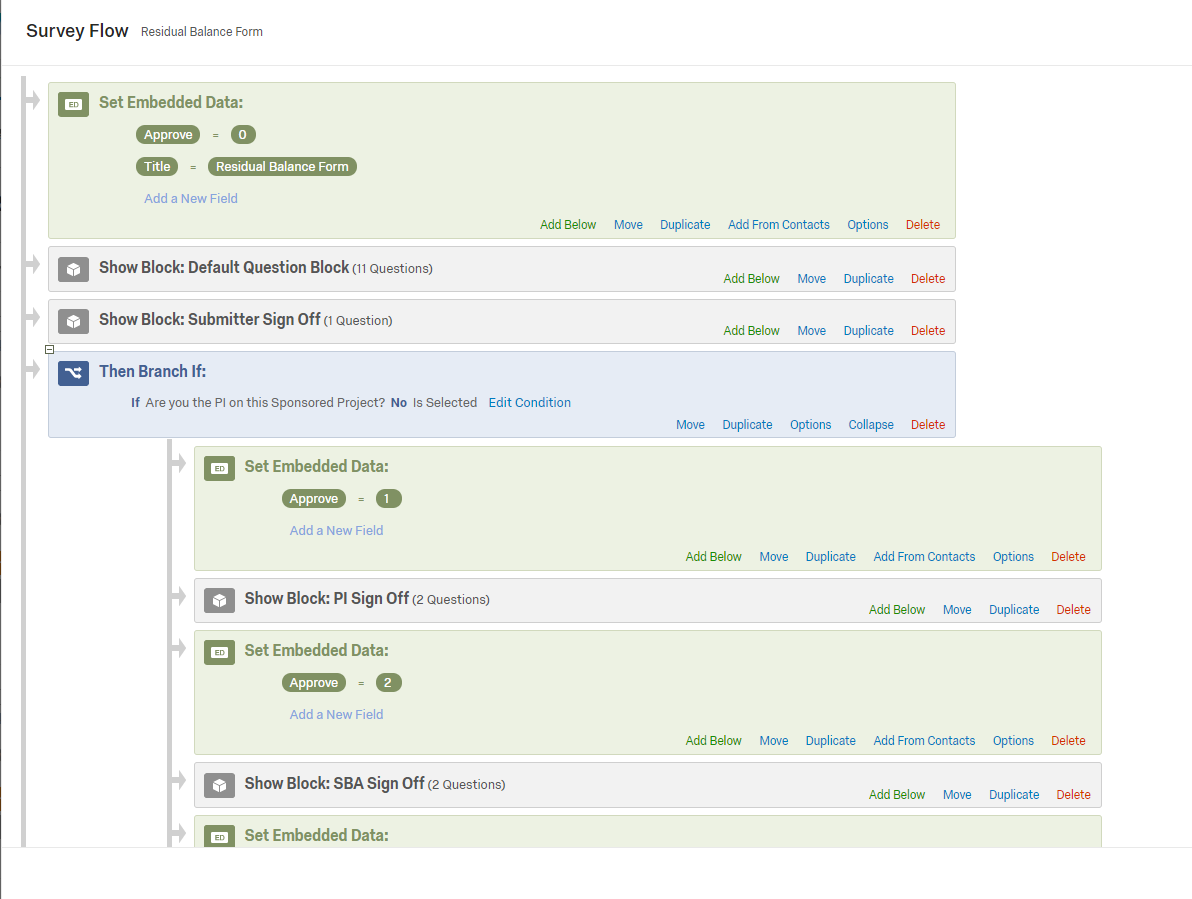 Set the approval embedded data for this area to 0, as you want anyone with a regular distribution link to be able to see this.
On this survey shown, if the PI is not the one completing the survey, it goes first to the PI by an action.
Here is what my action looks like for this email to be sent.
!
Set the approval embedded data for this area to 0, as you want anyone with a regular distribution link to be able to see this.
On this survey shown, if the PI is not the one completing the survey, it goes first to the PI by an action.
Here is what my action looks like for this email to be sent.
!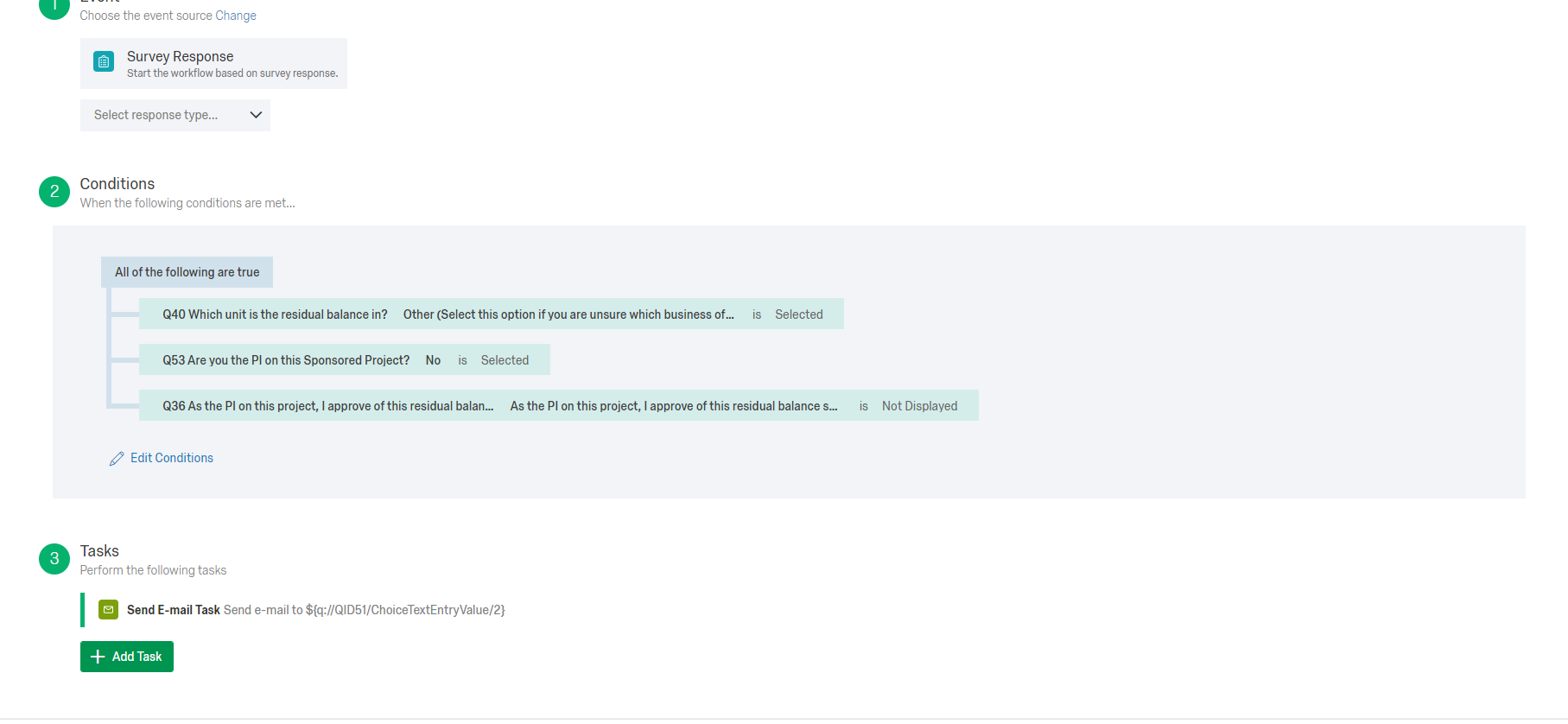 You have to be exclusionary in your conditions so each approval level doesn't get multiple emails.
The retake link in the email looks like this wvu.qualtrics.com/jfe/form/yourformdatahere?Q_R=${e://Field/ResponseID}&Q_R_DEL=1&Approve=1
The approve=1 is what is telling the form what area to show to the person who has that specific link.
For the 2nd approver, I would change that approve=1 to approve=2, following the embedded data I named for it in my survey flow.
I hope this helps someone else, we spent weeks trying to solve this!
You have to be exclusionary in your conditions so each approval level doesn't get multiple emails.
The retake link in the email looks like this wvu.qualtrics.com/jfe/form/yourformdatahere?Q_R=${e://Field/ResponseID}&Q_R_DEL=1&Approve=1
The approve=1 is what is telling the form what area to show to the person who has that specific link.
For the 2nd approver, I would change that approve=1 to approve=2, following the embedded data I named for it in my survey flow.
I hope this helps someone else, we spent weeks trying to solve this!
The Q_URL embedded data area hides the question from the user first taking the survey. I'll have a block for however many approval levels there are, so it could be 4-5 extra blocks beyond my original survey questions.
Next, go into survey flow
!
Set the approval embedded data for this area to 0, as you want anyone with a regular distribution link to be able to see this.
On this survey shown, if the PI is not the one completing the survey, it goes first to the PI by an action.
Here is what my action looks like for this email to be sent.
!
You have to be exclusionary in your conditions so each approval level doesn't get multiple emails.
The retake link in the email looks like this wvu.qualtrics.com/jfe/form/yourformdatahere?Q_R=${e://Field/ResponseID}&Q_R_DEL=1&Approve=1
The approve=1 is what is telling the form what area to show to the person who has that specific link.
For the 2nd approver, I would change that approve=1 to approve=2, following the embedded data I named for it in my survey flow.
I hope this helps someone else, we spent weeks trying to solve this!






Sign up
Already have an account? Login

Welcome! To join the Qualtrics Experience Community, log in with your existing Qualtrics credentials below.
Confirm your username, share a bit about yourself, Once your account has been approved by our admins then you're ready to explore and connect .
Free trial account? No problem. Log in with your trial credentials to join.
No free trial account? No problem! Register here
Already a member? Hi and welcome back! We're glad you're here 🙂
You will see the Qualtrics login page briefly before being taken to the Experience Community
Login with Qualtrics
Welcome! To join the Qualtrics Experience Community, log in with your existing Qualtrics credentials below.
Confirm your username, share a bit about yourself, Once your account has been approved by our admins then you're ready to explore and connect .
Free trial account? No problem. Log in with your trial credentials to join. No free trial account? No problem! Register here
Already a member? Hi and welcome back! We're glad you're here 🙂
You will see the Qualtrics login page briefly before being taken to the Experience Community
Login to the Community
Welcome! To join the Qualtrics Experience Community, log in with your existing Qualtrics credentials below.
Confirm your username, share a bit about yourself, Once your account has been approved by our admins then you're ready to explore and connect .
Free trial account? No problem. Log in with your trial credentials to join.
No free trial account? No problem! Register here
Already a member? Hi and welcome back! We're glad you're here 🙂
You will see the Qualtrics login page briefly before being taken to the Experience Community
Login with Qualtrics
Welcome! To join the Qualtrics Experience Community, log in with your existing Qualtrics credentials below.
Confirm your username, share a bit about yourself, Once your account has been approved by our admins then you're ready to explore and connect .
Free trial account? No problem. Log in with your trial credentials to join. No free trial account? No problem! Register here
Already a member? Hi and welcome back! We're glad you're here 🙂
You will see the Qualtrics login page briefly before being taken to the Experience Community
Enter your E-mail address. We'll send you an e-mail with instructions to reset your password.